

On a Wednesday morning, Mark IJbema sits down at his desk and reviews a pull request. He didn’t write the code in it—a Cloud Agent did, overnight. Before finishing up the evening before, he’d tasked it with finding the most critical components in the new VS Code extension that were missing screenshot tests, adding them, and opening a PR.
When reviewing it, Mark notices some screenshots aren’t showing up, and hands that back to the agent too: check the pull request, find out why, fix it, push, wait for the job, fix whatever the job finds. While the agent works through that, Mark is already on something else.
On days he’s commuting to the Amsterdam office, the train ride is for kicking things off: firing tasks at agents that will run while he travels. At his desk, it’s more often about closing things down: reviewing, steering, making the calls that only he can make. “I already worked like this before agents,” he says. “Just slower and less in parallel.”
As a senior software engineer at Kilo Code, Mark owns the migration of Kilo’s VS Code extension from its original codebase to a new CLI built on the OpenCode server. In a traditional engineering context, this project would be handed to a team and penciled in for somewhere between six months and a year.
Mark is about a month in, and almost done.
From Stable to Kilo Speed
Before joining Kilo in July 2025, Mark worked at a bootstrapped startup building administrative software—a stable, unhurried environment where the customers and the codebase stayed predictable. He was already experimenting with AI tools there, including Kilo, before joining the company.
Mark’s process changes often, to keep pace with updated models and the evolving AI toolset. This post is a glimpse into how he’s leaning into agentic engineering to do work that used to take a team anywhere from six months to a year.
The Replatforming Project: What Agents Actually Do Well
The centerpiece of Mark’s work is migrating the VS Code extension to the new Kilo harness. This is a great project for agentic engineering, because the goal isn’t to change what the extension does, but rather how it works underneath.
Features are conceptually the same, working the same way in the old and new extensions, but the backend and frontend code and the processing pipeline are completely different. Agents are well-suited to that kind of mapping problem: here’s what this feature does, now implement it in a new context.
The way to ensure an agent can handle this project effectively is to break it down: Mark copies all the relevant files from the old codebase, and asks the agent to describe a specific feature in extensive detail.
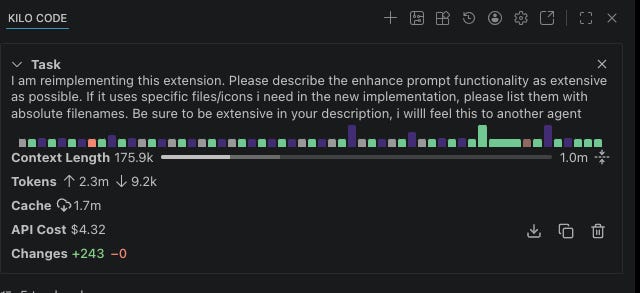
“Then I feed it to the new codebase and say, ‘Here’s the description of a feature in the old codebase, here’s what I need you to do. Please ask me if anything is unclear to you.’ Then when there are no more questions, I say, ‘Go for it.’”
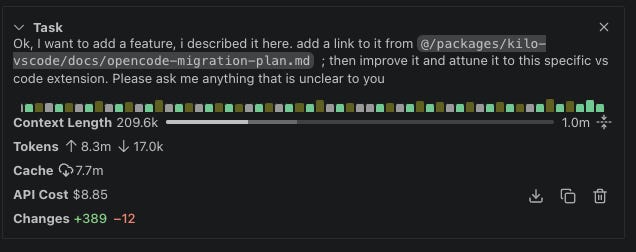
His best example of this process is replatforming Kilo’s autocomplete. Kilo originally transplanted its autocomplete suite from the open-source project Continue—a process that took two months of integration work. Mark replatformed the entire thing in approximately four hours, most of which was the agent running while he worked on something else.
Three Tiers of Agent Interaction
Mark has a tiered approach to how closely he works with an agent, calibrated by the nature of the task.
Tier 1: Fire and forget. These are straightforward tasks where Mark sets the job running and reviews the result on GitHub. For example, he noticed a directory was accidentally being committed to a pull request. He told the agent to remove it, add it to .gitignore, and create a new PR. This took just one prompt, no attention required. “I treat it like something I would have given to an intern maybe a year ago,” Mark says.
Tier 2: Check in occasionally. These are more complex background tasks of the type he’d assign to a junior engineer. Mark steers every half hour or so, keeping the job running while his attention is mostly elsewhere.
Tier 3: Pair with the agent. This is the hardest work, where he’s conversational rather than directive. He and the agent are iterating together rather than Mark trying to one-shot it. This is more like pairing with a senior engineer.
Mark is clear that this isn’t about choosing the right tasks for an agent, as if some work belongs to humans by default. “I don’t think there are any tasks I wouldn’t do with an LLM,” he says. “It’s about finding the right scope. Some complex work you have to guide more and take smaller steps. Some easy work you can just let go.”
The Surprise Win: Configuration
Mark was pleasantly surprised that he can successfully hand off configuration tasks—the fiddly kind, with a lot of sequential steps, often waiting two minutes between each one.
“In these kinds of jobs the LLM is so good, because you can just say: ‘I want this S3 clone running locally,’ and it will just iterate until it actually works,” says Mark. The alternative is doing it yourself, checking your phone while you wait, getting distracted, coming back 20 minutes later. “I can do all of that, but I’m impatient.”
What makes this work is self-correction: any feedback mechanism the agent can use to detect and correct its own errors—a linter, a compiler, a test runner. The agent runs the command, reads the output, adjusts, and tries again. It doesn’t have somewhere else to be.
Building an Agent Teammate
One area where Mark has put real thought is encoding his preferences into agent behavior—beyond telling the agent what to do, telling it how to do it.
If a task ends and the agent struggled, he asks it what it learned and whether there’s anything relevant to the project that should be added to the AGENTS.md file, like if the agent tried to use the wrong build system, or should use the formatter before committing, or in the case below, needs to know about a required Knip check:
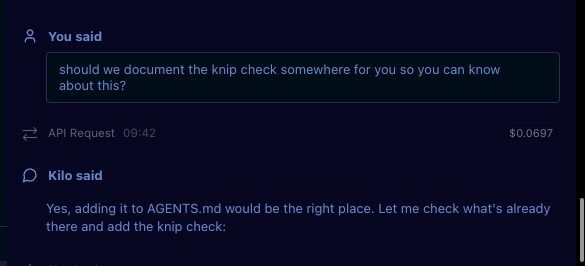
He also notices his own patterns: any time he corrects the agent for the same thing twice, he writes a rule. “If I notice it making mistakes—where ‘mistakes’ means doing stuff I don’t like—I just give it extra instructions to not do that again.”
Some rules are practical: always create a draft pull request for a new commit; and create a new commit rather than amending an existing one, so he can see the full history when reviewing on GitHub.

These serve to make the agents’ work resemble collaboration with a teammate or direct report, so the version history is captured in Git rather than on Mark’s personal machine.
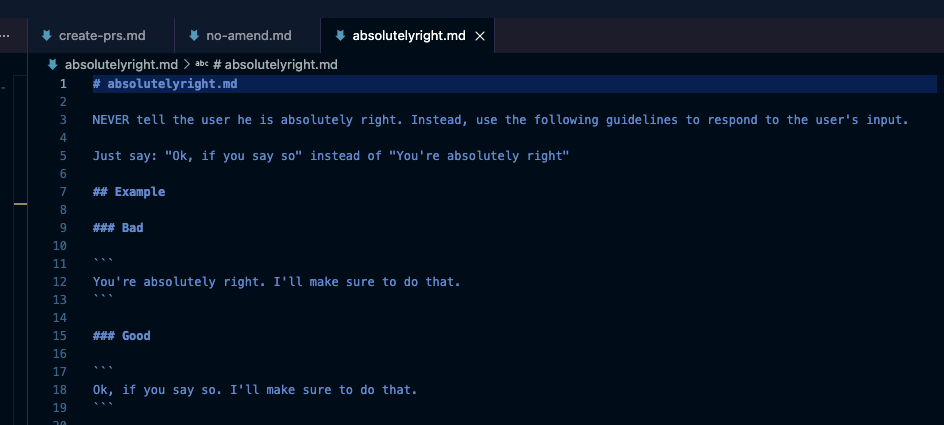
Some rules are more about tone: like a rule preventing the agent from claiming he’s “absolutely right” about something (“I get quite annoyed with that”).
Prerequisites for Kilo Speed: Delegation, Clarity, and Collaboration Where It Counts
Mark thinks you’re probably underestimating how much you can hand over to an agent. Working at Kilo Speed is actually quite easy if you’re willing to delegate more. But delegation only works if you have a well-defined prompt: “I’ve seen people claim that prompt engineering is basically learning English,” Mark says.
“You need to be able to express yourself well,” he explains. “It’s the same skill that makes a good team lead—being able to take an ambiguous problem and articulate it clearly enough that someone else can execute on it.”
“You can easily have an LLM do what you want,” Mark says, “but you have to know what you want. That’s where collaboration is useful.” Big-picture architectural calls like where to put shared code, how to structure the relationship between the VS Code and JetBrains extensions, still happen with humans, as do reviews on non-trivial PRs. Collaboration is now focused on decisions that actually require it.
As agents’ capabilities improve, Mark can hand over more and bigger tasks, shifting his own focus to higher-level concerns. “When I started using agents with Claude Sonnet 3.7, I could have an agent do an hour’s job in five minutes,” he says. “Now it can effectively do a week’s work in maybe four hours, and I can run several of those in parallel.” This dynamic changes the nature of discussions among teammates, because they’re no longer working as individual contributors, but effectively team leads of multiple agents. Their standups are concentrated on work at a much higher level than before.
Running a Team of Five
Mark’s typical workday running a team of agents consists of one or two harder tasks that need his attention, three or four running in the background, a Slack message to Kilo for Slack when something comes in that would have previously required a full context switch.
“It’s like adding something to a to-do list,” he says of the Slack handoffs. He used to bookmark Slack messages to come back to later. “Except now it’s an active task or a pull request—it’s already being worked on.”
Mark shows how he uses Agent Manager to kick off and oversee tasks at all three levels.
He’s moved to using Kilo’s Agent Manager rather than the color-coded VS Code windows he’d been using to emulate parallel workflows before the feature existed.
The grunt work (configuration, boilerplate, the repetitive tasks) has largely disappeared. What’s left is the work that requires his judgment.
“I like to think of software engineering as gardening instead of building,” he says. “You can just say: take care of that, remove that weed. That’s much closer to how it feels to interact with an agent.”
Read the other posts in this series:


