

Engineering teams don’t make decisions in IDE sidebars. They make them in Slack.
Slack has become more than just a messaging app. As startups and engineering teams have increasingly moved away from siloed workflows, Slack has become the central operating system where critical decisions are made and work gets done. Yet, most AI coding tools still force developers to leave context behind.
Kilo for Slack is our answer to that disconnect. We’re bringing the power of your favorite AI coding agent directly into your team’s conversations, so you can go from discussion to deployment without ever leaving the chat. You can ask questions about your repositories, request code changes, or get help with issues, all in the same place where the work is already being discussed.
Unlike most existing Slackbots, which are limited to a single repository or break down as soon as conversations get complex, Kilo for Slack works seamlessly across multiple repositories and infers which one you’re talking about. It also supports continuous, multi-turn conversations that build on existing PRs.
The Slackbot has become our go-to way to make changes at Kilo Code, and we hope you’ll love it as much as we do.
Kilo for Slack is Different from Cursor and Claude Code
Many AI coding tools offer Slack integrations, but they stop short of supporting real, end-to-end engineering workflows. Kilo for Slack was built for execution, not just interaction.
Multi-repository by default (vs. Cursor): Cursor’s Slackbot is limited to a single repository and requires manual configuration. Kilo infers the relevant repository from the conversation and works seamlessly across multiple repos at once.
Continuous, context-aware conversations (vs. Claude Code): Claude Code’s Slack integrations are designed for one-shot interactions. Kilo builds on existing Slack threads and pull requests, allowing conversations to evolve naturally as work progresses.
Cross-surface execution, not a closed loop (vs. both): Kilo supports real handoffs across Slack, IDEs, cloud agents, and the CLI. Instead of trapping teams inside a single interface or model, it’s designed to fit into how engineers already work.
Why We Built for Slack
Imagine this: Someone reports a bug in Slack. The team discusses potential causes, and then you Alt+Tab to your IDE and Kilo Code to explain the whole situation…over again. You wait for the fix, push to GitHub, then hop back to Slack to share the PR link.
This could happen dozens of times a day, and context switching is costly.
Kilo for Slack allows you to do all this (and more) without leaving Slack.
Partnering with MiniMax
The launch of Kilo for Slack is also a statement about where AI coding is headed.
For years, teams were told they had to rely on closed, proprietary frontier models to get reliable results. That tradeoff no longer holds.
2025 was the year that OSS models started to catch up to closed or proprietary models, reducing the performance difference from 8% to just 1.7% on several key benchmarks. As model quality converges, cost, flexibility, and control matter more than ever. MiniMax Group has always been devoted to open-weight models, and their successful Hong Kong IPO last week proves that open-source is here to stay.
That’s why we chose MiniMax as our launch partner. M2.1, MiniMax’s latest model, is now the default model for Kilo for Slack. As an added bonus, MiniMax M2.1 is free to use in Kilo for Slack for the first week.
Our testing has shown that M2.1 is remarkably powerful and comprehensive, able to successfully handle complex agentic coding workflows for a fraction of the cost of frontier models, without sacrificing quality.
This partnership reflects a broader shift in AI coding. Instead of a single frontier model forced into every workflow, teams choose the best model for the job. MiniMax’s M2.1 earned its place as the default for Kilo for Slack by matching frontier-level performance on complex agentic workflows. That outcome reinforces what we’re seeing more broadly: open-weight models are no longer playing catch-up. They’re setting the pace.
How Kilo for Slack Works
Here’s how it works:
Mention @Kilo in a Slack thread.
For example:
@Kilo based on this thread, can you implement the fix for the null pointer exception in the Authentication service?
Kilo for Slack will read the entire Slack thread, get your Github repo context, spin up a new cloud agent, implement a fix and push a PR to your repo.
You will get the proposed PR in a Slack message:
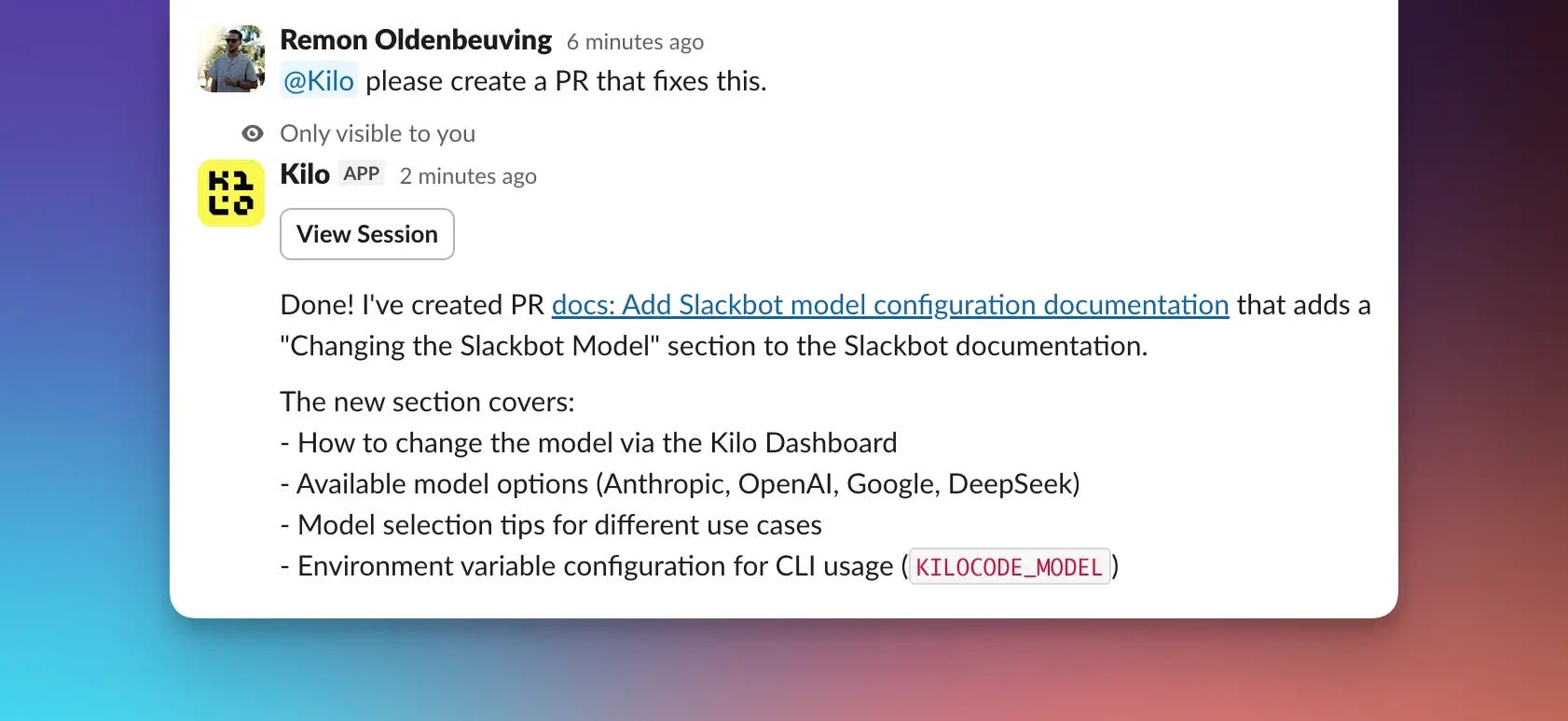
No copy-pasting. No context switching. Easy as sending a single Slack message.
What It Can Do
Here are the four main things you can use Kilo for Slack for:
Ask questions about your codebase:
@Kilo how is error handling implemented in the payment module?
Debug issues on the fly:
@Kilo I’m seeing this error in production: [paste stack trace]. What’s causing it? Please create a PR with a fix
Implement fixes from Slack discussions:
@Kilo please implement the caching improvements we discussed in this thread
Push any PRs without context switching
@Kilo please change “2025” to “2026” through all of the files in our kilo-org/kilocode repo
How It Works Under the Hood
When you mention @Kilo in a channel or Slack DM, the bot reads the thread context and accesses your connected GitHub repositories. It then either responds with an answer or, for implementation requests, creates a branch and PR.
If you’ve used Kilo Code in VS Code, you already know the quality of output you can expect.
You can choose from 450+ models that are available for the Slack bot.
The pricing is straightforward: usage-based pricing. You pay the same amount you’d pay if you were using a model directly through Kilo.
How to Get Started Right Now
Setup takes about two minutes:
Make sure you have a Kilo Code account
Connect your GitHub repos in the Integrations tab at app.kilo.ai
Add the Slack integration from the same Integrations page
Start mentioning @Kilo in your Slack workspace
You can message the bot directly through Slack DMs for private questions, or mention it in any channel where it’s been added for team-visible interactions.
What’s Next
The Slackbot is part of our broader goal to make Kilo available wherever developers already work.
Kilo is already in VS Code, JetBrains, and the CLI. Slack felt like the natural next interface; it’s where teams discuss code before anyone opens an editor, so having the AI present in that conversation removes an entire layer of friction.
If there’s a feature request you’d like implemented feel free to shoot me an email! - Remon
Want to Hop on a 1-on-1 Call?
Are you already using a competing Slackbot product or want to start using Kilo for Slack for your org? Shoot me an email and let’s hop on a 1-on-1 call!
This is an awesome feature. Already using it for pretty much everything!