

Last week, to celebrate the release of Kimi K2.5, we made it totally free in Kilo Code for a full week. The response? Let’s just say that AI never sleeps. Developers were hungry to put the model to the test, using it across modes and tasks in Kilo.
Overall, Kilo Coders loved the model.
But there were also some unexpected findings in terms of speed, cost, and performance.
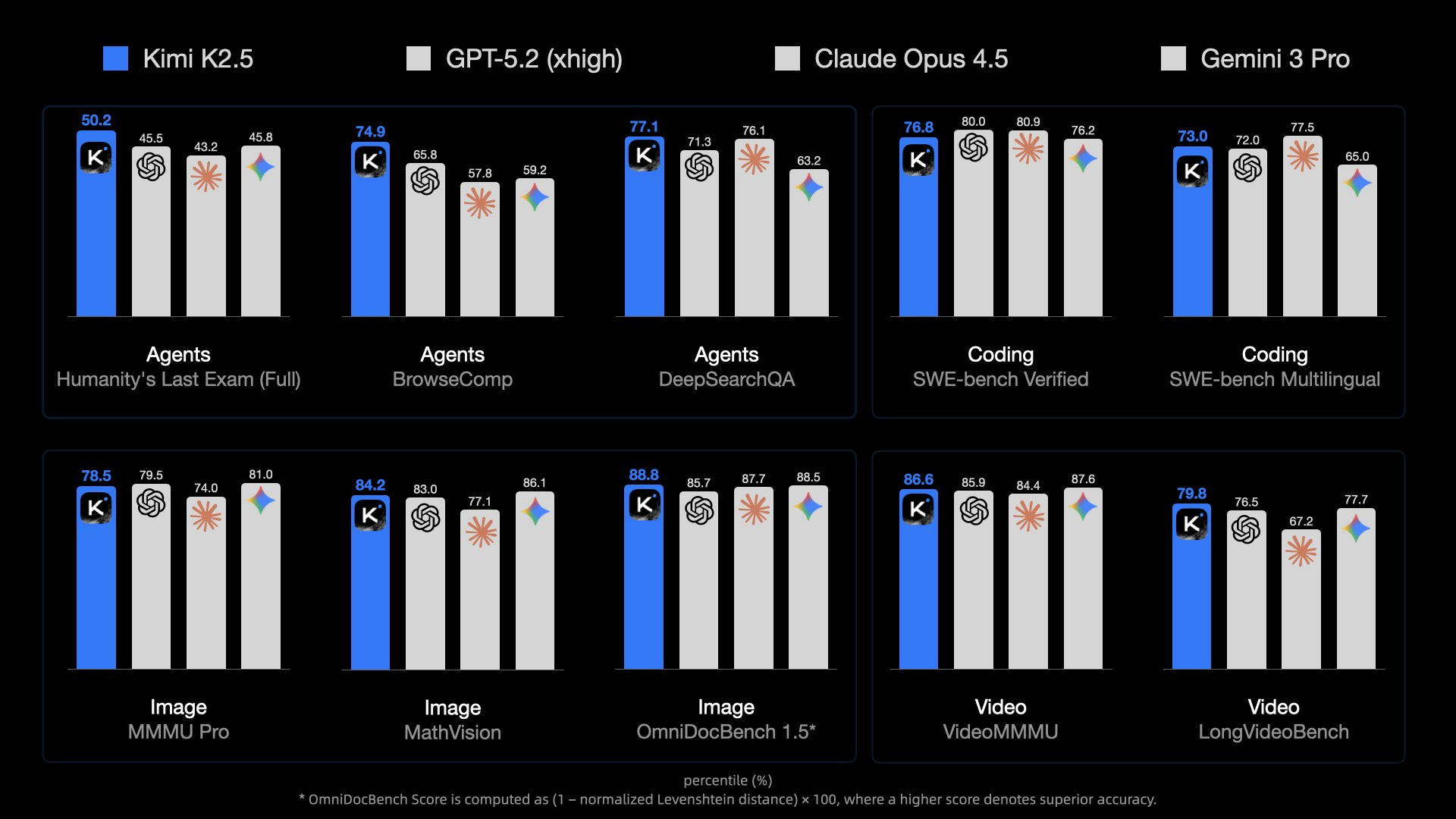
3x the Expected Usage
Within hours of launch, usage numbers told a clear story: developers were eager to test Kimi K2.5’s capabilities. We projected healthy adoption for a new model—especially a free one—but actual usage exceeded our forecasts by 3x, surging beyond 50B tokens per day on OpenRouter.
This wasn’t just curiosity-driven experimentation—developers were integrating K2.5 into real workflows, pushing it through complex coding challenges, and stress-testing its architectural reasoning.
The message was clear: when you give developers access to not just new but powerful new models, they’ll run with them and double down.

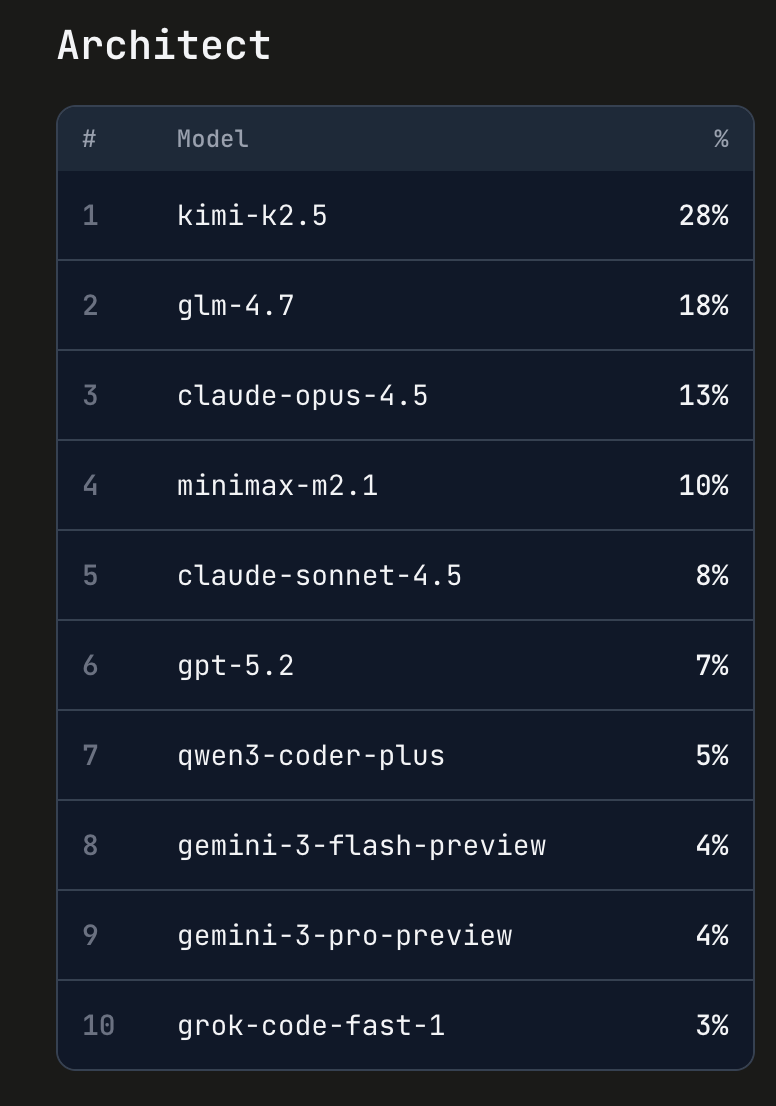
Architect Mode’s New Champion
Perhaps most telling was Kimi K2.5’s rapid ascent in Architect mode. Within days, it climbed to become one of the top-performing models for architectural planning and system design tasks. Typically this kind of climb takes several weeks, no matter how good or well-publicized the model might be. Developers praised its ability to reason through complex codebases, suggest refactoring strategies, and maintain context across large-scale projects.
This wasn’t a slow burn—K2.5 earned its spot through performance, not hype.
The Great Convergence: OSS Meets Enterprise
One of the most exciting insights from this launch is something we’ve been watching for months: open-source models are genuinely converging with enterprise-grade offerings in capability. Kimi K2.5 demonstrates that the gap between “free and open” and “premium and proprietary” continues to narrow.
We’re seeing OSS models handle production-level complexity, maintain reliability under load, and deliver results that would have been exclusive to enterprise tiers just months ago. This shift has profound implications for how teams build, deploy, and scale AI-powered dev tools.
Moonshot AI (makers of the Kimi models) has been pushing the boundaries around visual understanding, and now they’re making leaps in reasoning and tool calling.
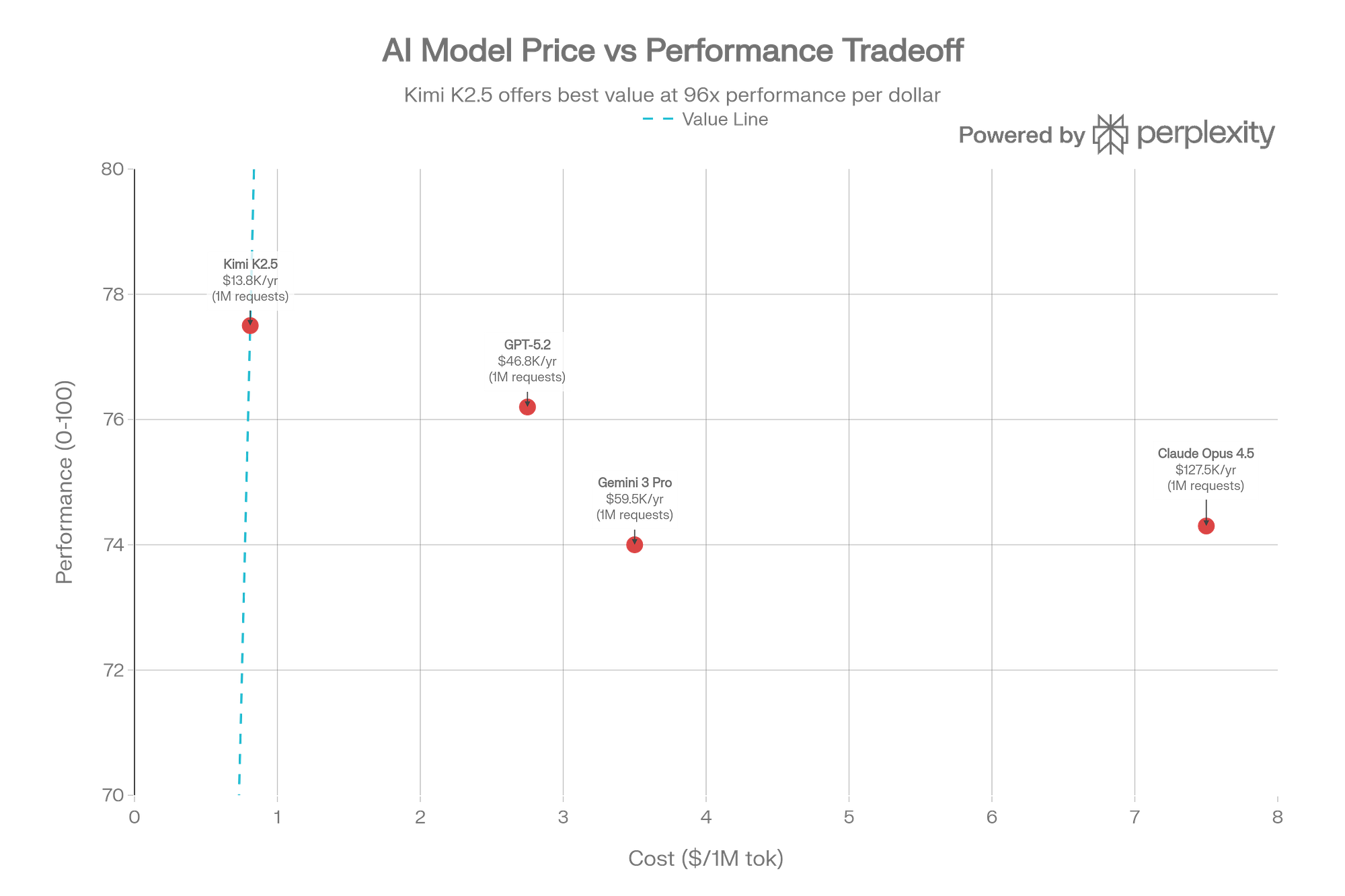
That said, the real price you pay is a bit more complicated.
The Caching Reality Check
One of Kimi K2.5’s most touted features deserves special attention: automatic context caching that promises to reduce input costs by 75% ($0.60/M down to $0.10/M for cached tokens). In theory, this makes K2.5 incredibly cost-effective for applications that reuse context.
The reality? More nuanced.
While the caching does work as advertised—automatic, zero-configuration, genuinely reducing cached input token costs—the model’s behavior undermines some of those savings, at least in this first release. According to Artificial Analysis benchmarks, Kimi K2 Thinking consumed 140 million tokens to complete their Intelligence Index evaluations—roughly 2.5x more than DeepSeek-V3.2 and double that of GPT-5 Codex.
The issue isn’t the caching—it’s the verbosity. K2.5 generates extensive reasoning tokens and, in agent mode, can execute up to 1,500 tool calls per task. When output tokens cost around $3.00 per million versus $0.50-$0.60 for input (or $0.10 cached), those savings get diluted quickly
As one Hacker News user noted, K2.5 is “10x the price per output token on any of the providers I’ve looked at.” It’s still cheaper than Claude Opus for API usage, but if you’re on a subscription plan with OpenAI or Anthropic, the math becomes less compelling—and you can now use your Codex subscription directly in Kilo.
There were also some latency issues, though those seem to have been resolved after the initial launch period.
What’s next
These issues aren’t unique to Kimi. They’re broader pattern we’re seeing across reasoning models: better thinking often means more tokens, no matter how “efficient” a model is.
The question becomes whether the quality justifies the cost for your specific use case.
For context, we recently tested MiniMax M2.1 against GLM 4.7, and it’s currently showing a better cost/benefit ratio for many workflows, less capable than K2.5 in some areas, but dramatically more efficient. That’s why we made M2.1 the default model for Kilo CLI 1.0—and totally free to use.
As we’ve written before, the future might involve spending $100K per developer annually on AI tools, and understanding these cost dynamics matters.
If you’re looking to optimize costs, check out our new Kilo Pass.
We were able to see the stats about Kimi K2.5’s cost and performance in more detail because we were making a paid model free (“subsidizing” the use for Kilo Coders). Which made me understand the need for Kilo Pass even more. It allows for model freedom and total flexibility to help you keep finding the right tools and LLMs for your specific workflows.
And look out for more free models soon.
I used Kimi 2.5 on VS Code IDE, which gives a great experience. Thank you!
I tried to use K2.5 for 3 of the 6-ish days the model was available and didn't get anything out of it that I could use. There were just too many API errors. I guess the times of day when I was trying to use it was when everyone else was too.