

Cloud Agents with Webhook Triggers turn Kilo into an event-driven automation layer for your development workflow.
You push a tag. A deploy finishes. Someone labels an issue. Kilo picks it up, spins up a Cloud Agent, and starts working. No manual trigger, no context-switching, and workflows that happen while you sleep.
We’ve already covered some big ones in previous posts (see here and here): incident triage, security patching, dependency upgrades, documentation sync, policy enforcement.
But webhooks can handle a lot more than the obvious plays. Here are seven more automations you should steal.
1. Nightly Code Quality Sweeps
Every codebase accumulates lint violations, inconsistent formatting, unused imports, and dead code paths that nobody prioritizes because they’re not the most urgent. They just make everything slightly worse over time.
Set up a cron job (GitHub Actions scheduled workflow, a simple cron server, or any scheduler that can fire an HTTP POST) to trigger a webhook on a nightly or weekly cadence. The payload can specify which checks to run:
{
  "task": "code-quality-sweep",
  "checks": ["lint-fix", "format", "unused-imports", "dead-code"],
  "target_dirs": ["src/", "lib/"],
  "base_branch": "main"
}
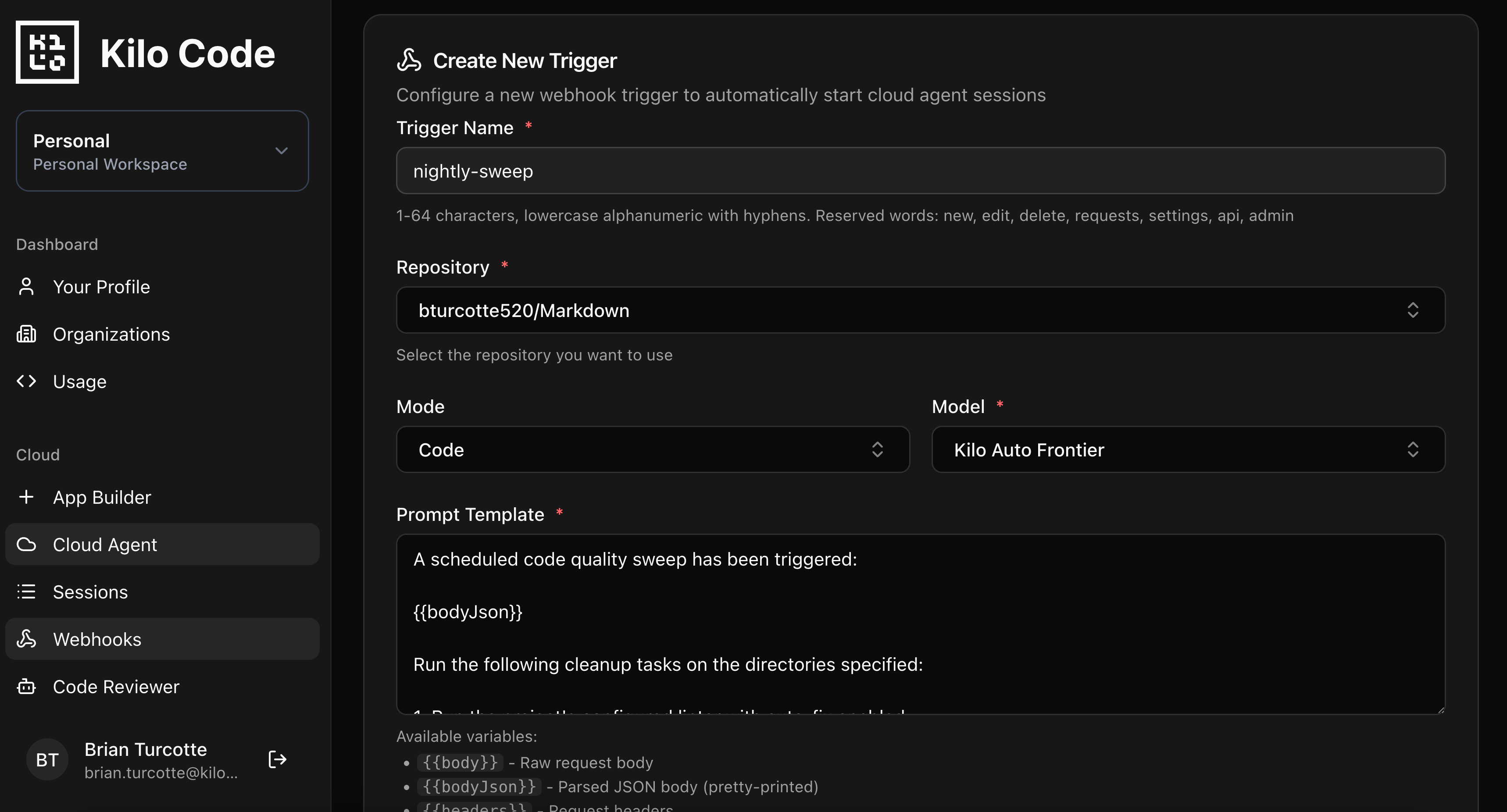
Cloud Agent Prompt Template:
A scheduled code quality sweep has been triggered:

{{bodyJson}}

Run the following cleanup tasks on the directories specified:

1. Run the project's configured linter with auto-fix enabled
2. Run the project's formatter (Prettier, Black, gofmt, etc.)
3. Identify and remove unused imports
4. Search for dead code: unexported functions with zero call sites,
   unreachable branches, commented-out blocks older than 30 days
5. Run the test suite to confirm nothing breaks
6. Commit each category of fix separately:
   - "style: auto-fix lint violations"
   - "style: format code"
   - "refactor: remove unused imports"
   - "refactor: remove dead code"

If any fix causes test failures, revert that specific change and
document it in `quality-sweep-notes.md`.

Open a pull request summarizing all changes with counts per category.
This is the kind of thing that never warrants sprint priority but compounds over months. The agent handles it overnight, and you review a clean PR in the morning. If your team runs a monorepo, scope target_dirs to specific packages and rotate through them on different nights.
2. Feature Request to Prototype Branch
When someone files a well-scoped feature request, the path from “that’s a good idea” to “someone started working on it” can take days of backlog grooming and sprint planning. For straightforward requests, an agent can at least get an MVP in place automatically.
Wire up a GitHub webhook that fires when an issue is labeled (e.g., auto-prototype or agent-implement). The payload includes the full issue body:
{
  "action": "labeled",
  "label": {
    "name": "auto-prototype"
  },
  "issue": {
    "number": 342,
    "title": "Add CSV export to the analytics dashboard",
    "body": "Users should be able to export the current dashboard view as a CSV file. The export button should appear in the top-right toolbar. Should include all visible columns with current filter state applied.",
    "user": {
      "login": "contributor-username"
    }
  },
  "repository": {
    "full_name": "org/analytics-dashboard"
  }
}
Cloud Agent Prompt Template:
A feature request has been labeled for automatic prototyping:

{{bodyJson}}

Analyze this feature request and build a prototype implementation:

1. Read the existing codebase to understand architecture, patterns,
   and conventions
2. Create `prototype-plan.md` outlining your approach, files to modify,
   and any assumptions you're making
3. Implement the feature following existing project patterns
4. Add basic tests covering the happy path
5. If the request is ambiguous or requires design decisions, document
   your choices in `prototype-plan.md` and pick the simplest option
6. Commit incrementally as you work:
   - "feat: scaffold [feature] structure"
   - "feat: implement [feature] core logic"
   - "test: add tests for [feature]"

Do not modify CI configuration, deployment configs, or unrelated code.
Keep scope tight to what the issue describes.
This isn’t about shipping features without review. It’s about eliminating the gap between “approved idea” and “first draft.” Your team reviews the prototype PR, iterates on it, or uses it as a reference for a manual implementation. Either way, the starting line moved forward without anyone context-switching.
Tip: Be selective about which issues get the label. This works best for well-specified, moderate-complexity requests. Vague issues like “make the app faster” won’t produce useful output.
3. Stale Branch Audit and Cleanup
Many repos accumulate dozens of branches that nobody remembers. Feature branches from three months ago, experiment branches that went nowhere, hotfix branches that were merged but never deleted. They clutter your branch list and occasionally cause confusion about what’s active.
Trigger this on a weekly or biweekly cron:
{
  "task": "branch-audit",
  "stale_threshold_days": 30,
  "protected_branches": ["main", "develop", "staging", "release/*"],
  "dry_run": false
}
Cloud Agent Prompt Template:
A scheduled branch audit has been triggered:

{{bodyJson}}

Audit the repository's remote branches:

1. Use `git branch -r` and `git log` to list all remote branches
   with their last commit date and author
2. Identify branches with no commits in the last {{body.stale_threshold_days}} days
3. Skip any branches matching the protected patterns
4. For each stale branch, check if it was merged into main
   (use `git branch -r --merged origin/main`)
5. Generate `branch-audit-report.md` containing:
   - Total branch count
   - Stale branches (merged vs unmerged), with last commit date and author
   - Recommended actions for each
6. If dry_run is false AND the branch was already merged:
   delete the remote branch using `git push origin --delete <branch>`
7. Commit the audit report:
   "chore: branch audit report - [date]"

Never delete unmerged branches automatically. Flag them in the report
for human review.
This is pure housekeeping that nobody wants to do manually. The audit report gives you visibility into what’s lingering, and the auto-deletion of merged branches keeps things clean without risk.
4. Release Prep Automation
Release days involve a predictable checklist: bump the version, update the changelog, check that migration guides are current, tag the commit, maybe update some environment configs. It’s mechanical work that’s easy to mess up when you’re rushing.
Trigger this when you create a GitHub release or push a tag matching your release pattern:
{
  "action": "published",
  "release": {
    "tag_name": "v2.4.0",
    "name": "v2.4.0",
    "body": "## What's New\n- CSV export for analytics dashboard\n- Improved error handling in payment flow\n- Bug fix: session timeout on mobile",
    "prerelease": false,
    "target_commitish": "main"
  },
  "repository": {
    "full_name": "org/product-api"
  }
}
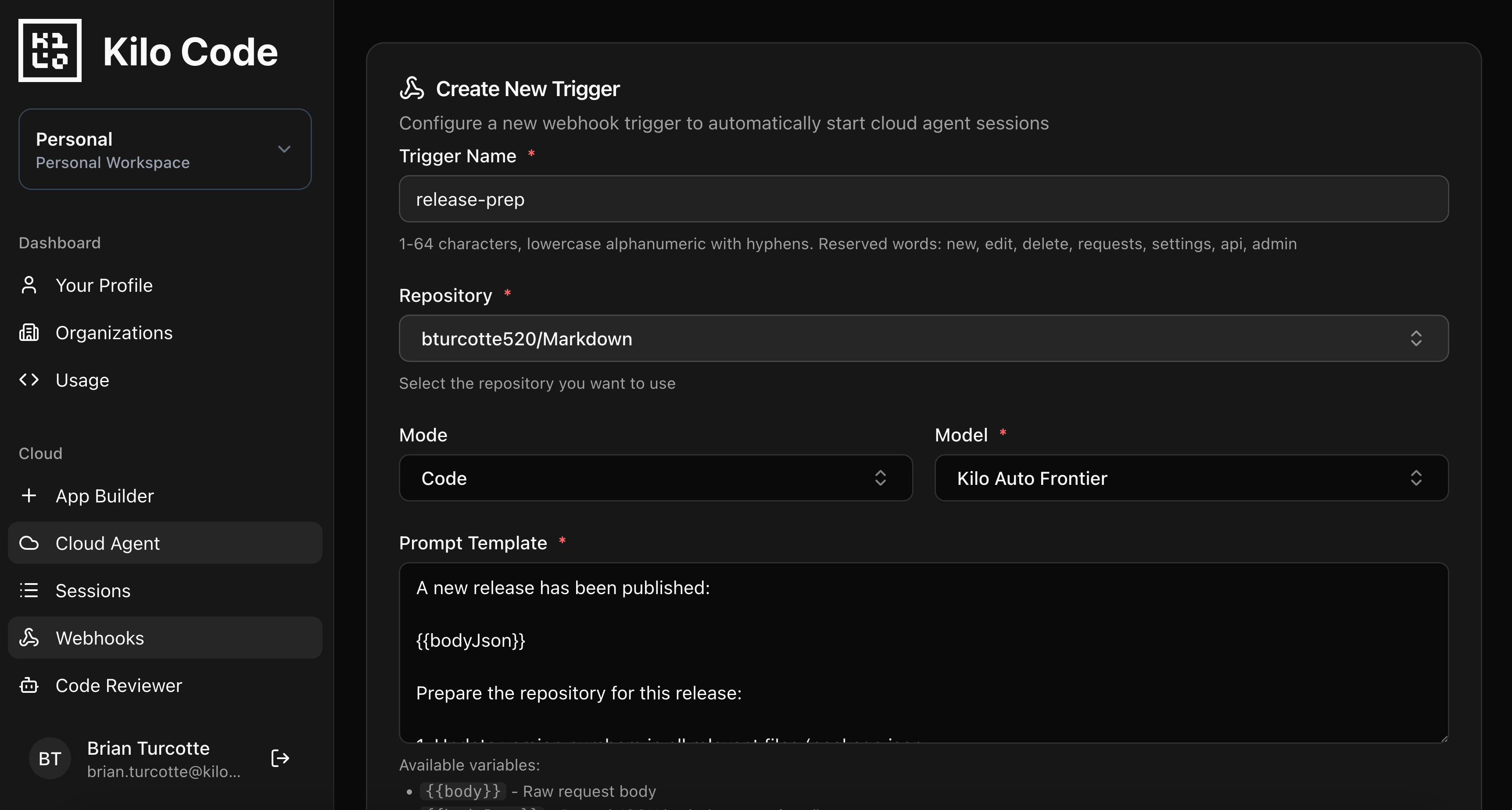
Cloud Agent Prompt Template:
A new release has been published:

{{bodyJson}}

Prepare the repository for this release:

1. Update version numbers in all relevant files (package.json,
   pyproject.toml, version.go, etc.) to match the tag
2. Generate a CHANGELOG entry for this version:
   - Use `git log` to collect all commits since the previous tag
   - Group by type (feat, fix, refactor, docs, chore)
   - Include PR numbers where available (parse from commit messages
     or use `gh pr list --state merged`)
3. Check that README version badges reference the new version
4. If a MIGRATION.md or UPGRADING.md exists, verify it covers any
   breaking changes found in the commit log
5. If breaking changes exist but aren't documented, create a section
   in the migration guide with the relevant commit details
6. Commit: "chore(release): prepare v{{body.release.tag_name}}"

Do not modify application logic or tests.
The agent handles the tedious release bookkeeping so your release process is consistent every time. No more forgetting to update the changelog or missing a version reference buried in a config file.
5. Scheduled Test Coverage Gap Analysis
Test coverage reports tell you a number. They don’t tell you which gaps actually matter or write the tests to fill them. An agent can do both.
Run this on a weekly cron, or trigger it after a milestone is closed:
{
  "task": "coverage-gap-analysis",
  "coverage_threshold": 70,
  "focus_dirs": ["src/api/", "src/services/"],
  "skip_patterns": ["*.test.*", "*.spec.*", "__mocks__/"]
}
Cloud Agent Prompt Template:
A test coverage analysis has been triggered:

{{bodyJson}}

Analyze and improve test coverage:

1. Run the project's test suite with coverage reporting enabled
2. Parse the coverage report to identify files below
   {{body.coverage_threshold}}% coverage
3. Filter to files in the focus directories, excluding skip patterns
4. For the 5 files with the lowest coverage:
   - Analyze what's untested (uncovered branches, functions, edge cases)
   - Write tests that cover the most critical untested paths
   - Prioritize: error handling > core business logic > utility functions
5. Run the test suite again to verify new tests pass
   and coverage improved
6. Generate `coverage-report.md` with:
   - Before/after coverage percentages per file
   - Summary of what was tested and why those paths were prioritized
7. Commit: "test: improve coverage for [module/area]"

Write tests that follow existing test patterns and conventions
in the project. Do not refactor source code to improve testability.
Scoping to the 5 worst files per run keeps PRs reviewable. Over a few weeks of scheduled runs, coverage steadily improves without anyone grinding through it manually.
Note on runtime: If your full test suite takes more than 10-12 minutes, configure the agent to run a targeted subset (e.g., only tests in the focus directories). Each Cloud Agent message has a 15-minute execution window.
6. First-Time Contributor Support
Open source projects lose contributors at the first PR. The experience is often: submit a PR, wait days for review, get a list of style violations and missing tests, feel overwhelmed, disappear. An agent can smooth that onboarding curve significantly.
Wire up a GitHub webhook that fires on pull_request.opened. Filter in your GitHub webhook settings (or in the prompt) for first-time contributors:
{
  "action": "opened",
  "pull_request": {
    "number": 187,
    "title": "Add dark mode toggle to settings page",
    "body": "Implements dark mode toggle as described in #142.",
    "user": {
      "login": "new-contributor"
    },
    "head": {
      "ref": "feature/dark-mode-toggle"
    },
    "author_association": "FIRST_TIME_CONTRIBUTOR"
  },
  "repository": {
    "full_name": "org/open-source-project"
  }
}
Cloud Agent Prompt Template:
A pull request has been opened by a first-time contributor:

{{bodyJson}}

If author_association is not "FIRST_TIME_CONTRIBUTOR", stop here.
No action needed for returning contributors.

Help this contributor get their PR ready for review:

1. Check out their branch and review the changes
2. Check if tests exist for the new/modified code. If not, write
   tests following the project's existing test patterns and push
   them to the contributor's branch
3. Run the linter and formatter. If there are violations, fix them
   and push a commit: "style: fix lint/format issues"
4. Check if the PR description references an issue. If the linked
   issue has acceptance criteria, verify the implementation covers them
5. If CONTRIBUTING.md exists, check the PR against its requirements
   (commit message format, branch naming, etc.) and fix what you can
6. Create a welcoming comment on the PR (using `gh pr comment`)
   summarizing what you did:
   - Tests added or adjusted
   - Style fixes applied
   - Any remaining items the contributor should address

Be encouraging. This may be their first open source contribution.
The agent doesn’t replace human code review. It handles the mechanical stuff (linting, test scaffolding, format fixes) so that when a maintainer does review, the conversation is about the actual implementation rather than style violations. For the contributor, the experience goes from “wall of automated check failures” to “an agent cleaned up the small stuff, here’s what’s left.”
7. Post-Deploy Smoke Test + Rollback Alert
You’ve deployed. CI passed. But does the thing actually work in production? Smoke tests catch the gaps between “tests pass in CI” and “the app works for real users.”
Trigger a webhook from your deployment pipeline (GitHub Actions, ArgoCD, a deploy script) after a successful deploy:
{
  "event": "deploy_completed",
  "environment": "production",
  "service": "api-gateway",
  "deploy_commit": "a1b2c3d",
  "deploy_url": "https://api.yourproduct.com",
  "health_endpoint": "/health",
  "critical_endpoints": [
    { "method": "GET", "path": "/api/v1/status" },
    { "method": "GET", "path": "/api/v1/config" }
  ],
  "previous_commit": "e4f5g6h",
  "rollback_branch": "release/2.3.9"
}
Cloud Agent Prompt Template:
A deployment has completed:

{{bodyJson}}

Run post-deploy verification:

1. Use curl to hit the health endpoint and verify a 200 response:
   `curl -s -o /dev/null -w "%{http_code}" {{body.deploy_url}}{{body.health_endpoint}}`
2. For each critical endpoint, make a request and verify:
   - Response status is 2xx
   - Response time is under 2 seconds
   - Response body is valid JSON (if applicable)
3. Check the deploy commit's diff against the previous commit to
   identify which files changed
4. If any endpoint fails:
   - Document the failure details in `deploy-smoke-report.md`
   - Include the failing endpoint, status code, response body, and
     which files in the deploy diff are most likely related
   - Use `gh issue create` to open a P1 issue with the failure details
5. If all endpoints pass, create `deploy-smoke-report.md` confirming
   the deploy is healthy with response times for each endpoint
6. Commit: "chore: post-deploy smoke test report for {{body.deploy_commit}}"

This is verification only. Do not modify application code.
The agent runs basic health checks immediately after deploy and, if something’s wrong, opens an issue with the failure context and the relevant diff. It’s not a replacement for a full monitoring stack, but it catches the “deploy broke something obvious” cases within minutes instead of waiting for user reports.
Important: Your Agent Environment Profile needs network access to hit those endpoints. If your production environment is behind a VPN or firewall, the Cloud Agent container won’t be able to reach it. This works best for publicly accessible APIs or services with external health endpoints.
Wiring It All Up
Every automation above follows the same setup flow in the Kilo Dashboard at app.kilo.ai/cloud/webhooks:
Create an Agent Environment Profile with the env vars, secrets, and startup commands your automation needs. Install any tools not in the base image via startup commands. Profiles are reusable across triggers.
Configure a Webhook Trigger with your prompt template and target repo. The trigger resolves the profile at runtime, so profile updates automatically apply to future executions.
Copy the webhook URL and configure your external system to POST to it. GitHub webhook settings for repo events, a cron job for scheduled tasks, your deploy pipeline for post-deploy flows.
For personal accounts, webhook sessions run in your Cloud Agent container and you can watch them execute live. Organization webhooks run in dedicated compute as a bot user, with completed sessions available to share or fork.
If you’re building automations with Cloud Agents, share what you’re running in the #cloud-agents channel on Discord.