

Last month, we shipped a renewed Kilo CLI built on OpenCode server—a portable, open-source core that isn’t tied to any single editor. The VS Code extension was always going to be next. Today it’s here.
The completely rebuilt Kilo Code for VS Code is available now as a pre-release, and we’re looking for developers to help us test it. Same portable engine as the CLI. No more VS Code internals weighing down every surface. And with the new foundation comes a set of capabilities developers have been asking for: subagent delegation and parallel execution, the Agent Manager, and improved latency.
This isn’t an incremental update. It’s a new extension—architected to grow with us as we expand to every surface where developers work. We’re putting it out as a pre-release because we want real feedback from real workflows before we push it to production. Some things aren’t migrated yet (more on that below), and that’s the point—we’d rather ship early and build the rest with your input than polish in private.
If you find bugs and help fix them, we want to reward you for it. More on that below too.
Why We Rebuilt
Our original VS Code extension served over 800,000 developers and worked well on its home turf. But under the hood, every surface—CLI, JetBrains, Cloud Agents—was still running VS Code internals, whether it needed them or not. The clearest example was JetBrains, where we were running VS Code internals inside a JetBrains IDE. Developers felt it.
When we rebuilt the CLI on OpenCode server—an MIT-licensed, open-source foundation for agentic coding—we saw the opportunity to fix this at the root. Instead of patching around VS Code dependencies, we built a portable core that runs natively on every surface. The new VS Code extension shares the same engine as Kilo CLI. One foundation. One set of capabilities. One experience that follows you from terminal to editor and back.
What’s New
Subagent Delegation and Parallel Execution
The new extension is fundamentally more responsive—and the reason is parallelism at every level.
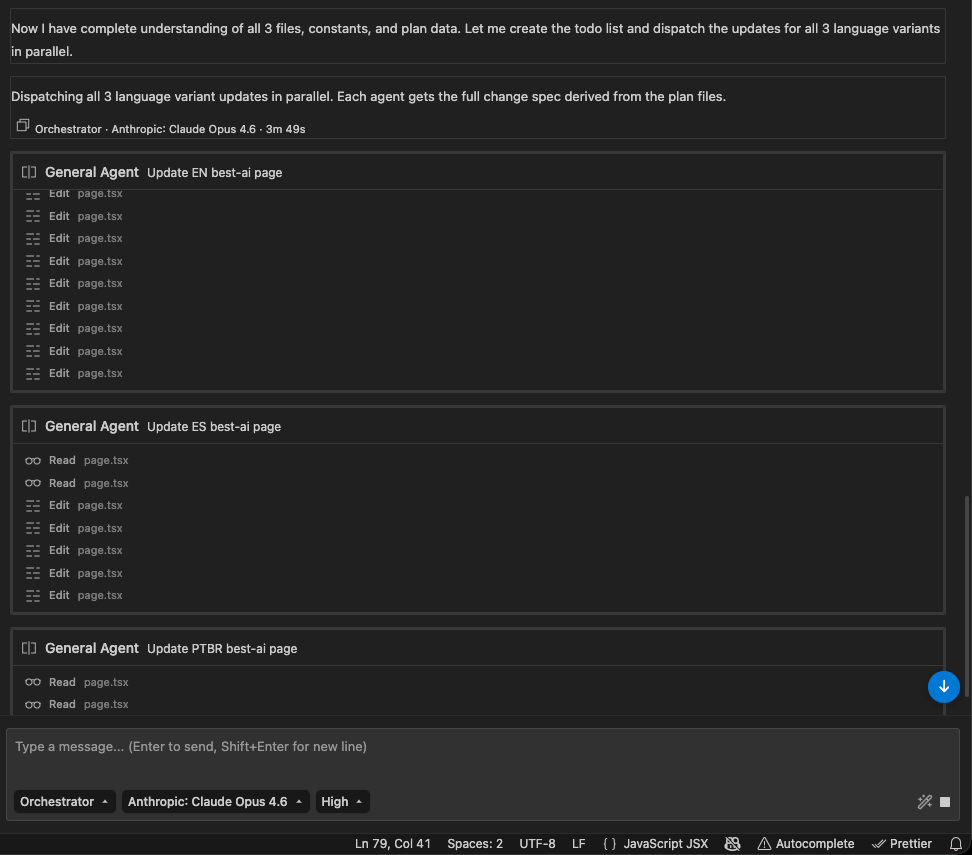
Kilo now supports parallel tool calls, meaning the agent can execute multiple actions at the same time instead of waiting for each one to finish before starting the next. Files read, terminal commands, searches—they run concurrently, and you feel the difference immediately. Tasks that used to block on sequential tool execution now resolve faster without any change to how you prompt.
On top of that, the extension supports parallel subagents. When a task is too complex for a single prompt, Kilo can spin up multiple subagents that work simultaneously—an implementation agent, a test-writing agent, and a documentation agent—each performing its piece of the work in parallel, then condensing the results back to the parent agent. Orchestrator mode coordinates the delegation and merges everything intelligently.
And subagents aren’t a black box. You can define your own. If your workflow calls for a security review agent, a migration agent, or a linting pass, create it. Custom subagents let you shape the delegation pattern to match how your team actually works, rather than relying on a one-size-fits-all orchestration.
The result is an agent that doesn’t just think faster—it works faster, doing more in the same amount of wall-clock time.
The Agent Manager
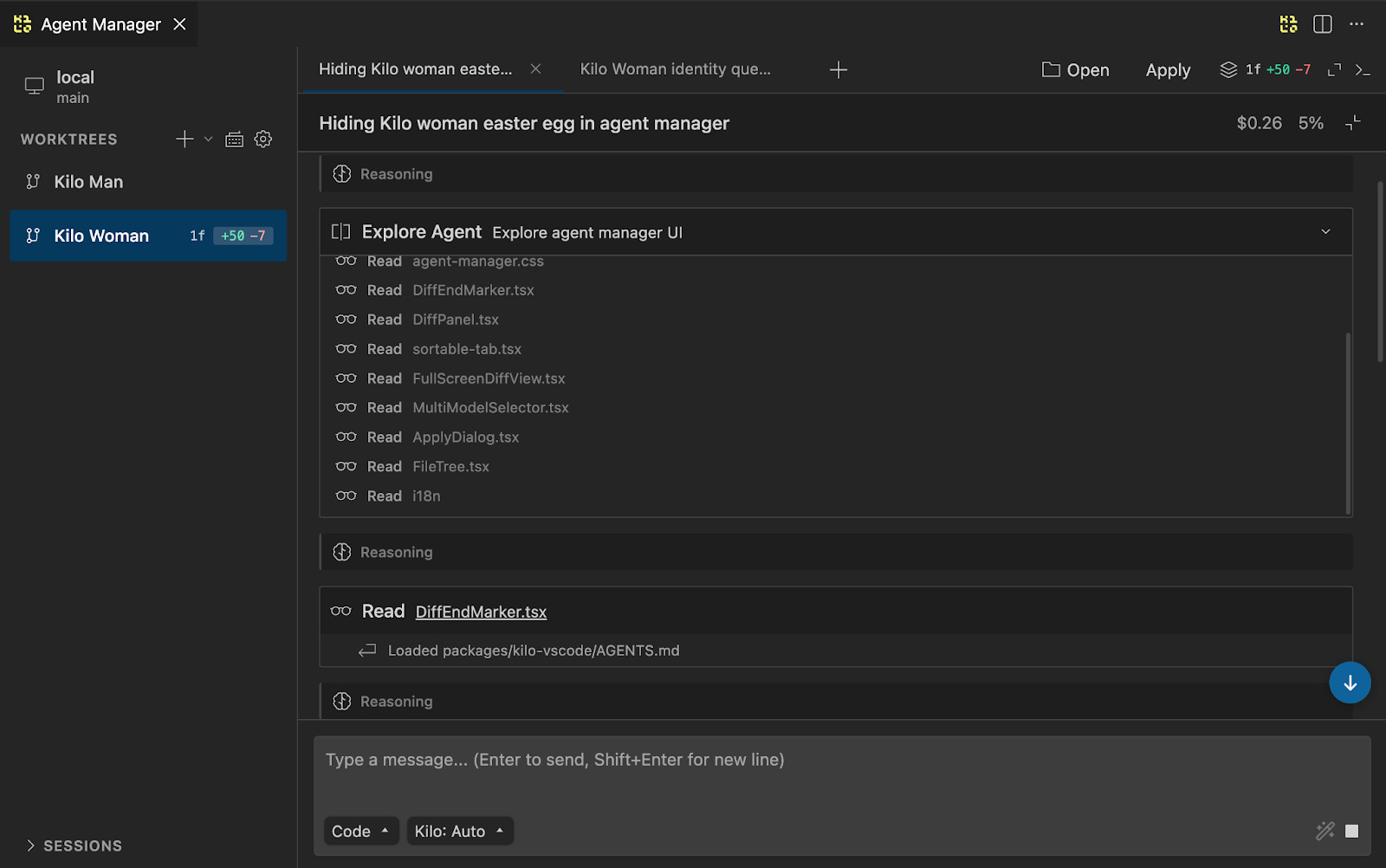
The Agent Manager has been part of Kilo Code for a while, but in the previous extension it sat on top of a separate mechanism from the rest of the stack. In the rebuilt extension, the Agent Manager runs on the same portable core as everything else. That means it inherits all the new capabilities natively—git worktrees, parallel sessions, inline code review—without the workarounds that were needed before.
Spin up new agents through tabs. Monitor what each one is doing. Switch context instantly. Whether you’re running two agents or eight, the Agent Manager gives you one place to see everything that’s happening and step in when you need to.
Inline Code Review
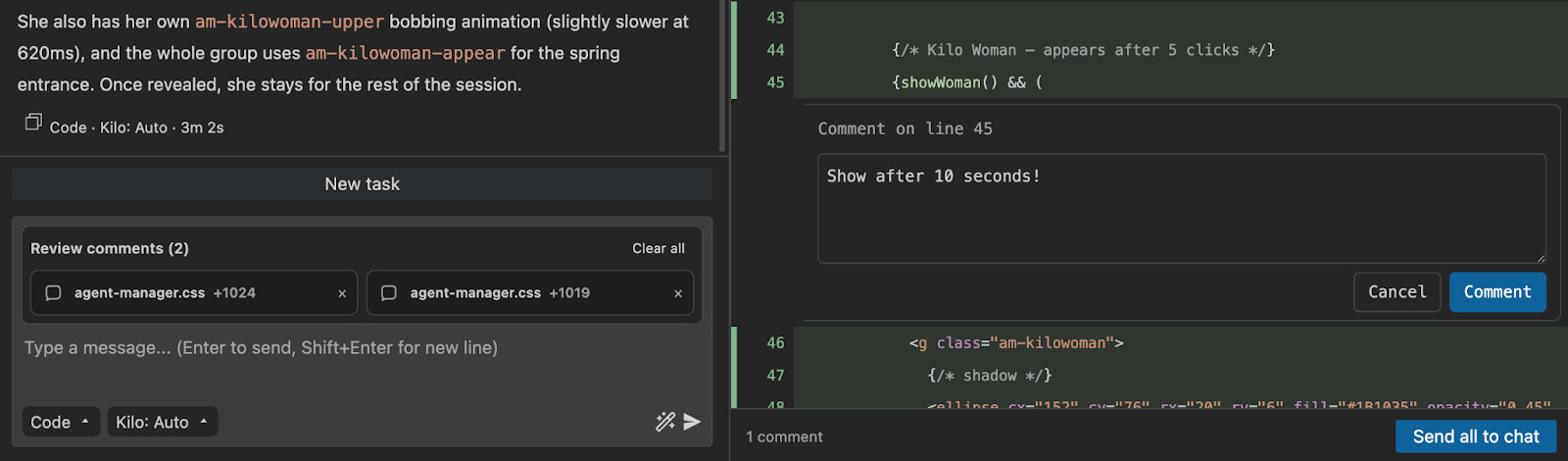
When agents make changes across your codebase, you need a way to review the work and push back when something isn’t right. The Agent Manager includes a built-in diff reviewer that shows every change an agent has made, file by file, in either unified or split view. Toggle it open for a side panel, or expand into a full-screen review tab with a file tree sidebar for navigating large changesets.
But viewing diffs is just the starting point. You can leave line-level review comments directly on the diff, the same way you would on a pull request. Click a line, type your feedback, and when you’re done reviewing, hit “Send all to chat.” Every comment, with its file path, line number, and the code in question, is sent straight to Kilo as structured context. Point at the line, say what’s wrong, and let Kilo handle the rest.
This turns agent-assisted development into something closer to a real code review workflow. Instead of approving or reworking an entire changeset, you’re having a targeted conversation with the agent about specific lines of code, the same way you’d review a pull request from a teammate.
Parallel Agents with Worktrees
This is where it gets powerful. Open as many Kilo tabs as you need—each one is a fully independent agent. But running multiple agents on the same codebase creates conflicts. So the Agent Manager lets you create git-worktrees: separate copies of your repository where each agent operates independently, like giving each developer their workspace.
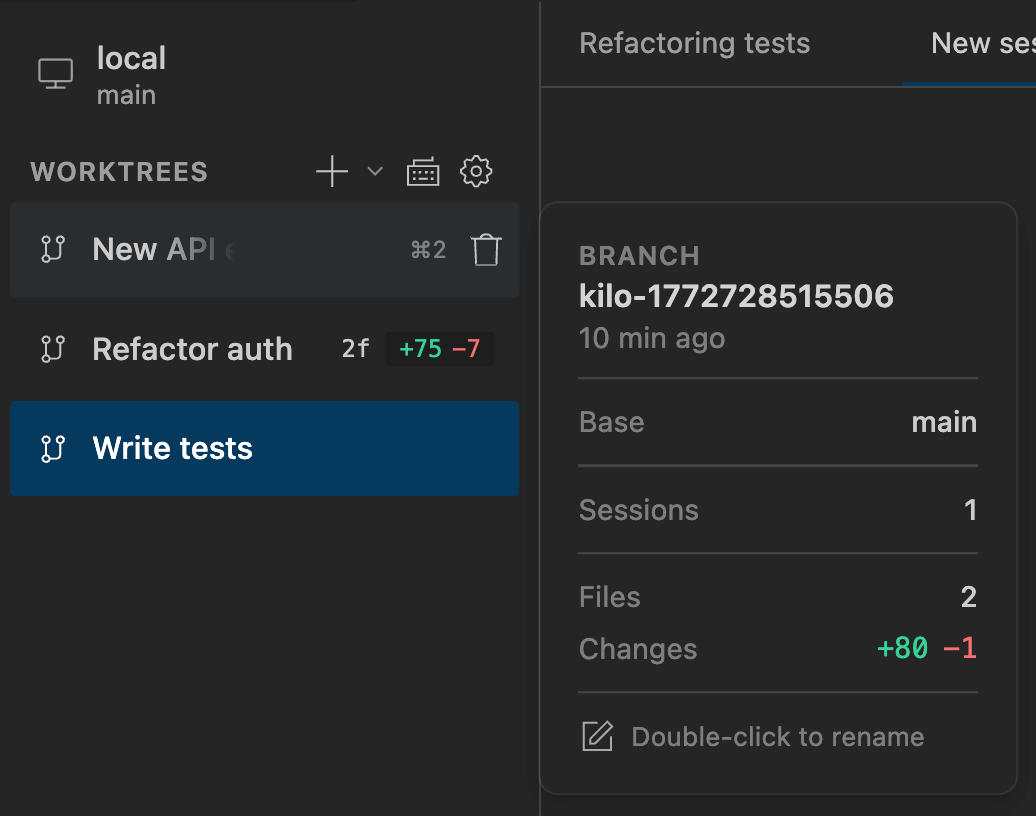
Click the plus button, and Kilo creates a new worktree in a subdirectory of your repo. One agent adds a new API endpoint. Another refactors the auth module. A third writes tests. They all work simultaneously without stepping on each other’s code.
When they’re done, you merge the results—apply changes directly, commit them, or create a PR, the same way you’d handle branches from different developers on your team.
For engineers working on large codebases, this is a multiplier. Instead of feeding one task at a time to a single agent and waiting for completion, you orchestrate multiple streams of work in parallel. What used to take hours finishes in minutes.
Running parallel agents on the same worktree is also supported for read-heavy workflows. A common pattern: one agent makes code changes while a second agent reviews the current diff or investigates how a specific feature is implemented elsewhere in the codebase. No merge overhead, just faster feedback loops.
Multi-Model Comparisons
This one’s useful more often than you’d think. The Agent Manager lets you start multiple agents on the same prompt using different models—Claude Opus 4.6 and GPT-5.3, for example. Both work the task independently, and you compare the results side by side.
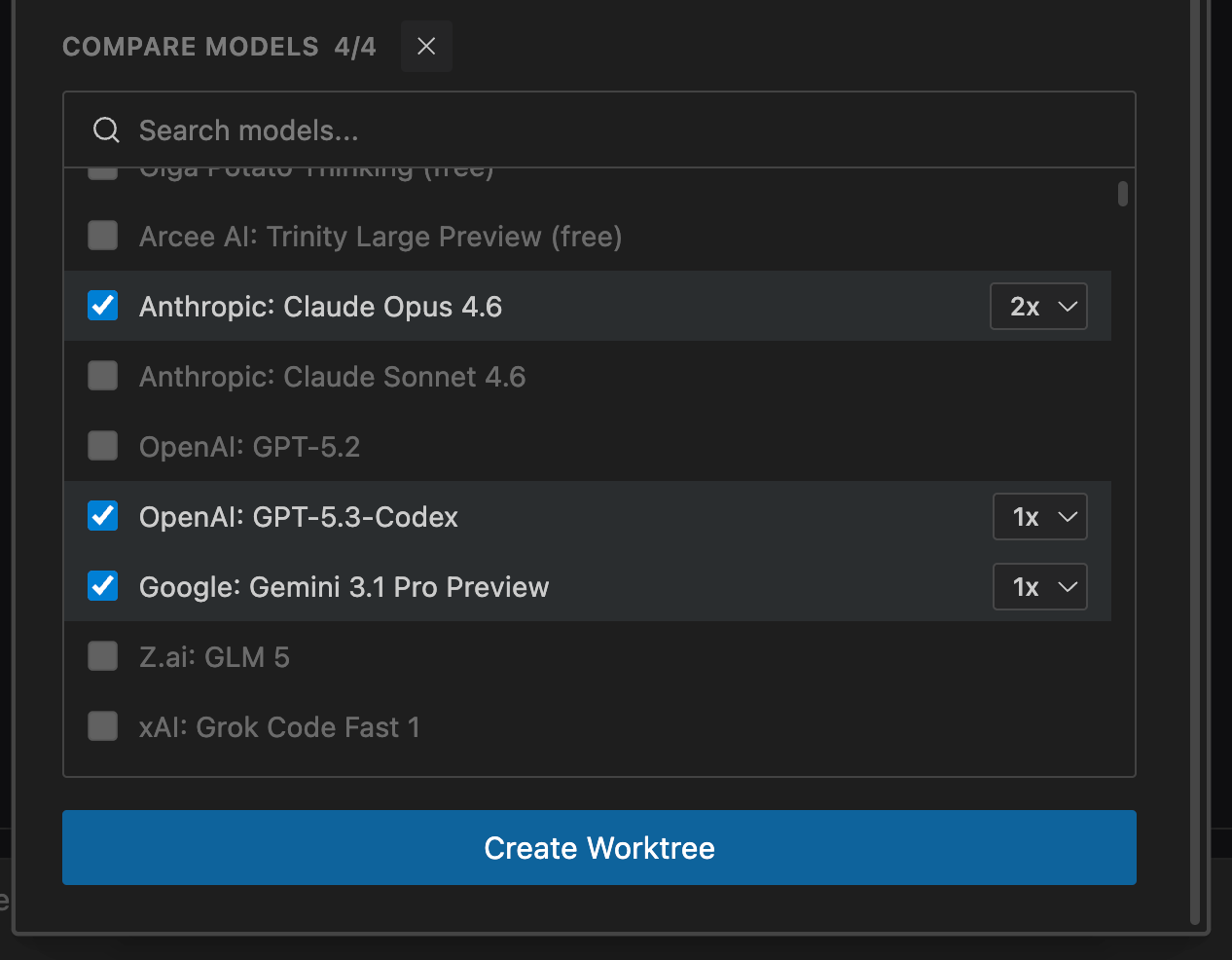
It’s not just for trying out new models. Any time you’re doing something complex or open-ended—a tricky refactor, a page layout, an architecture decision—it helps to have a few versions to compare. Run two or three models on the same problem, see which one got closest, and go with that. Sometimes Opus nails it, sometimes GPT does. Having both means you don’t have to guess.
Cross-Platform Sessions
Start a coding session in the CLI while being SSHed into a production server. Pick it up in VS Code when you’re back at your desk. Share the context with a teammate via Slack. Because the extension and CLI now share the same portable core, session continuity isn’t a bolt-on feature—it’s built into how the system works.
Get Started
Here’s how to get started with the pre-release:
Search for “Kilo Code” in the VS Code Extensions panel, or install directly from the Visual Studio Marketplace.
Switch to the pre-release version in the extension panel.
Open multiple Kilo tabs and go parallel.
A few things to know before you dive in. This is a pre-release, and not everything has been migrated yet. Provider configuration isn’t available in the extension UI right now—if you configure your providers via the Kilo CLI, those settings will carry over and work in the extension. We’re building native provider setup into the extension as a priority for GA.
If you want to test the pre-release without touching your current setup, install it on VS Code Insiders—it runs as a separate instance, so you can try the new extension side by side with your existing one.
If you’re already a Kilo CLI user, your settings and sessions sync automatically. That’s the whole point.
We’d love your feedback—what works, what doesn’t, what’s missing. Drop it in Discord.
What’s Next
The pre-release is stable and ready for daily use. Here’s what we’re focused on as we move toward general availability:
Smoother migration. We’re building a migration experience that automatically carries your provider settings, API keys, and configurations like Memory Bank over to the new extension. You shouldn’t have to reconfigure anything.
Bug bounty for PRs. This is open source, and we want the community involved from day one. Find a bug in the pre-release, submit a PR to fix it, and if it gets merged, we'll give you $100 in Kilo Credits.
Production release. Once we’ve incorporated feedback from the pre-release and stabilized the remaining rough edges, we’ll push the full general release to all users.
Install the extension. Try the CLI. Tell us what you think.
Move at Kilo Speed.
Thank you guys! But after a short try, I had to switch back. It's very misaligned with the old version. What made me move back after 30 minutes:
Isolated from the IDE:
- Files: In the old version, I can see current state of each file during development right in the IDE editor. When the agent works on the files, it's very transparent. I don't feel OK giving agents too much freedom. I treat Kilo as an assistant, not as a developer. I micro-manage it. I don't want agents working on their own copies of my project, on their isolated git trees: I have one tree, one branch I am working on, and I want the agent to be working on the same branch in the same editor.
- Terminal: While the old Kilo extension prefers its own terminal, there's an option there to use the IDE terminal, and I prefer that second option. This way, I have the commands that Kilo ran in my terminal history, and I see the commands being executed in a familiar and transparent way.
Less control on what the agent's doing:
- When I prompt the agent to switch to another mode after some phase of the task, in the new extension it ignores it. The old version agent follows such instructions. If I ask the old version agent to interact with me, it does. The one from the new extension didn't ask me anything and executed the whole task on its own. Same agent mode, same LLM, but very different behaviour.
- I often interact with an agent after its operations. In the old extension chat it's easy to do: I can request the agent to do something else after each action the agent does. Every file read, every think operation - if I have set Kilo to require my confirmations I really can micro-manage it. The new version is very rigid in this way: agent creates a list of actions, executes them, and it feels like a black box. The new extension is designed for a very different way of work.
The bottom line:
The experience of the new extension is TOO different. There's no way to use my established workflows in the new Kilo extension at all.
I would like to have the same experience in the new extension with some features on top. Not something completely different. Not a black box with some magic happening inside but a transparent manageable tool with all the controls.
What I'm really waiting for from the new extension it is running parallel agents in two or more tabs. The old extension allows it but in a bad way: it can use only the same mode and the same model in all the tabs, you switch mode in one, the mode switches in the other, and I expect the new version to be more flexible.
when do you plan make JetBrains build?