


Most marketing automation tools stop at “send a notification.” Someone signs up, you get an email. A campaign ends, you get a Slack ping. The actual work, updating the dashboard, drafting the recap, refreshing the audience segment, still lands on you.
Kilo’s Cloud Agents with Webhook Triggers change that. Any external service that can send an HTTP request can kick off a real working session: Kilo spins up a Linux container, clones the repo or workspace you’ve pointed it at, runs your prompt template against the incoming payload, and commits its work to a branch. It can hit APIs, parse data, generate files, and push results back to GitHub.
For marketing teams that own anything with a repo (docs sites, landing page code, content libraries, analytics configs, MDX-based blogs), this is the layer between “an event happened” and “the work got done.”
Here are seven automations worth setting up this week.
1. Competitor Mention Tracking
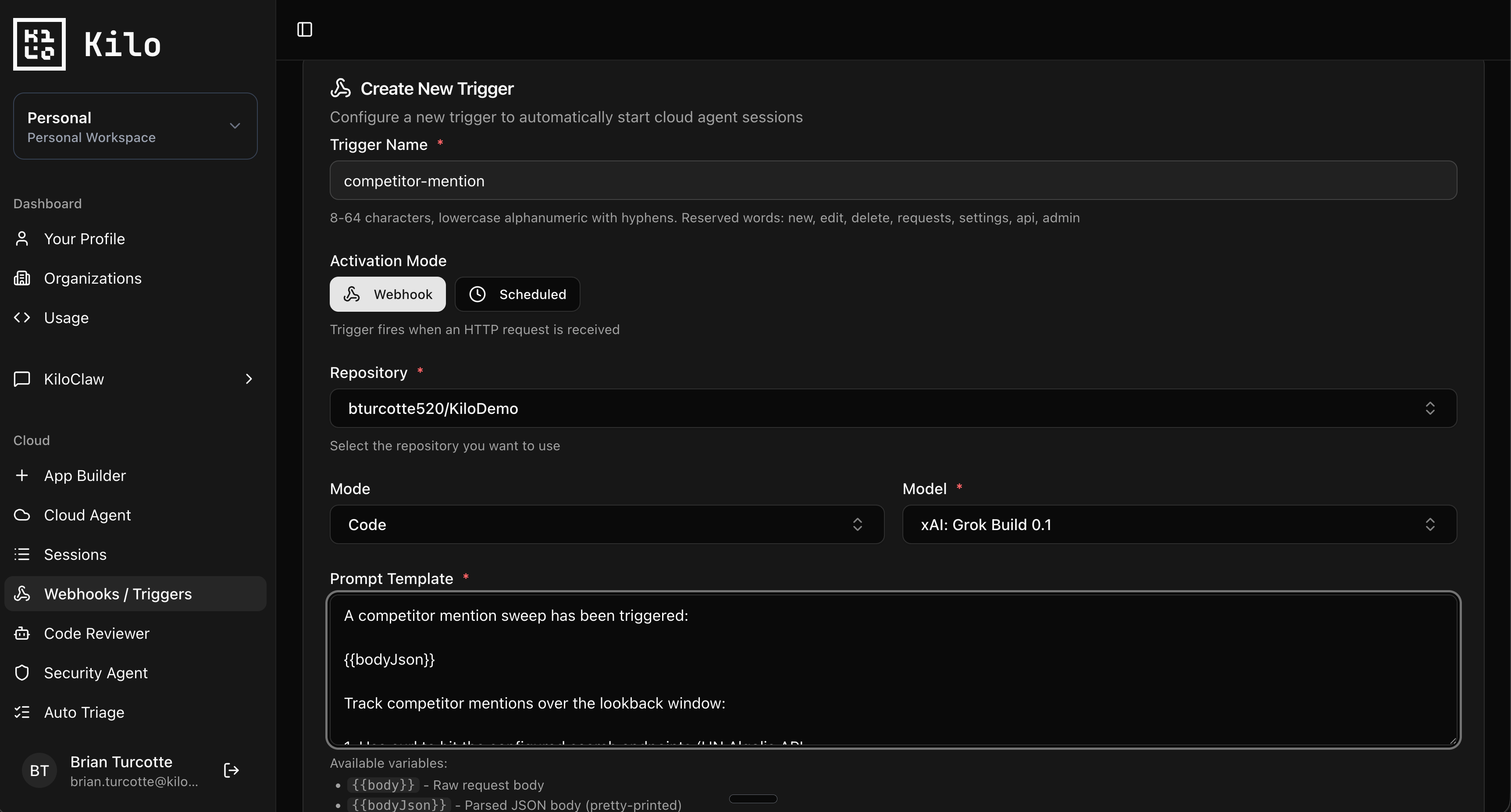
If you’re tracking what competitors are saying, your usual options are a paid social listening tool that costs $400 a month and surfaces a Slack message, or doing it manually. Webhooks give you a third option.
Wire up a scheduled trigger (daily or every few hours) that hits a search API or RSS feed and passes results to a Cloud Agent:
{
  "task": "competitor-mentions",
  "competitors": ["CompetitorA", "CompetitorB", "CompetitorC"],
  "keywords": ["pricing", "alternative", "vs", "review"],
  "lookback_hours": 24,
  "output_dir": "intel/competitor-watch/"
}
Cloud Agent Prompt Template:
A competitor mention sweep has been triggered:

{{bodyJson}}

Track competitor mentions over the lookback window:

1. Use curl to hit the configured search endpoints (HN Algolia API,
   Reddit JSON endpoints, RSS feeds) for each competitor + keyword pair
2. Filter results to the lookback window
3. For each result, capture: source, URL, snippet, sentiment
   (positive/neutral/negative based on the snippet)
4. Group findings by competitor in
   `{{body.output_dir}}/{{body.task}}-{{timestamp}}.md`
5. Flag anything that looks like a comparison post, pricing complaint,
   or migration discussion at the top of the file under "Worth a look"
6. Commit: "intel: competitor mentions for {{timestamp}}"
The first time you run it you’ll get a feel for how noisy the results are and can adjust the keywords. The agent compiles intel into a format your team actually reads. Over a few weeks the pattern of what competitors are getting hit on becomes pretty clear.
A note on payloads: scheduled triggers don’t accept inbound HTTP requests, so the agent does the API calls itself using curl. Make sure any API keys are in your Agent Environment Profile as secrets.
2. Campaign Asset Generation from a Brief
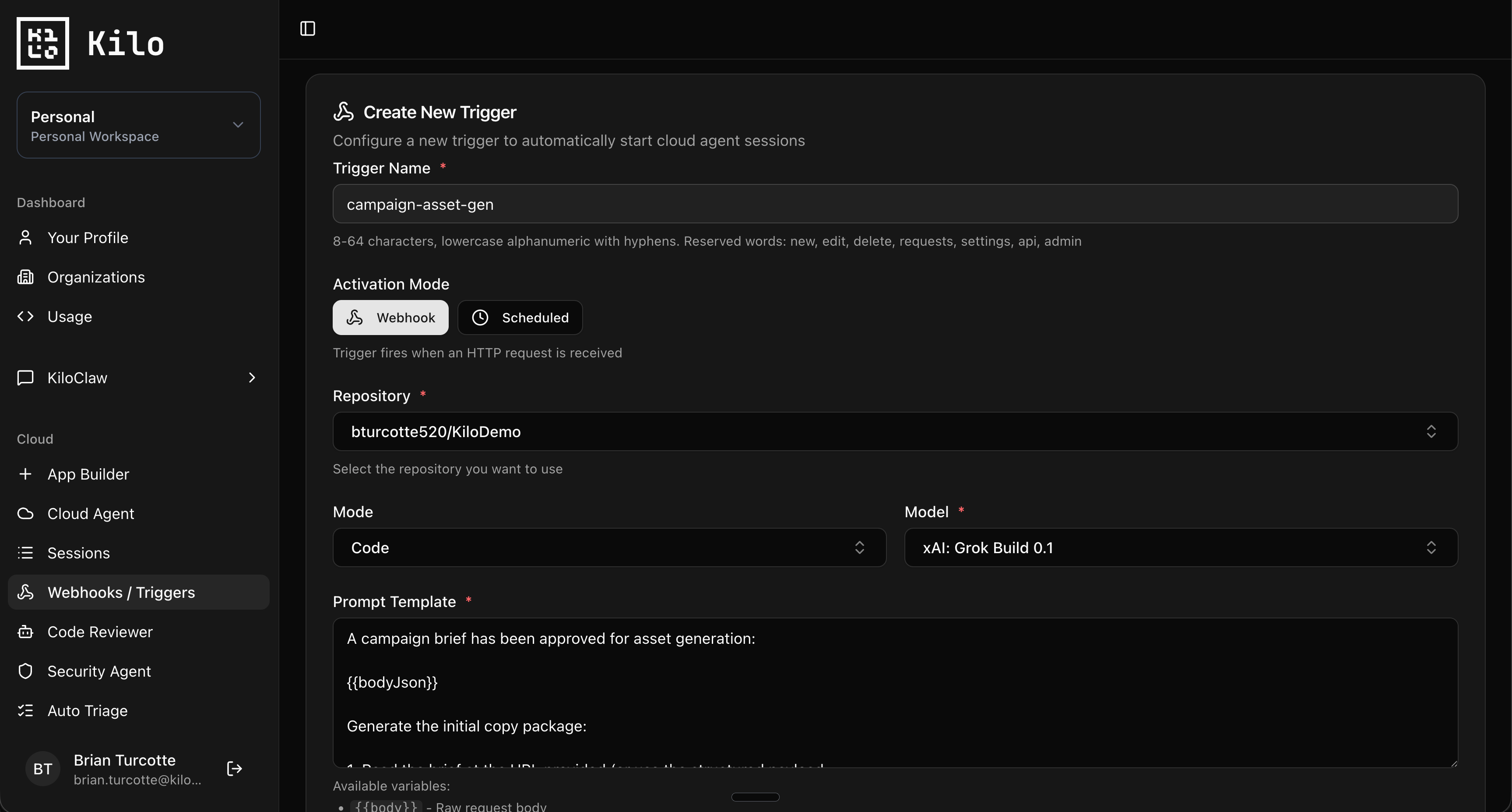
You write a campaign brief in Notion or a Google Doc. The hand-off to production then takes a week of back-and-forth: a designer wants the headline rewritten, a copywriter wants more context on the audience, someone forgets the UTM convention.
Trigger a webhook when a brief is approved (a label on a Linear ticket, a state change in Notion via Zapier, or just a manual POST):
{
  "campaign_name": "developer-survey-2026",
  "brief_url": "https://notion.so/...",
  "audience": "backend developers, 3-10 years exp",
  "channels": ["email", "twitter", "landing-page"],
  "primary_cta": "Take the 5-minute survey",
  "tracking_prefix": "utm_campaign=dev-survey-2026"
}
Cloud Agent Prompt Template:
A campaign brief has been approved for asset generation:

{{bodyJson}}

Generate the initial copy package:

1. Read the brief at the URL provided (or use the structured payload
   if the URL is inaccessible)
2. For each channel listed, generate copy in
   `campaigns/{{body.campaign_name}}/`:
   - email.md: subject line (3 variants), preview text, body copy
   - twitter.md: 5 tweet variants, each under 280 chars
   - landing-page.md: hero headline, subhead, three benefit bullets,
     CTA copy
3. Apply the tracking prefix to any URLs you include
4. Check `brand/voice-guide.md` for tone and prohibited phrases
5. Commit each channel separately so reviewers can comment per file:
   - "copy: draft email for {{body.campaign_name}}"
   - "copy: draft twitter for {{body.campaign_name}}"
   - "copy: draft landing page for {{body.campaign_name}}"
The agent isn’t writing the final version. It’s giving your team a starting point that already respects the brand guide, applies tracking conventions correctly, and lays out the work in a reviewable format. Your copywriter spends their time on the hard part: making it actually good.
3. SEO Page Refreshes Triggered by Ranking Drops
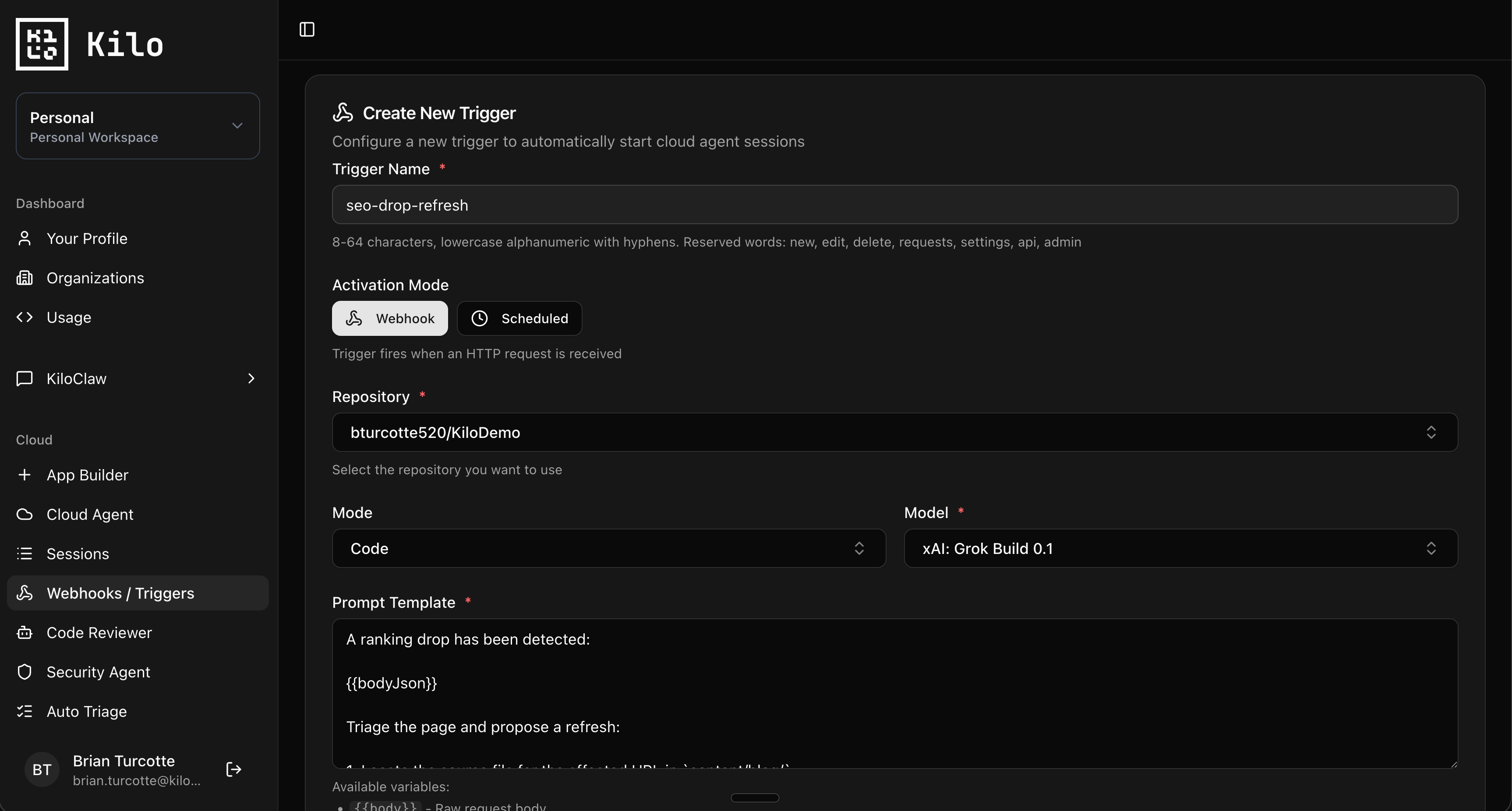
Your top-ranking pages slip. You notice it three weeks later when traffic is already down. By then the post needs more than a refresh, it needs a rewrite.
Some rank tracking tools (AccuRanker, Ahrefs, SEMrush) support webhooks, or you can use Zapier or n8n as a bridge. Configure a webhook to fire when a tracked URL drops more than 5 positions:
{
  "alert_type": "ranking_drop",
  "url": "https://yourcompany.com/blog/how-to-deploy-nextjs",
  "keyword": "deploy nextjs",
  "previous_position": 3,
  "current_position": 11,
  "competitor_at_top": "https://competitor.com/...",
  "last_updated": "2025-08-12"
}
Cloud Agent Prompt Template:
A ranking drop has been detected:

{{bodyJson}}

Triage the page and propose a refresh:

1. Locate the source file for the affected URL in `content/blog/`
2. Read the current post in full, noting publish date and last update
3. Use curl to fetch the competitor URL that's now outranking us
   (use a normal user agent header)
4. Compare structure, depth, and freshness of the two pages
5. Generate `seo-refresh-plans/{{body.keyword}}.md` containing:
   - A diagnosis of why the page likely dropped (age, missing sections,
     outdated examples, schema gaps)
   - A specific section-by-section refresh plan
   - 3-5 new H2s to add based on what the competitor covers but we
     don't
   - Updated code examples if the existing ones reference deprecated
     APIs
6. Commit: "seo: refresh plan for {{body.keyword}}"
The agent doesn’t rewrite the post. It builds the diagnostic that would otherwise take you 45 minutes of tab-switching between Ahrefs, the live page, and the competitor. By the time you sit down to update the post, you know exactly what to fix.
4. Newsletter Recap from a Week of Published Posts
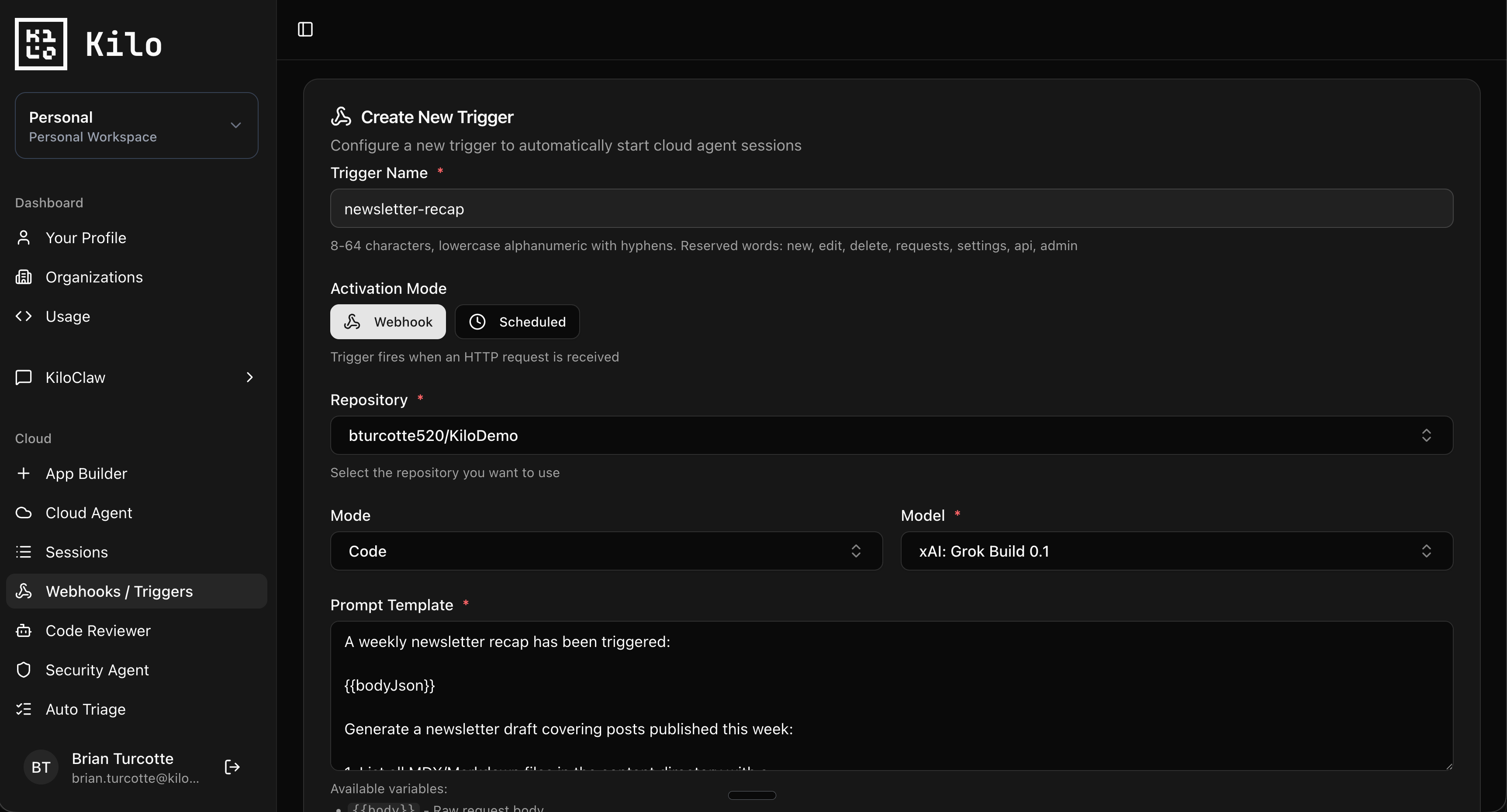
A lot of marketing teams publish to a content repo: MDX files, frontmatter, the usual. Pulling together a Friday newsletter that summarizes the week’s posts is mechanical work that always seems to land at 4pm on Thursday.
Fire a webhook on a weekly cron with the date range:
{
  "task": "newsletter-recap",
  "start_date": "2026-05-18",
  "end_date": "2026-05-24",
  "content_dir": "content/blog/",
  "audience": "developers",
  "tone": "conversational, technical but not stiff"
}
Cloud Agent Prompt Template:
A weekly newsletter recap has been triggered:

{{bodyJson}}

Generate a newsletter draft covering posts published this week:

1. List all MDX/Markdown files in the content directory with a
   publishDate inside the specified date range
2. For each post, read the frontmatter (title, description, author)
   and summarize the body content
3. Draft a newsletter with:
   - A two-sentence intro that ties the week together (look for a
     common theme across the posts, but do not force one)
   - One short blurb per post: a hook, a key insight, and a link
   - A closing line that points to the most important post of the week
4. Match the existing tone from prior newsletters in
   `marketing/newsletters/` (read the last 3 for reference)
5. Output to `marketing/newsletters/draft-{{body.end_date}}.md`
6. Commit: "content: newsletter draft for week of {{body.start_date}}"
You wake up to a draft sitting in a branch, ready to review. The agent gets you 80% of the way there. The 20% that requires actual editorial judgment, which post leads, what gets cut, the subject line, still belongs to you.
5. Social Post Drafting from a New Blog Post
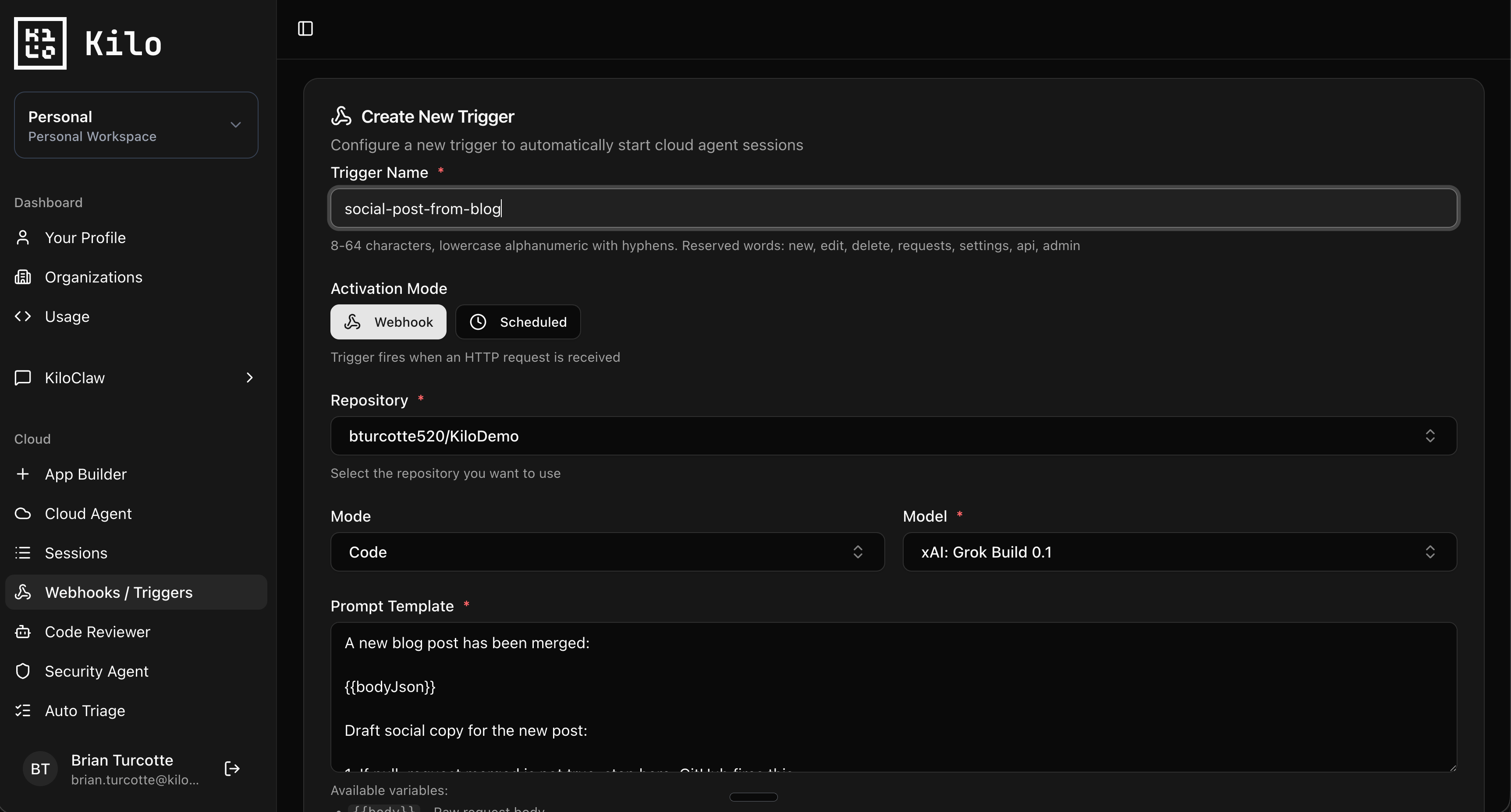
You ship a blog post. Now you need 4 X posts, a LinkedIn post, a Threads version, etc. Each one needs a different angle, a different tone, and a different length limit.
Fire a webhook on every merged PR to your content directory:
{
  "action": "merged",
  "pull_request": {
    "title": "Add post: webhook automation patterns",
    "merged_at": "2026-05-25T14:00:00Z"
  },
  "changed_files": [
    "content/blog/webhook-automation-patterns.mdx"
  ],
  "repository": {
    "full_name": "kilo/marketing-site"
  }
}
Cloud Agent Prompt Template:
A new blog post has been merged:

{{bodyJson}}

Draft social copy for the new post:

1. If pull_request.merged is not true, stop here. GitHub fires this
   event on every close, not just merges.
2. Identify which file in changed_files is the new blog post
3. Read the post and extract: title, the strongest single insight,
   3 quotable lines, the target audience
4. Generate `social/{{post-slug}}.md` with:
   - Twitter: a 5-tweet thread, plus 2 standalone variants
   - LinkedIn: a 1200-character post written like a real human, not
     a press release
   - Threads: 3 variants under 500 chars each
5. For each variant, include 1-2 relevant hashtags but never more
   than 2
6. Pull at least one direct quote from the post to use in at least
   one variant per channel
7. Do not use emojis unless the post itself uses them
8. Commit: "social: drafts for {{post-slug}}"
A few notes from running this: tell the agent explicitly what NOT to do. “Don’t use emojis,” “don’t start with a hook question,” “don’t use the word ‘unlock’ or ‘leverage’.” LLMs default to a kind of LinkedIn-thought-leader voice unless you push them off it. The prompt template is where you do the pushing.
6. Auto-Generated Weekly Marketing Report
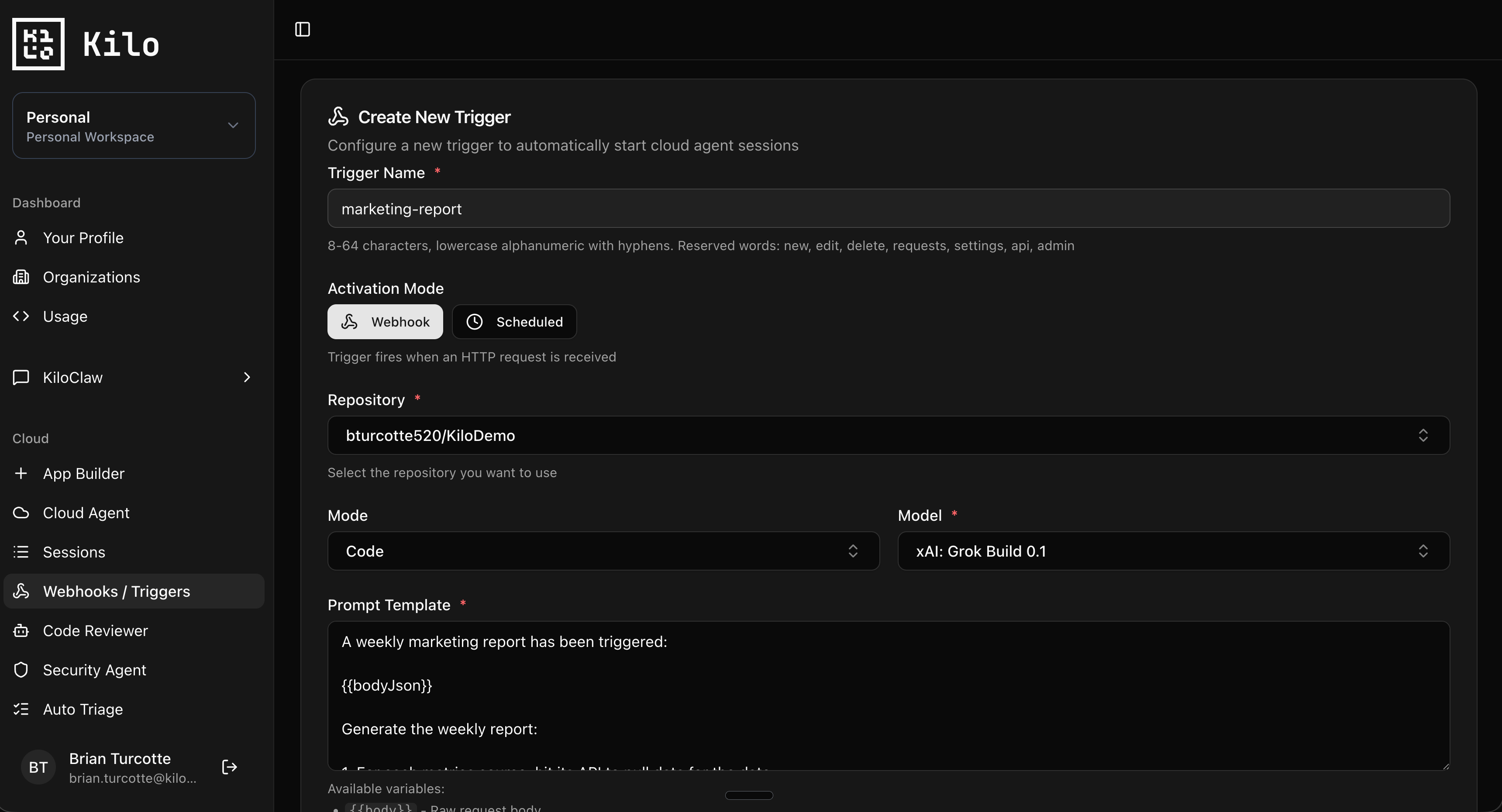
End of week reporting is a tax on your time that no one really enjoys. You’re pulling numbers from analytics, attribution tools, CRM, social platforms, and ad managers, then writing a paragraph that essentially says “things are going fine, here’s what we did.”
Trigger a webhook every Friday afternoon:
{
  "task": "weekly-marketing-report",
  "week_start": "2026-05-19",
  "week_end": "2026-05-25",
  "metrics_sources": ["plausible", "hubspot", "twitter-api"],
  "campaigns_active": ["dev-survey-2026", "ide-comparison-launch"],
  "output_dir": "reports/weekly/"
}
Cloud Agent Prompt Template:
A weekly marketing report has been triggered:

{{bodyJson}}

Generate the weekly report:

1. For each metrics source, hit its API to pull data for the date
   range (API keys are in the environment)
2. Compute week-over-week deltas for the core metrics:
   - Site traffic (sessions, top pages)
   - Newsletter (subscribers added, open rate)
   - Social (impressions, follower change)
   - Pipeline (MQLs from marketing channels, if available)
3. For each active campaign, pull its specific performance:
   clicks, conversions, CPA
4. Write `{{body.output_dir}}/{{body.week_end}}.md` with:
   - A 3-sentence summary at the top (the actual story of the week)
   - A metrics table with deltas
   - A "What worked" section (2-3 specific things)
   - A "What didn't" section (2-3 specific things, including null
     results, not just spin)
   - A "Next week" section pulled from the team's plan.md if one
     exists
5. The summary should be written like a person briefing their team,
   not a press release
6. Commit: "report: weekly marketing report {{body.week_end}}"
The “What didn’t” section is the one that matters. Most automated reports are designed to make everything sound good. Tell the agent to surface real null results and you get a document that’s actually useful to read.
7. UTM Hygiene Audit Across the Site
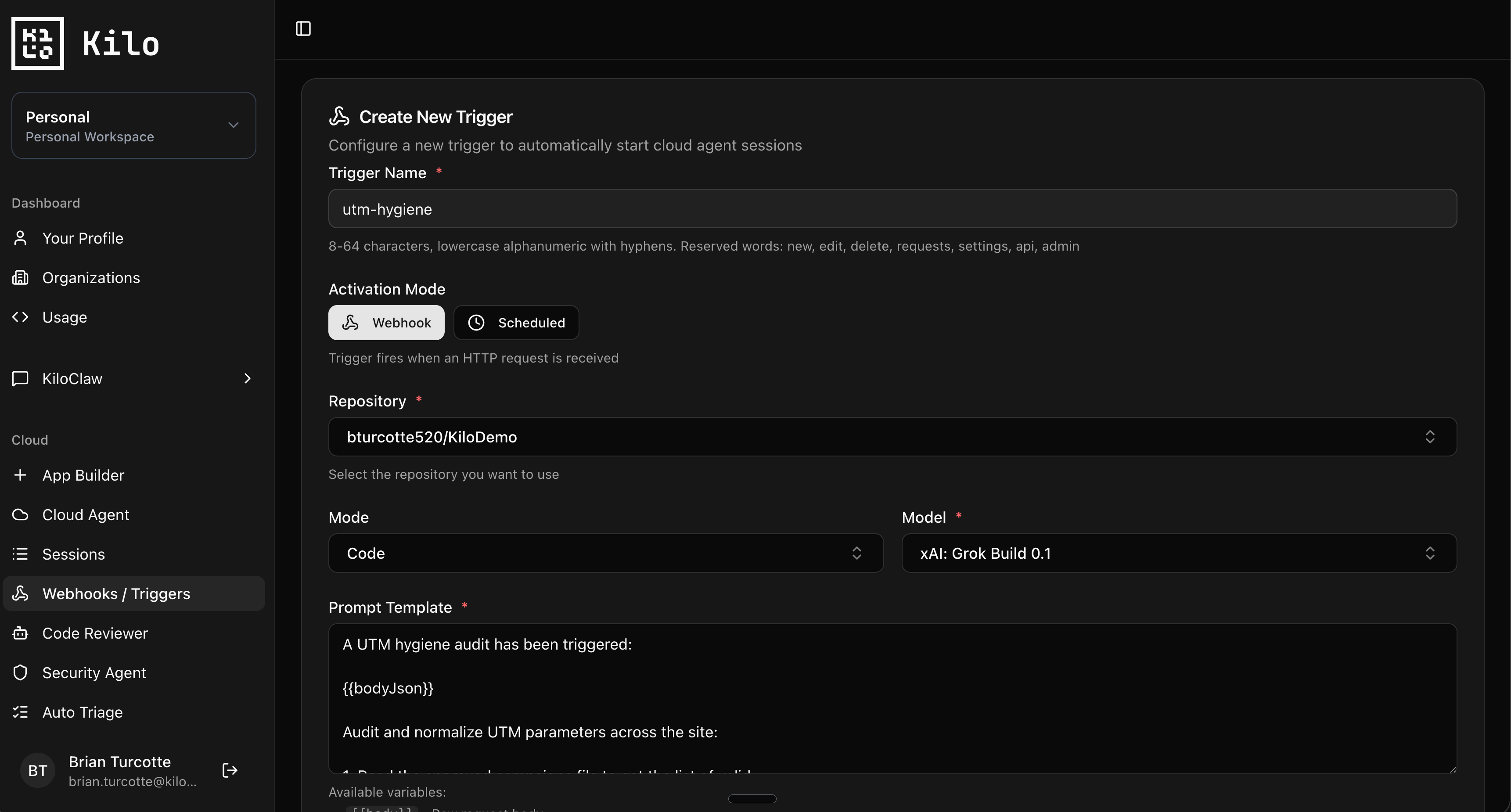
UTM parameters are the marketing equivalent of unused imports. They accumulate, they’re inconsistent, and when you finally need to attribute something correctly, three of the source links use utm_campaign=newsletter-q4 and the other four use utm_campaign=q4_newsletter and now your dashboard is lying to you.
Run this on a monthly cron:
{
  "task": "utm-audit",
  "site_dir": "site/",
  "blog_dir": "content/blog/",
  "approved_campaigns_file": "marketing/approved-utms.json",
  "fix_inconsistencies": true
}
Cloud Agent Prompt Template:
A UTM hygiene audit has been triggered:

{{bodyJson}}

Audit and normalize UTM parameters across the site:

1. Read the approved campaigns file to get the list of valid
   utm_campaign, utm_source, and utm_medium values
2. Use grep to find every URL in MDX, JSX, and TSX files that
   contains utm_ parameters
3. For each finding, check against the approved list:
   - Valid: leave alone
   - Wrong case or hyphen/underscore mismatch: normalize to the
     approved version
   - Unknown campaign: log to `utm-audit-issues.md` for human review
   - Missing required params: log to `utm-audit-issues.md`
4. If fix_inconsistencies is true, apply the normalizations in
   place
5. Generate `utm-audit-report-{{timestamp}}.md` with:
   - Total URLs audited
   - Normalizations applied
   - Issues requiring human review
6. Commit normalizations and the report separately:
   - "chore(marketing): normalize UTM parameters"
   - "chore(marketing): UTM audit report {{timestamp}}"
This isn’t glamorous, but the first time you run it you’ll find dozens of inconsistencies that have been silently messing up your reporting for months. After that, monthly maintenance keeps things clean.
Setting It Up
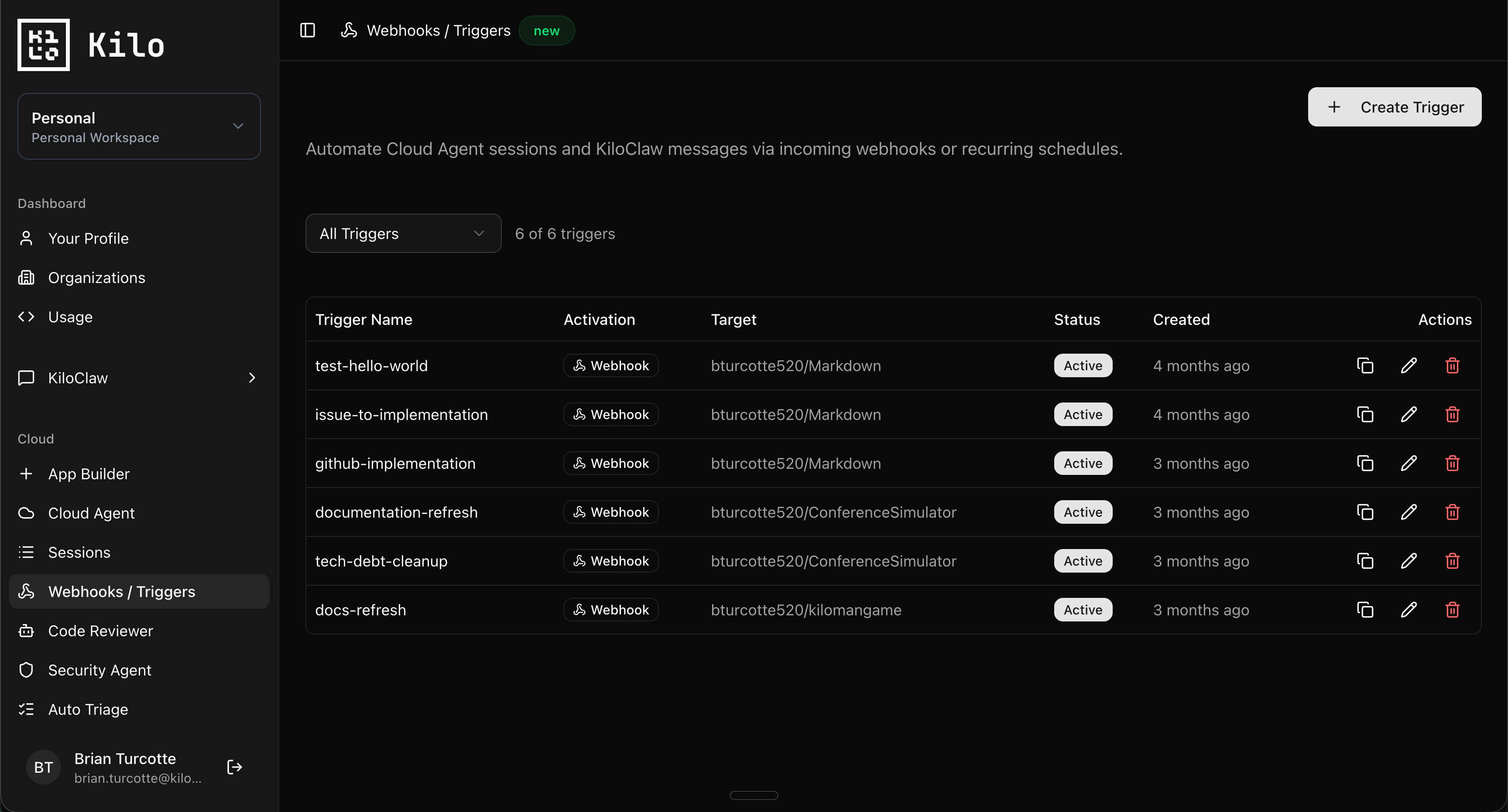
All of these follow the same pattern in the Kilo Dashboard at app.kilo.ai/cloud/webhooks:
Create an Agent Environment Profile with the API keys, env vars, and startup commands your automations need. For marketing automations, you’ll usually want keys for your analytics platform, CRM, social APIs, and whatever rank tracker you use. Install any extra CLI tools through startup commands. Profiles are reusable across triggers.
Configure a Webhook Trigger with your prompt template, target repo, and the profile. Scheduled triggers use cron expressions (minimum 10 minute interval). Webhook triggers give you a unique URL to wire into external services.
Copy the URL and configure your source: GitHub for content PRs, Zapier or n8n for SaaS event bridging, your rank tracker for SEO alerts, a cron scheduler for the recurring ones.
For personal accounts, sessions run live in your Cloud Agent container and you can watch them execute. Organization triggers run in dedicated compute as a bot user, with completed sessions available to share or fork across the team.
What This Actually Changes
Marketing teams spend a lot of time on work that doesn’t require marketing judgment. Pulling reports. Drafting first versions. Auditing things that should already be correct. Running checks on stuff that nobody else is checking.
Webhooks don’t replace the part of marketing that’s actually hard: knowing what story to tell, what’s worth investing in, what your audience actually cares about. They replace the part that’s mechanical: the report assembly, the asset draft, the audit, the cleanup. Your team reviews the agent’s work instead of producing it from scratch.
If you’re building marketing automations with Cloud Agents, share what you’re running in the #cloud-agents channel on Discord!