

You’re staring at a model picker. Twelve options. You vaguely remember that one of them scored well on a leaderboard you saw last week. You pick Claude because that’s what you usually pick.
Starting today, Terminal Bench completion scores and per-attempt costs show up directly in the Kilo CLI and VS Code extension model details panel. The benchmark data is now in the same place you already check price and context limits.
Why Put This in the Picker
Terminal Bench 2.0 isn’t a toy benchmark. It drops AI agents into sandboxed terminal environments and asks them to do real work — git operations, system administration, data processing, cryptanalysis. The tasks were written by Stanford and Laude Institute researchers, and the scores reflect actual pass rates on 89 real-world problems.
The spread between models is large. On the public Terminal Bench 2.0 leaderboard, GPT-5.5 with the NexAU-AHE agent hits 84.7%. Claude Code with Opus 4.6 lands at 58.0%. Gemini CLI with 3.1 Pro scores 61.4%. That’s a 26-point gap between the top and what most people would still consider a strong model.
Those numbers measure each model in its own optimized agent scaffold. What matters in Kilo is how a model performs in Kilo’s harness, with Kilo’s tool pipeline, context management, and retry logic. That’s what Kilo Bench measures, and that’s what now shows up in your model picker.
What Changed
Open model details in either the VS Code extension or the CLI. For models where we have Kilo Bench data, you’ll see two new fields:
Terminal Bench Score — the completion rate when running through Kilo’s evaluation harness
Avg. Attempt Cost — what each benchmark attempt actually costs, including reasoning tokens, re-sent context, tool calls, everything
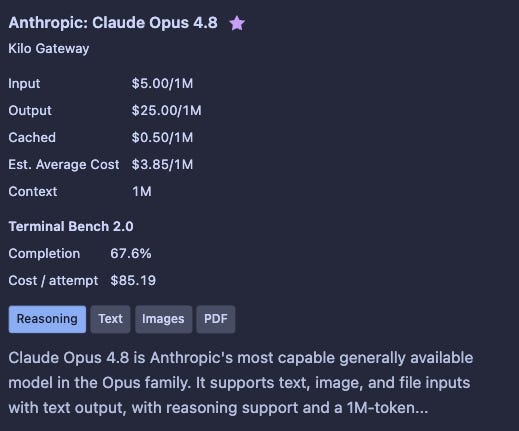
The score and cost together show the value-per-dollar of a model in your tool. A model that completes 74% of tasks at $0.52 per attempt is a different choice than one completing 54% at $1.83 per attempt, even if the second model looks better somewhere else.
The Gaps Are Big Enough to Matter
This would be a small UI detail if every model scored within a few points of each other. They do not.
On our Kilo leaderboard, GPT-5.5 hits 74.1% on Terminal Bench through Kilo’s harness. Kimi K2.6 lands at 54.4%. That’s a 20-point gap between two models you might otherwise treat as interchangeable. Meanwhile, on SWE-bench Verified, where the top six are separated by 1.3 points, those same models look nearly identical. The difference shows up when you test them in a real agent framework doing terminal-heavy work.
Cost widens the gap. A model that needs three attempts to pass a task effectively costs 3x its per-attempt price. Kilo Bench captures this because it runs multiple trials per model and tracks both per-attempt cost and cost-to-complete. When you see “$0.47/attempt” in your model details, that’s what it cost in our runs, including reasoning tokens, re-sent context, and tool calls.
Coverage Is Still Expanding
Not every model in the picker has Kilo Bench data. Running Terminal Bench evaluations takes time and compute, so we’re working through the catalog and prioritizing models Kilo developers actually use. If you don’t see a Terminal Bench score for a model, it means we haven’t evaluated it yet.
We’ll keep expanding coverage. The leaderboard at kilo.ai/leaderboard shows the current state, and new models get added as we complete evaluation runs.
How to Get It
Update to the latest Kilo CLI or VS Code extension. The Terminal Bench data pulls from the same API that powers the web leaderboard, so you’ll always see current scores without needing to update again.
In VS Code: open model details for any supported model → the benchmark section appears below pricing info.
In the CLI: model info commands now include Terminal Bench fields when data is available.
Why This Exists
We wrote about why KiloBench exists a few weeks ago. Generic benchmarks are saturating, scaffold inflation makes raw scores misleading, and per-token pricing tells you almost nothing about actual cost. The useful signal is harness-specific pass rate plus real cost-per-task.
That data belongs in the model picker, where the decision happens. You shouldn’t need a spreadsheet or a blog post to figure out which model to use. The UI should give you enough signal to choose without leaving the workflow.
Terminal Bench scores are live now in the latest Kilo CLI and VS Code extension release. Check kilo.ai/leaderboard for the full table, or just open your model picker and look.
Not able to see 😢🥹 i'm in the vs code extension, updated restarted better steps please :)