

So I’ve been managing paid search accounts for the last 12 years. Paid search evolved from manual CPC bidding and pretty manual campaign management to conversion-based bidding which almost completely excluded day-to-day decisions from humans. And now, we’ve entered the era of AI-driven campaign management. Dozens of campaigns, thousands of keywords, copy changes every week, the usual Monday-morning reporting – all these things are possible to do without opening the Google Ads UI or Editor. When I started at Kilo, a few months ago, I decided to move the whole operation into Kilo CLI with a handful of custom skills that I wrote myself.
Most of this work isn’t hard if you get the concept of the ads and how they are operated. It’s just tedious and error-prone. Renaming 40 ad groups in the Google Ads Editor or building a new campaign from a spec doesn’t take a week – it takes maybe an hour of clicking the same buttons in a slightly different order. But during that hour you can easily pin the wrong headline, paste the wrong URL into three ad groups, or forget to attach the sitelinks. Prompting an agent to do the same thing takes a few minutes and the output is consistent by construction. And in some cases (especially in the AI space), agents help to quickly jump on the trend and launch ads in a few minutes with a couple of prompts.
This is a writeup of what I built, how it’s structured, and how I actually use it.
Why Kilo CLI and not just one big agent
Kilo CLI lets me pick a different model per task. That’s the whole thing. I’m not stuck paying Opus prices to rename an ad group. If you are managing a dozen accounts for your clients, you could face a huge bill. Or you do not want to wait for a 5-hour rate limit to reset to get your tasks done before the sunset.
My usual setup:
Planning and strategy. Opus 4.6 or 4.7, or GPT 5.5 at high thinking. Writing a new campaign spec, arguing about the structure, deciding whether three comparison campaigns should share a landing page. This is where I want the expensive brain.
Execution. Sonnet 4.6, or Kimi K2.6. Once the plan is locked, the actual work is “read the skill, follow the pattern, write the Python, run dry-run, show me the diff.” That’s mechanical. Cheaper models do it fine and they do it faster.
The big picture
Here’s roughly what the whole thing looks like on GitHub:
~/paid-ads/
├── .kilocode/
│   ├── rules/                       ← always-on guardrails
│   │   ├── safety.md                  never --execute without --dry-run,
│   │   │                              never touch budgets without asking,
│   │   │                              never commit .env, etc.
│   │   └── main.md                    workflow: read ROADMAP, read todo,
│   │                                  update CHANGELOG, update skill
│   └── skills/                      ← loaded on demand
│       ├── google-ads-scripts/        the script library skill
│       ├── pmax-sqr-audit/            PMax search terms audit workflow
│       └── weekly-report/             Monday report workflow
│
├── scripts/                         ← ~40 Python scripts (the muscle)
│   ├── export_*.py                    pull data into JSON
│   ├── create_*.py                    build new campaigns end-to-end
│   ├── update_*.py                    mutate live entities
│   ├── fix_*.py                       audit + fix (tracking, URLs, naming)
│   ├── add_*.py                       append keywords, sitelinks, negatives
│   ├── audit_*.py                     read-only analysis, no mutations
│   ├── weekly_report.py               Monday sync generator
│   └── sync_campaigns_md.py           regenerate inventory pre-push
│
├── reports/                         ← auto-saved, dated (2026-04-20.md, …)
├── docs/                            ← landing-page intent maps, SOPs
├── tasks/
│   ├── todo.md                        active backlog
│   └── specs/                         written before multi-file work
├── CHANGELOG.md                     ← one line per change, automated
├── ROADMAP.md                       ← strategic priorities
└── campaigns.md                     ← regenerated from the API pre-push
Rules are always on. They’re the “don’t shoot yourself in the foot” layer. Skills load on demand when I’m doing a specific kind of work. The scripts are where the actual API calls live.
A note on “topic”
One piece of vocabulary that shows up a lot below: topic. A topic is a slice of the campaign naming convention that groups related campaigns regardless of geo or channel. My campaign names look like <scope>_<stage>_acq_<topic>_<channel>_<goal>, so a topic might be product-personas (persona landing pages), competitors (competitor targeting), brand (defensive brand search), and so on. One topic usually spans multiple campaigns – a core campaign for Tier 1 countries, a global campaign for the rest, sometimes a PMax variant on top. When the weekly report is grouped by topic, it’s rolling up those parallel campaigns into one row so I can see the whole personal effort or the whole competitor effort in one number.
The three skills
1. google-ads-scripts – the library
This is the backbone. It’s basically a README that lists every existing script, what it does, which patterns it demonstrates, and the conventions any new script has to follow. When I ask for something new, the agent reads this first and copies the closest existing pattern instead of inventing its own.
The conventions that matter:
Every mutating script ships with
--dry-run(default) and--execute. Dry-run prints every operation it would perform, with enough detail to eyeball a diff. Nothing hits the API until I pass--execute.New campaigns are always created PAUSED. Enabling is a deliberate UI step.
Every creation script supports
REUSE_CAMPAIGN_IDso a half-finished run can resume. Rate limits and transient API errors do happen on large batches – a 751-ad-group campaign creation will occasionally fail halfway, and restarting from scratch is not an option.Keyword/negative adds always dedupe against what’s already there. No one wants duplicate-keyword warnings.
Here’s what a fresh campaign-creation dry-run looks like in practice. Say I want a new comparison campaign:
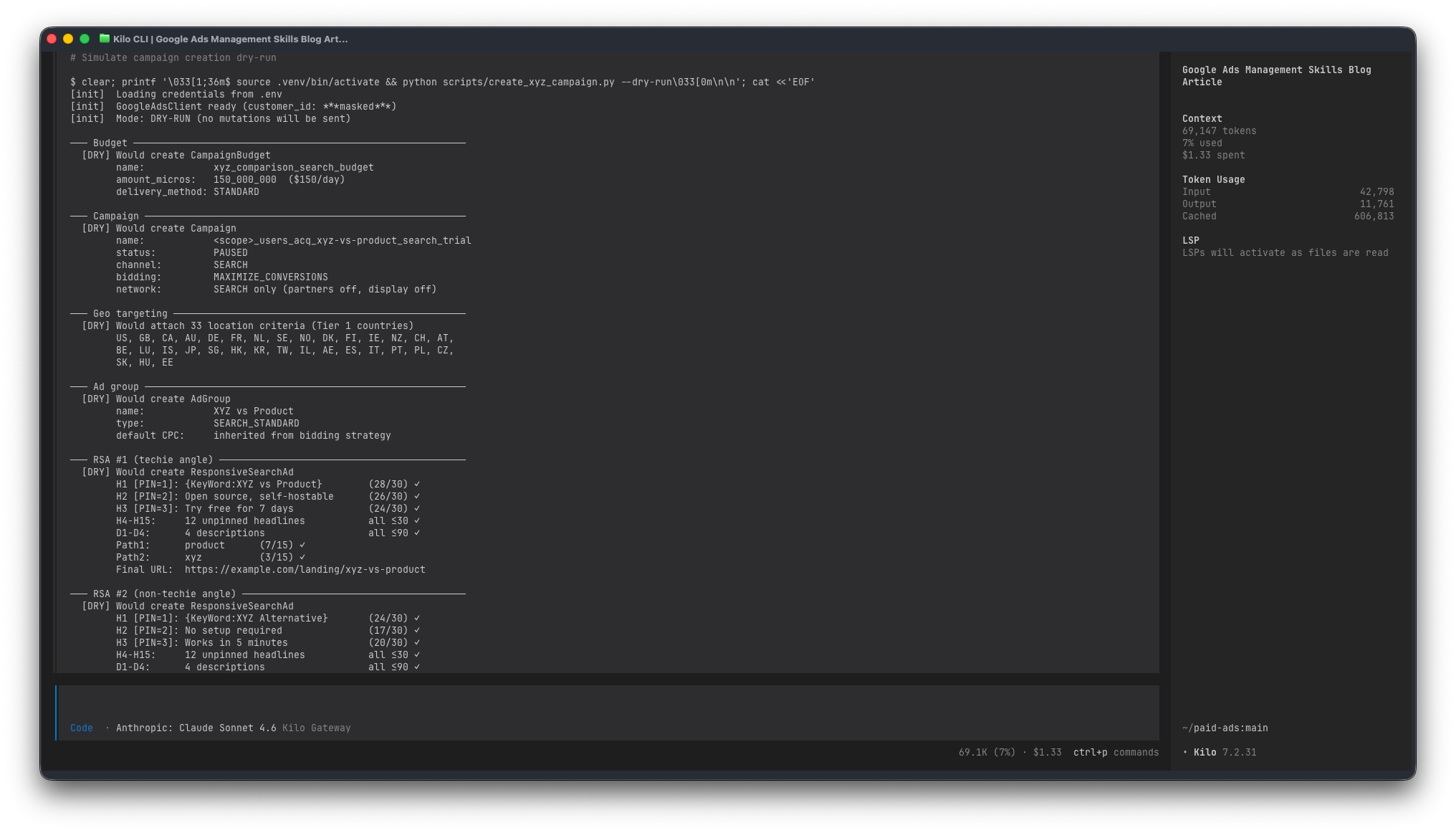
I read through it, push back on maybe one headline, run --execute, check the UI, enable manually. The same campaign in the Google Ads Editor is maybe an hour of clicking – not hard, just slow, and every field is a chance to paste the wrong URL or forget a pin. The agent does the same work in a few minutes and the output is consistent.
The other example worth showing is the tracking template audit. Campaigns drift – I renamed one, the utm_campaign param in the tracking template now points to a dead name, and the analytics dashboard is quietly attributing spend to a campaign that was renamed six months ago (I prefer to use actual names instead of IDs). The kind of thing nobody wants to audit by hand because it means opening every single campaign in the UI and comparing two strings.
One script walks the whole account:
$ python scripts/fix_tracking_templates.py --dry-run

[init]  Found 31 campaigns (24 Search, 4 PMax, 3 Display)

─── Search campaigns ────────────────────────────────
  brand_search_ww                           OK
  competitors_search_core            ⚠ FIX utm_campaign mismatch
                                            was:  competitors_search_create-instance
                                            want: competitors_search_core
  personas_search_core               ⚠ FIX param order
  category_search_apac               ⚠ FIX {keyword} unsupported in Search
                                            use {_keyword} instead
  ... (21 more)

  Search: 7 need fixes, 17 already OK

─── Performance Max campaigns ───────────────────────
  pmax_core       ⚠ FIX final_url_suffix – utm_campaign stale
                  ⚠ FIX tracking_url_template must be {lpurl} not ""
                    (API rejects empty string: STRING_TOO_SHORT)
  pmax_global     ⚠ FIX utm_content references old asset group name
  pmax_br             OK

─── Summary ─────────────────────────────────────────
  9 fixes, 22 already OK → 9 mutations
That “tracking_url_template must be {lpurl}, not empty string” line is a real API quirk – clearing the field with an empty string returns STRING_TOO_SHORT, which is not obvious from the docs. Once a session figures it out, the fix goes into the skill, and the next session never hits the same wall. These little footguns are the whole reason skills compound over time.
2. pmax-sqr-audit – turning the Performance Max search terms report into an action plan
PMax is a bit of a black box unless you pull the search terms export and actually read it. Which nobody wants to do, because it’s a 3,000-row CSV with two decorative header rows that break most parsers.
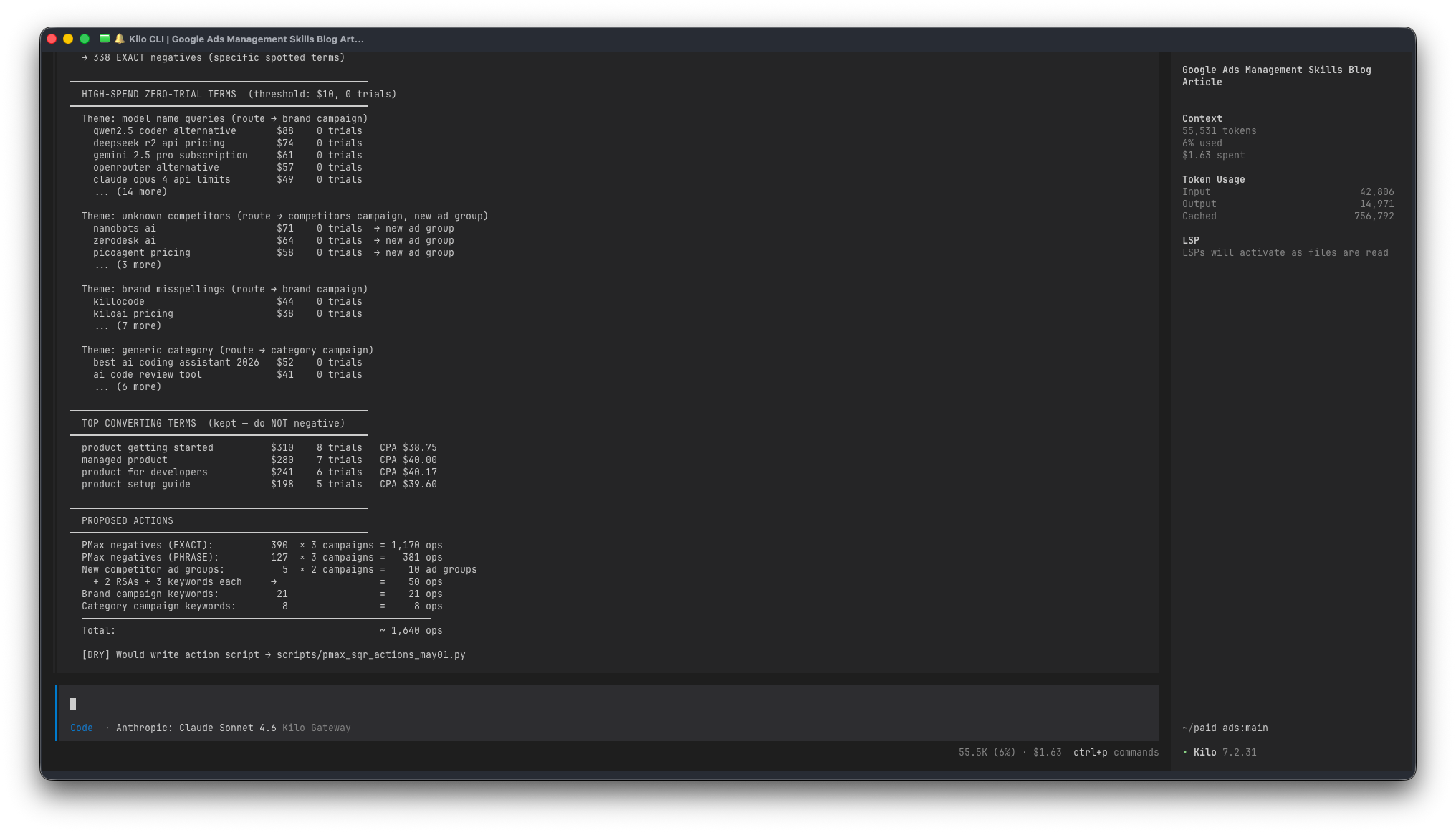
This skill codifies the whole workflow. Parse the CSVs, cross-reference against live Search keywords to find cannibalisation, bucket irrelevant terms into categories (video, gaming, trading bots, resume builders, wrong products…), theme the high-spend zero-trial terms (model-name queries, unknown competitors, brand misspellings), and decide where each thing goes:
Brand misspellings → brand campaign, and negative in PMax
Unknown competitors → new ad group in the competitors campaign, and negative in PMax
Category-generic stuff → category campaign, and negative in PMax
Irrelevant → just a PMax negative, no routing
There’s one invariant I’ve written in bold caps in the skill: every keyword added to a Search campaign also becomes a PMax EXACT negative. Otherwise PMax will keep eating the targeted Search campaigns’ traffic at a higher CPC, and you pay twice for the same conversion.
Rough shape of the output when I run it on a recent export:
3. weekly-report – the Monday sync, mostly automated
Every Monday the paid team does a sync where we look at last week’s numbers. Cost by topic, CPA vs last week, daily trend, top personas, the monetisation funnel. Pulling all of that out of the Google Ads UI, exporting it to a spreadsheet, and reformatting it into the team’s template is the kind of task that’s not hard but also not fun – and easy to mess up a column here or there.
The report script produces everything that’s just data, and leaves the commentary to me. That split matters: I don’t trust any LLM to write the “why did this spike” paragraph from numbers alone. But the numbers themselves are a mechanical aggregation, and mechanical work is exactly what scripts are for.
The skill is mostly about the landmines. Stuff like:
Our trial KPI is a secondary conversion action, so it only appears in
metrics.all_conversions, notmetrics.conversions. Miss that and your CPA is off. In caps at the top of the skill.The monetisation section has to query all campaigns including non-core ones, because our general brand search campaign is weirdly the second-best revenue producer. If you filter too tight you miss where money actually comes from.
segments.conversion_action_namecan’t coexist withmetrics.cost_microsin the same GAQL query forsearch_term_view. Two queries, merge in Python.
Here’s an anonymised chunk of what the output looks like:
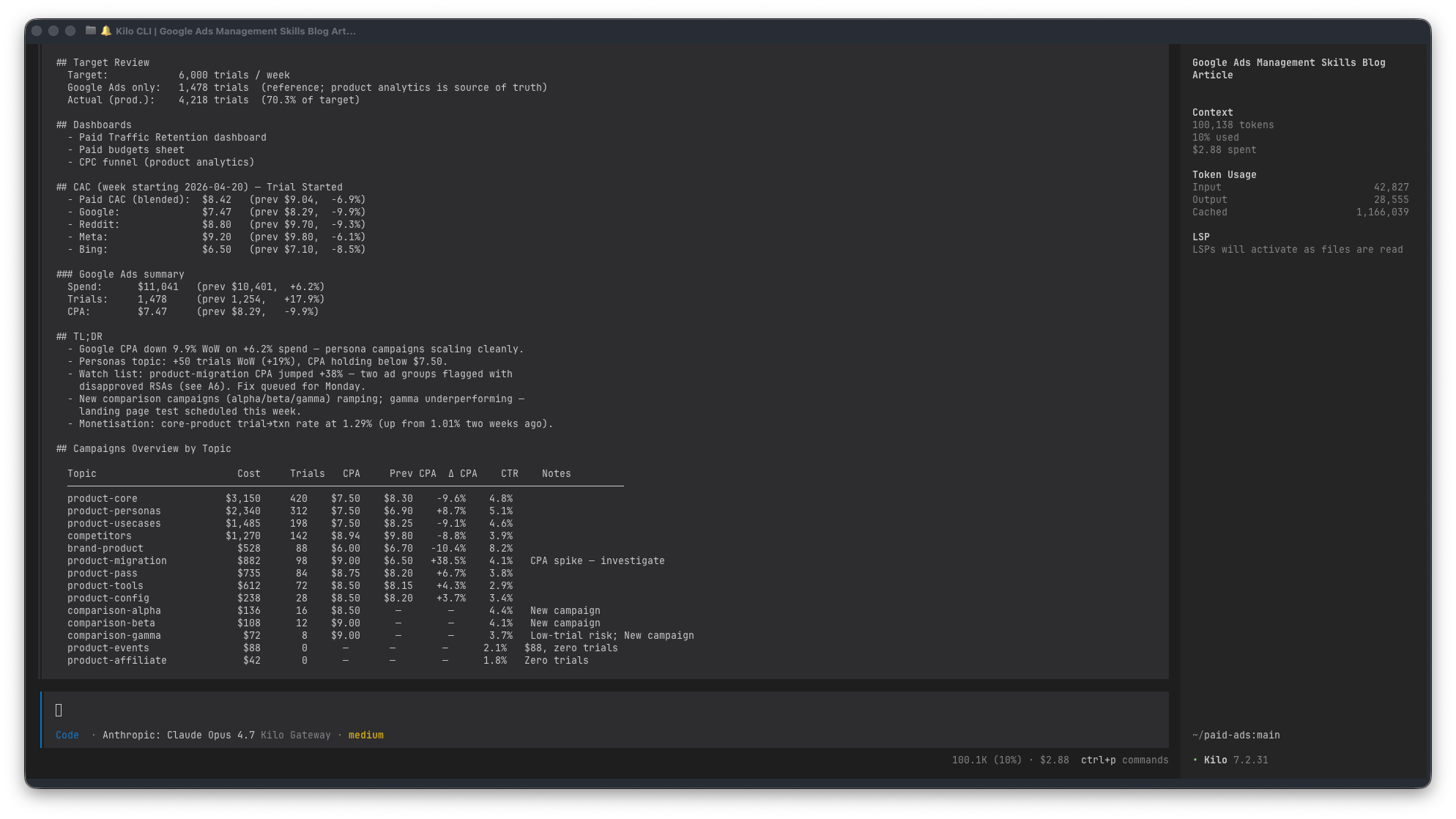
The Notes column is auto-generated from rules (”CPA spike”, “Zero trials”, “Budget-capped”, “New campaign”). Those are signals, not conclusions – my job on Monday morning is to pick the ones that matter and write the real story underneath.
What the script never writes, and I don’t let it write: the TL;DR, the monetisation commentary, and the “what we’re going to do about it” section. Numbers auto, judgement manual. Pretending otherwise is how you end up with confident-looking reports that miss the actual story.The Notes column is auto-generated from rules (”CPA spike”, “Zero trials”, “Budget-capped”, “New campaign”). Those are signals, not conclusions – my job on Monday morning is to pick the ones that matter and write the real story underneath.
What the script never writes, and I don’t let it write: the TL;DR, the monetisation commentary, and the “what we’re going to do about it” section. Numbers auto, judgement manual. Pretending otherwise is how you end up with confident-looking reports that miss the actual story.
The self-improvement engine
The rules file says: whenever the agent writes a new script, it must add an entry to the corresponding skill describing what the script does and which pattern it demonstrates. If it discovers a new API quirk, that goes in the skill too.
So the skills grow by themselves. Each session teaches the next session something new. The STRING_TOO_SHORT note on tracking_url_template, the secondary-conversion-metric caveat, the PMax channel performance – none of those were written by me up front. They were all discovered mid-task and then documented as part of the task.
The other automated piece is action logging. Every change lands in CHANGELOG.md as a one-liner with the why, not just the what. tasks/todo.md gets updated when work finishes or when follow-ups surface. campaigns.md regenerates from the live API before every git push so the remote always has the current campaign list. None of that is me remembering to do it; it’s all in the rules.
The result is that the repo is self-describing. What’s live, what’s paused, what’s planned, what has changed recently, why. Coming back after a week or two away doesn’t require any mental reconstruction – the state is on disk.
What actually changed
The time savings are real. But more wins are elsewhere:
Consistency. Every campaign gets the same naming, the same RSA structure, the same tracking template, the same geo split. No drift.
Reviewability. Dry-run output is a text diff. Five minutes of reading catches things a UI change would never surface.
Recall. API footguns and account-specific rules stay caught. Nobody has to remember “did we already fix that” because the skill remembers.
Cost. Cheaper models handle the bulk of execution. Opus-tier reasoning stays reserved for plans and strategy where it earns its keep.
Context. A new session catches up in about 30 seconds because the skills, the CHANGELOG, and the todo file describe the current state.
Total skill content is maybe 600 lines of markdown. It’s worth more than all the Python in the repo combined, because the markdown is what makes the Python safe to generate from a prompt in the first place.
If you want to build your own
A few notes for anyone thinking of going the same direction:
A skill is a reference document, not a prompt. Write it for a future session that has forgotten everything. The agent reads it the same way.
Encode the conventions you actually enforce. If half the scripts have dry-run defaults and half don’t, fix the scripts first, then document it.
Make the skill self-maintaining. Put “every new script MUST be added to the registry below” at the top, and the maintenance takes care of itself.
Safety rails go in the rules file. Never commit
.env, never skip dry-run, never touch budgets without asking, no--forcepush to main. Spell it out.Every API quirk you discover is worth a paragraph. That’s where the compounding happens.
Use cheaper models for execution. Save the expensive ones for planning.
The setup took a few hours – not a big investment for something that runs continuously.
We’ve come full circle. I mean we started interacting with computers just from a terminal, then we used GUIs, now we’re moving back to terminals, and I can't be happier.
Looks interesting - is any of the above open source? I am fighting with google ads for my local church and this might help us. Thanks