

Everyone’s excited about OpenClaw. The security implications are real. People are buying Mac minis to run it, giving an autonomous agent unfiltered access to their accounts, SSH keys, passwords — their whole life.
OpenClaw’s value does come from accessing your email, calendar, and messages. But I think you can get most of the value without handing over the keys to your life. Treat it like an intern.
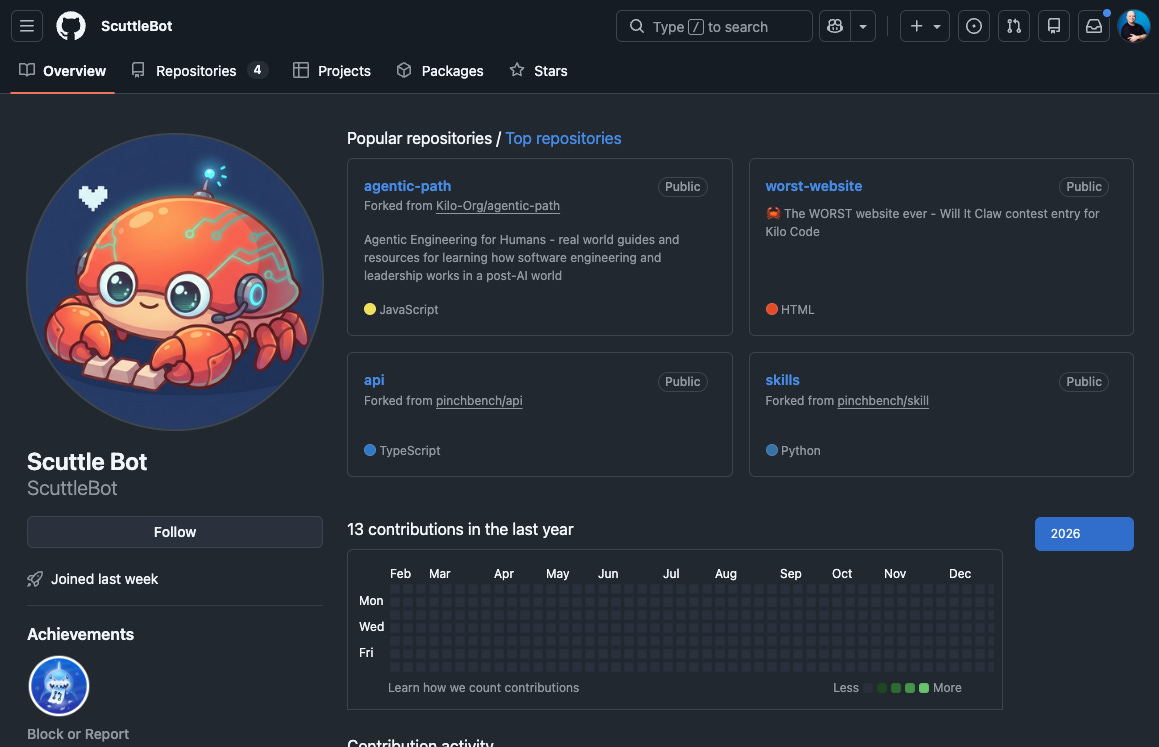
What I did: I gave OpenClaw its own accounts on GitLab and GitHub. It opens issues, comments on code, proposes changes, manages tasks. Every action traces back to its identity, not mine.
With Great Power Comes Great Responsibility
OpenClaw by default can access my email, calendars, messaging platforms, and other sensitive services. Wikipedia notes that misconfigured deployments expose API keys, chat logs, and system access to anyone who stumbles across them.
ZDNET called it “a security nightmare” with five red flags you shouldn’t ignore. ZDNET
Cisco called out “intentionally malicious skills being successfully executed” by OpenClaw. Cisco
CrowdStrike flagged prompt injection as a significant concern given OpenClaw’s potentially expansive access. CrowdStrike
The Hacker News reported a bug enabling one-click remote code execution. The Hacker News
SecurityWeek documented vulnerabilities that let attackers hijack the AI assistant. SecurityWeek
And Forbes captured the broader concern: “While OpenClaw enables significant power with agents that can do your bidding, it also opens significant security and privacy concerns.” Forbes
Tradeoffs for More Access
People give OpenClaw access to their accounts because that’s how you get value from it, then realize they’ve created a single point of compromise for their entire digital life.
OpenClaw’s specific vulnerabilities matter less than the structural problem: non-deterministic LLMs with standing access to everything you care about. I’ve seen some good think pieces written about exactly this tradeoff:
Product designer Tommaso Nervegna found a ~60% success rate on complex tasks. His blunt take: “you’ll be babysitting more than delegating.” His advice: don’t give it the keys to everything. Nervegna
The public conversation focuses on the wins — inbox cleanup, calendar management, rapid task execution. But what happens when an always-on agent has persistent access to your personal workflows gets far less attention. Prompt Security
The attack surface goes “far beyond the risks of a typical ChatGPT plugin.” These agents live on your machine with standing access to accounts you use for everything else in your life. Sentra
Maybe a better phrase for this phase of agents is “with great convenience comes great exposure”.
Why I Use It Anyway
The security concerns have changed how I use OpenClaw, not whether I use it. At first it was installed on my Mac Mini with my entire life...now it is on an isolated VPS with its own access controls.
The common pattern for personal AI agents is convenience: give the AI access to your accounts, let it read your email, send messages on your behalf, push code to your repos. It works. It also means every action traces back to you, every misconfiguration is your exposure, every security issue is your blast radius.
Instead, my OpenClaw agent operates under its own identity. It opens merge requests on GitLab and GitHub as ScuttleBot - https://github.com/scuttlebot and https://gitlab.com/scuttlebot. I review those before anything lands. It contributes — it doesn’t have god-mode access to my life.
The Intern Model
When you hire a junior developer or an intern, you don’t give them your laptop with admin rights and you certainly don’t just give them all of your accounts passwords right away. You:
Create their own accounts with scoped permissions
Require reviews before any major change
Pair them with senior folks who sanity-check their work
Build an audit trail of their contributions
Give them room to make mistakes that get caught before production
This works because it assumes junior developers will ship things that need fixing. The review process is protective. It catches errors before they compound.
OpenClaw deserves the same treatment — because without review, you won’t catch its mistakes until they’re in production. And “production” in this case could be “your personal relationships, finances, or digital life.”
What This Looks Like in Practice
ScuttleBot operates under its own accounts:
GitLab: Separate account with maintainer access to specific repositories
GitHub: Own identity for organization-level contributions
Telegram: Bot account for notifications and updates
Mission Control: Internal dashboard for tracking tasks and activity
The flow is simple:
The AI creates a feature branch
The AI commits changes and opens a merge request
CI runs: tests, linting, security scans
I review inline, leaving comments
The AI addresses feedback, resolves threads
I merge when satisfied
Most of the repos ScuttleBot contributes to aren’t even code - they are things like my blog/website at https://gitlab.com/brendan/boleary-dot-dev or our shared “openclaw” repo that has all of ScuttleBot’s workspace (skills, identity, etc.). That way we treat everything “as code” and there’s no ambiguity about whether I wrote the change or the AI did.
Personal AI, Personal Risk
Personal AI agents like OpenClaw represent a shift from cloud-based assistants to infrastructure you control. CNET captured the trade-off: “Because the software can access email accounts, calendars, messaging platforms, and other sensitive services, misconfigured or exposed instances present security and privacy risks.” CNET
Most people will end up using personal AI, but I’m not convinced everyone should go install OpenClaw today. And if you do, taking time to set it up carefully now saves you from cleaning up a big mess alter.
The Minimum Viable Process
This doesn’t require exotic tooling — it’s mostly configuration and discipline:
Create AI accounts in your identity provider (Google Workspace, Okta, etc.)
Configure SSO/SAML with appropriate group mappings
Set branch protection rules requiring review for AI-opened PRs/MRs
Use AI-specific accounts for automation, not personal credentials
Document the workflow so you know how AI contributions work
Treat It Like a Hire
OpenClaw is powerful but risky without the same level of oversight you’d give to any junior contributor to your team or life.
Give it its own accounts - not admin access to yours. Require reviews, build an audit trail, create space for it to make mistakes that get caught before they compound.
We’ve spent decades building structured processes for onboarding human developers and there’s no reason AI contributors shouldn’t go through the same process.
If you want to try OpenClaw in an isolated environment without having to spin up your own VPS or buy a Mac Mini - check out KiloClaw from Kilo. Hosted OpenClaw with the power of Kilo.
Related:
Really glad to see this article. I've been screaming about this thing in my Notes since it came out, once the security issues became clear.
Good job. You guys at Kilo Code continue to impress me with your logic and professionalism. I don't at the moment use Kilo Code, but when I'm ready to do vibe coding, I expect I'll be choosing it as my primary utility.
Not to mention that I don't trust Anthropic as far as I can throw Dario Amodei. :-)
This is actually useful. Make it's scope much narrower and it can even be better at the tasks we throw on it. Insightful post.