

Last week, I needed to find the code that handles “that thing where we retry failed API calls with exponential backoff.” I knew we had it somewhere. I’d seen it months ago but I couldn’t remember the function name, the file, or even which service it lived in.
grep wasn’t going to help me. Neither was VS Code’s search. I didn’t know the exact words—I just knew what the code did.
This is a problem that haunts every developer working in a large codebase. Enter: semantic code search.

15% - or over an hour!
Research suggests developers spend roughly 15% of their time on search and navigation tasks. That’s not 15% of their coding time—that’s 15% of their entire workday. For a team of ten engineers, that’s like paying one and a half full-time salaries just to find stuff.
The bigger your codebase gets, the more that percentage can grow. What starts as a minor annoyance in a small project becomes a genuine productivity tax at scale.
Traditional search tools treat code like plain text. They look for literal keyword matches. But code and the way we think about code rarely use the same vocabulary. A function named deserialize_JSON_obj_from_stream won’t show up when you search for “read JSON data”—even though that’s exactly what it does.
This disconnect between how developers think and how code is written is what researchers call the “semantic gap.” And bridging that gap is where things get interesting.
What Semantic Search Actually Does
Instead of matching text strings, semantic search converts your query and every piece of code into vectors—numerical representations that capture meaning. If your query and a code snippet have similar meanings, they’ll end up close together in this vector space, even if they share zero words in common.
So when I search for “retry failed API calls with exponential backoff,” the system doesn’t just look for those exact words. It attempts to understand the concept and finds code that implements that concept, regardless of whether the developer called it retryWithBackoff, exponentialRetry, resilientFetch, or something else entirely.
The results from academic research are pretty striking:
One semantic search system (DeepCS) returned relevant code as the first result at an average rank of 3.5, compared to 6.0 for traditional keyword search. That means developers see the right answer roughly twice as fast.
The same system found relevant code within the top 5 results for 76% of queries—a significant improvement over baseline methods.
Another approach (SemEnr) achieved 18-20% better accuracy than previous state-of-the-art models by enriching code embeddings with documentation from similar code.
In industrial deployments at companies like Samsung, semantic search outperformed traditional code search tools by about 41% in mean reciprocal rank.
When you’re searching for code dozens of times a day, the difference between finding what you need on the first result versus the sixth is the difference between staying in flow and losing your train of thought.
The Scale Problem (And Why It’s Solvable)
One concern I hear a lot: “Sure, semantic search is nice in theory, but can it actually handle our million-line monorepo?”
The honest answer is: yes, but it takes work.
Computing similarity between a query and millions of code vectors isn’t trivial. But modern approaches combine fast initial filtering with semantic ranking to get the best of both worlds.
Vector databases like Qdrant, Milvus, and others are specifically designed for this kind of high-dimensional similarity search at scale. They can handle millions (even billions) of vectors with millisecond-level lookup times.
The infrastructure challenge is real, but it’s a solved problem for organizations willing to invest in it.
Where AI Coding Agents Come In
Beyond helping human developers, semantic search has become essential infrastructure for AI coding assistants.
Without semantic search, an AI assistant working in a large codebase is essentially blind. It can only see what’s directly in front of it (the current file, maybe a few related files) - or use tools like grep to stumble around the codebase. With semantic search, it can find and reference code from anywhere in the project that’s relevant to your question.
Research shows that providing an LLM with the right retrieved code can improve success rates on code generation tasks by up to 20%. There also can be a cost here too: irrelevant code that superficially matches the query can actually hurt performance by about 15%. The quality of what gets retrieved directly determines the quality of what the AI produces.
An AI that can intelligently search your codebase is fundamentally more capable than one that can’t.
The Practical Tradeoffs
Semantic search transforms how you find code—but it’s not free.
The Real Costs
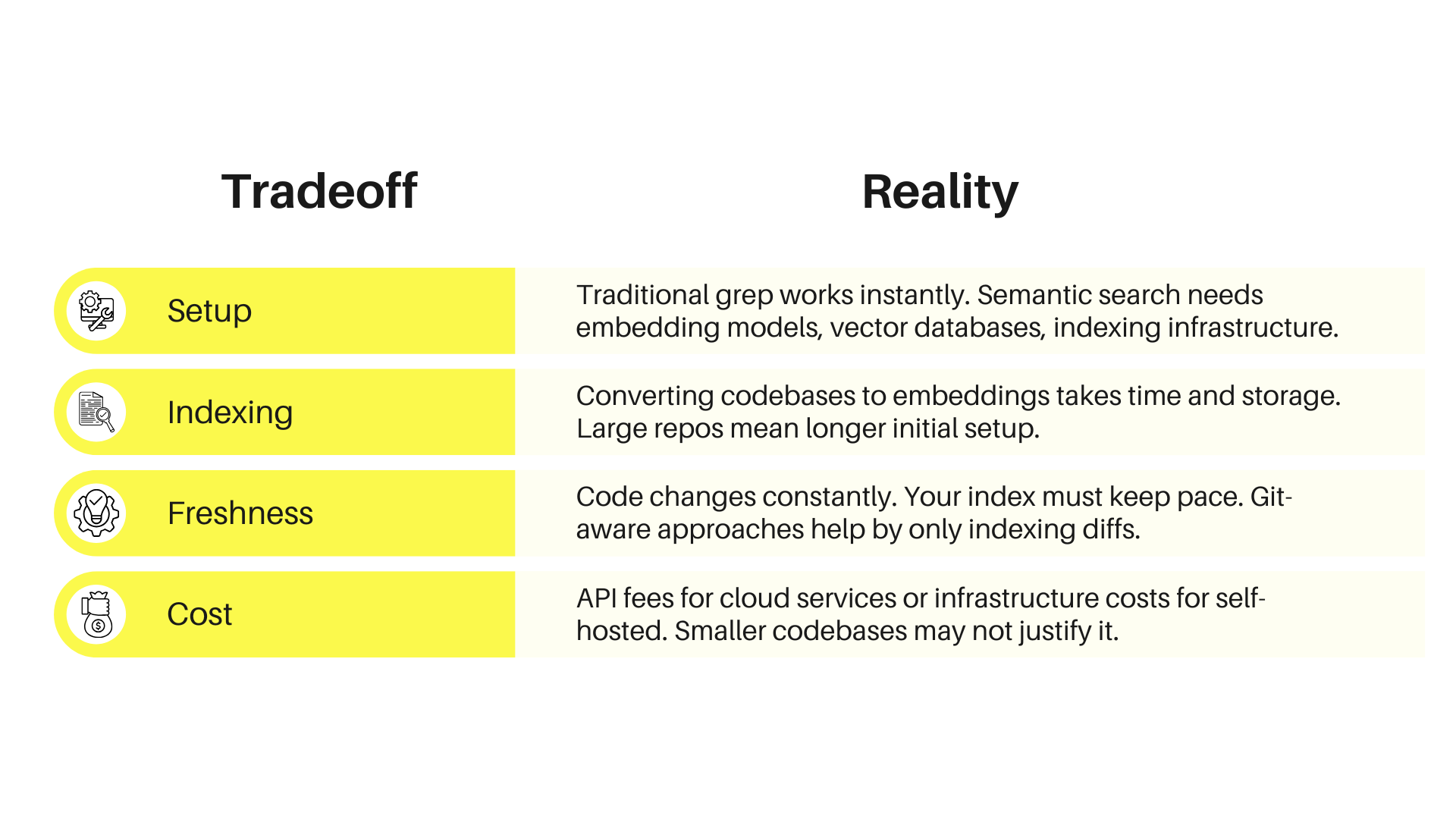
When text search wins: Exact matches—when you know the precise function name or error message—are faster and more predictable with traditional search.
When semantic search wins: You know what you want conceptually, but not specifically.
The Sweet Spot
Semantic search delivers the most value for:
Large codebases (tens of thousands of files+)
Teams with onboarding challenges
AI coding assistant workflows
Build vs. Buy
You could build it yourself:
Set up Qdrant or another vector database
Choose and configure an embedding model
Write the indexing pipeline
Handle incremental updates on file changes
Share indexes across your team
Keep everything in sync with Git branches
That’s weeks of work before you see any value (and then you’re maintaining it as models improve and edge cases emerge).
The Kilo Code approach: Managed Indexing handles all of this in the cloud.
What Makes It Different
Git-aware indexing: Indexes your base branch completely, then only indexes diffs for feature branches. Your index always reflects your actual working state.
Team sharing: Indexes are shared across all team members. One person’s work benefits everyone. No duplicate infrastructure.
Zero setup: Nothing to install. No Docker containers. No API keys. It works when you enable it.
Automatic cleanup: Unused indexes get garbage collected after 7 days, then re-index automatically when needed.
Why It Matters
Developers spend 15% of their time searching for code. That’s a real cost.
Semantic search won’t eliminate searching—but cutting that time significantly creates compounding productivity gains.
For teams using AI coding assistants, semantic search transforms them from general-purpose tools into something that actually knows your project.
Try it: Managed Indexing is free during beta. Worth testing if finding things in your codebase has become a real problem.