

Sometimes you know exactly what you need from a codebase, but not what it is called.
Maybe you are looking for the retry logic. Maybe you need to understand how customer identity gets validated across three services. Maybe you just opened a large repo and the first thing you need is not one file. It is a way to find the concepts that matter.
Exact search is still the right tool when you know the symbol, error string, import path, or config key. But a lot of engineering work starts one step before that. You know the shape of the thing. You know the behavior. You do not know the vocabulary this repo uses yet.
That is why codebase indexing is back in Kilo Code.
After the rebuilt v7 extension shipped, we heard the feedback clearly: a lot of you wanted indexing back. With a major implementation from community contributor shssoichiro, review and updates from the Kilo team, and continued feedback from issue filers, Discord testers, and prerelease users, codebase indexing is now available as a standard Kilo feature.
As of today, codebase indexing is generally available in the latest version of Kilo Code, graduating from the experimental. However, it is opt in - you decide when to enable it - see “Enabling Codebase Indexing” below or stay tuned for an in-depth how-to guide coming out this weekend!
What changed
Codebase indexing gives the Kilo agent a semantic_search tool. Instead of running multiple greps to locate relevant code, the agent can search the indexed project by meaning.
In a large codebase, grep-based discovery is expensive. The agent has to guess terms, run searches, read results, guess again, and burn context on each iteration. Semantic search lets the agent describe what it is looking for conceptually and get back relevant files and line ranges in one call.
For example: a marketplace app uses customer in UI code, kunde in a German integration, person in a CRM schema, and user in auth. With grep, the agent would need to discover each term separately—four searches minimum, plus reading results and deciding what is related. With semantic search, a single query like “customer identity validation” can surface all of those areas because the index understands the conceptual relationship, not just the text.
Grep is still better when the agent knows the exact target: a symbol name, an error string, a file path. Semantic search is better when the agent knows the concept but not the vocabulary—and skipping the multi-grep discovery loop saves tokens and context window for the actual work.
Indexing is another retrieval tool. It is useful when the problem is conceptual, cross-cutting, or spread across a large codebase.
Community brought this back
The core implementation landed in PR #6966, opened by shssoichiro (ExpedientFalcon on our Discord).
This was a large port and rebuild. It brought indexing into the new Kilo architecture as a kilo-indexing package, preserved the Tree-sitter-based chunking approach, rewrote the file watcher for the new extension and CLI world, and exposed the agent-facing tool as semantic_search.
That work went through weeks of review, improvements, and stabilization to the new v7 world before it merged. After that, more feedback came in around configuration, project-level behavior, tool descriptions, and indexing status. Those reports mattered: the feature is better because users kept trying it in real repos and telling us where it was awkward.
Then PR #10668 removed the old experimental.semantic_indexing gate. The reason was simple: indexing already has explicit global and project-level enablement. In addition, we were finally convinced that it works well enough to release back to the wider community for continued engagement and feedback.
So the feature is no longer experimental, but it is not automatic either.
Enabling Codebase Indexing
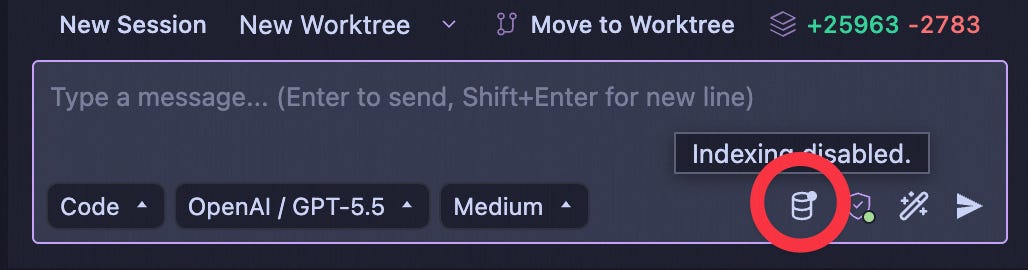
Codebase indexing starts only after you enable it globally or for a project.
That distinction matters. Configuring an embedding provider does not start indexing by itself. Kilo will not begin indexing a repo just because an API key exists in your config. This is because it requires an embedding storage engine and free embedding models are not readily available (though if you BYOK there are some!)
You can enable indexing from:
Kilo Code Settings → Indexing
The indexing indicator in the prompt input panel
The CLI /indexing command
The indexing section in kilo.jsonc
A typical setup looks like this:
{
“indexing”: {
“enabled”: true,
“provider”: “ollama”,
“vectorStore”: “lancedb”
}
}
Use this as a shape, not a required config. The settings UI is usually the easiest path because it helps you choose the provider, vector store, search threshold, batch size, retry behavior, and max results without hand-editing config.
How to get started with indexing
Indexing needs two pieces:
an embedding provider to turn code chunks into vectors
a vector store to save and search those vectors
The fastest path is to open Kilo Code Settings, go to Indexing, enable indexing for the project, and choose the LanceDB vector store.
If you already have Kilo tokens, use the the default Kilo provider and model.. That gives you a hosted embedding path without setting up a local model or managing another provider key.
If you do not have Kilo tokens, use Mistral BYOK for free. Bring your own Mistral key, save the settings, and let Kilo build the index for that project.
Kilo also supports other direct providers and vector stores. We will cover the full list in the how-to guide coming soon! For this launch, the main thing to know is simpler: pick the recommended path that matches your setup, enable indexing for the repo, and wait for the index status to move to “Complete.”
How Kilo builds the index
Kilo parses code with Tree-sitter and identifies semantic blocks such as functions, classes, and methods. Markdown has a dedicated parser, and unsupported file types fall back to line-based chunking.
Kilo also filters out files that should not be indexed, including binary files, images, large files over 1MB, .git, dependency folders such as node_modules and vendor, and files ignored by .gitignore or .kilocodeignore.
Once an index exists, Kilo keeps it updated incrementally. Changed files are re-indexed. Unchanged content is skipped with hash-based caching. Git branch changes are handled so the index can track the project you are actually working in.
You can inspect status in the UI. Indexing states include Standby, In Progress, Complete, Error, and Disabled.
When to use semantic search
Use semantic search when exact search would turn into a guessing game.
Good examples:
“Where do we validate customer identity?”
“How does this repo handle retries?”
“Find code related to account cancellation.”
“Where are we doing permission checks before destructive actions?”
“Show me similar implementations before I refactor this path.”
These are not exact-string questions. They are orientation questions. They are common in large repos, unfamiliar projects, docs-heavy codebases, and systems with domain language that evolved.
Use grep, file reads, and import-following when you know the target precisely.
Good examples:
AuthService
ERR_INVALID_PROVIDER
indexing.enabled
packages/kilo-indexing
from “@kilo/indexing”
The best agentic workflow uses both. Start broad when you do not know the vocabulary. Narrow down once you have names, files, and call paths. Then read the code before changing it.
Try it in a repo where search has been frustrating
The easiest way to evaluate indexing is not with a toy repo - in fact it will probably perform better in larger repos rather than experimental/small ones. Try it in a project where you have felt the pain: a large codebase, a plugin-heavy app, a docs-heavy repo, or a domain model with names that are not obvious from the outside.
Enable indexing for that project, choose your provider and vector store, wait for the index to complete, and ask Kilo a conceptual search question. Then compare the results with the grep terms you would have tried manually.
If semantic search gives you a better starting point, keep it on for that repo. If exact search is enough, leave it off. Kilo supports both paths.
Thank you
Codebase indexing came back because the community asked for it, built large parts of it, tested it, and kept pushing on the details.
Thank you to shssoichiro for the main implementation work, and to everyone who filed issues, opened PRs, tested prereleases, reported awkward behavior, and kept the discussion honest about where semantic search helps and where it does not.
That is the version of indexing we want in Kilo Code: practical, opt-in, local-friendly, and honest about its tradeoffs.
Codebase indexing is available now in Kilo Code. Try it on a repo where you know what you are looking for, but not what it is called.
Is this coming to the CLI or just the VS Code plugin ?
I wonder if it would be valuable, to have each task session, auto summarize, and then have the semantic and index search cull from the summaries, rather than the entire session.