

Auto Efficient is a new tier in Kilo’s Auto Model lineup, and it’s a fundamentally smarter way to route. Instead of locking you into a single model or asking you to switch manually as the work shifts, it classifies each session in real time and routes it dynamically to the benchmark-proven best model for that task.
Routine work runs on something lean, harder tasks get more firepower, and the router keeps adjusting as your session evolves. You get the right model at every point in your workflow, automatically, with costs that reflect the actual complexity of the work rather than a fixed tier across the board. It’s live now, and you select it right in the model picker.
How it works
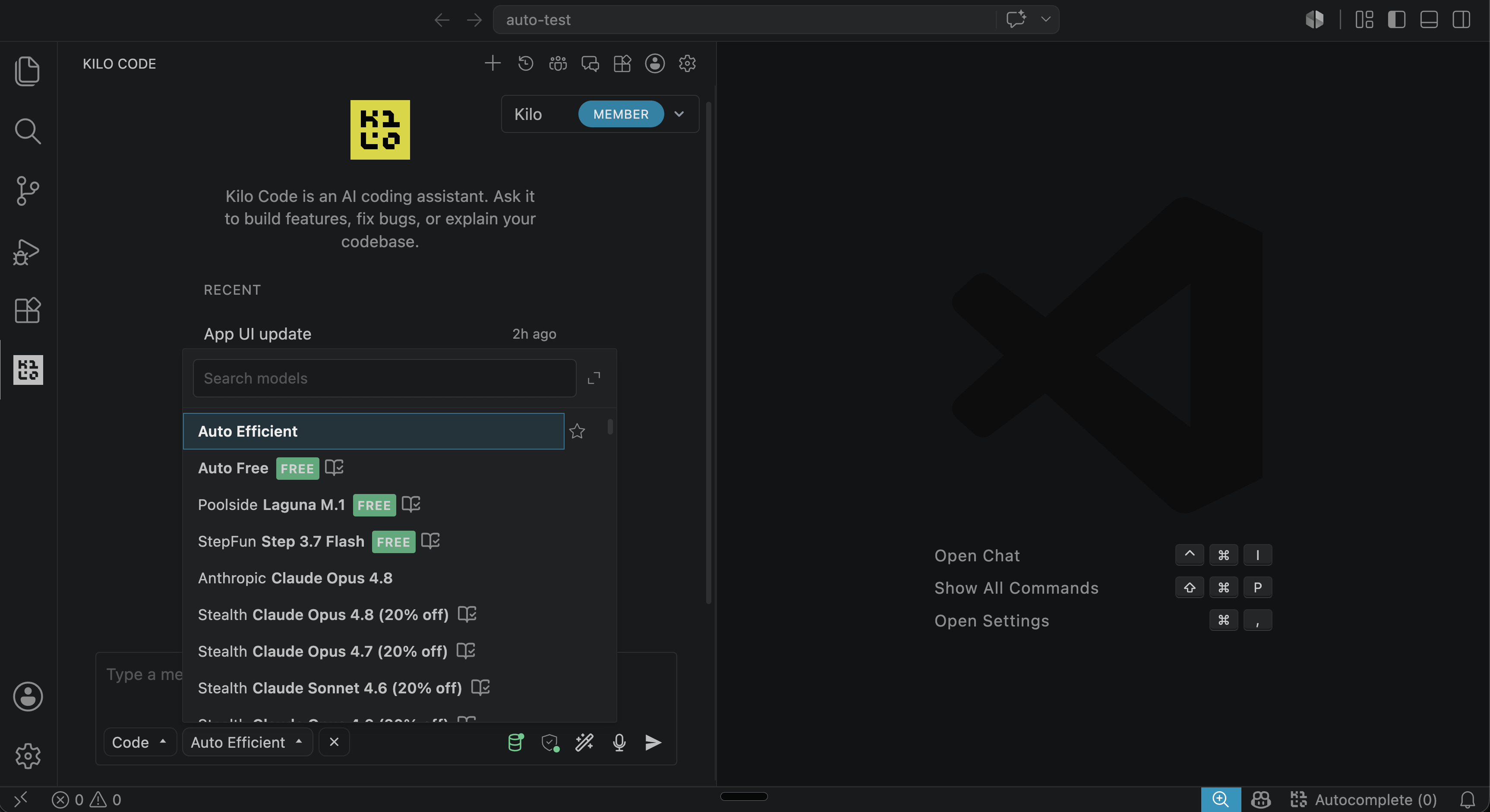
Auto Efficient runs on a short loop. A lightweight classifier reads your session in context and works out what kind of task you’re on and how hard it is. Kilo matches that to the cheapest model proven accurate enough for the work, drawn from a pool of candidates that we’ve selected based on benchmark performance. Then it routes the request, with no mode change or manual switch on your end.
The decision happens between your keystrokes. When you ask for a quick rename, it quietly runs something fast and cheap. Ask it to plan a tricky migration, and it reaches for a stronger model, all under the same Auto Efficient setting.
Based on real benchmarks
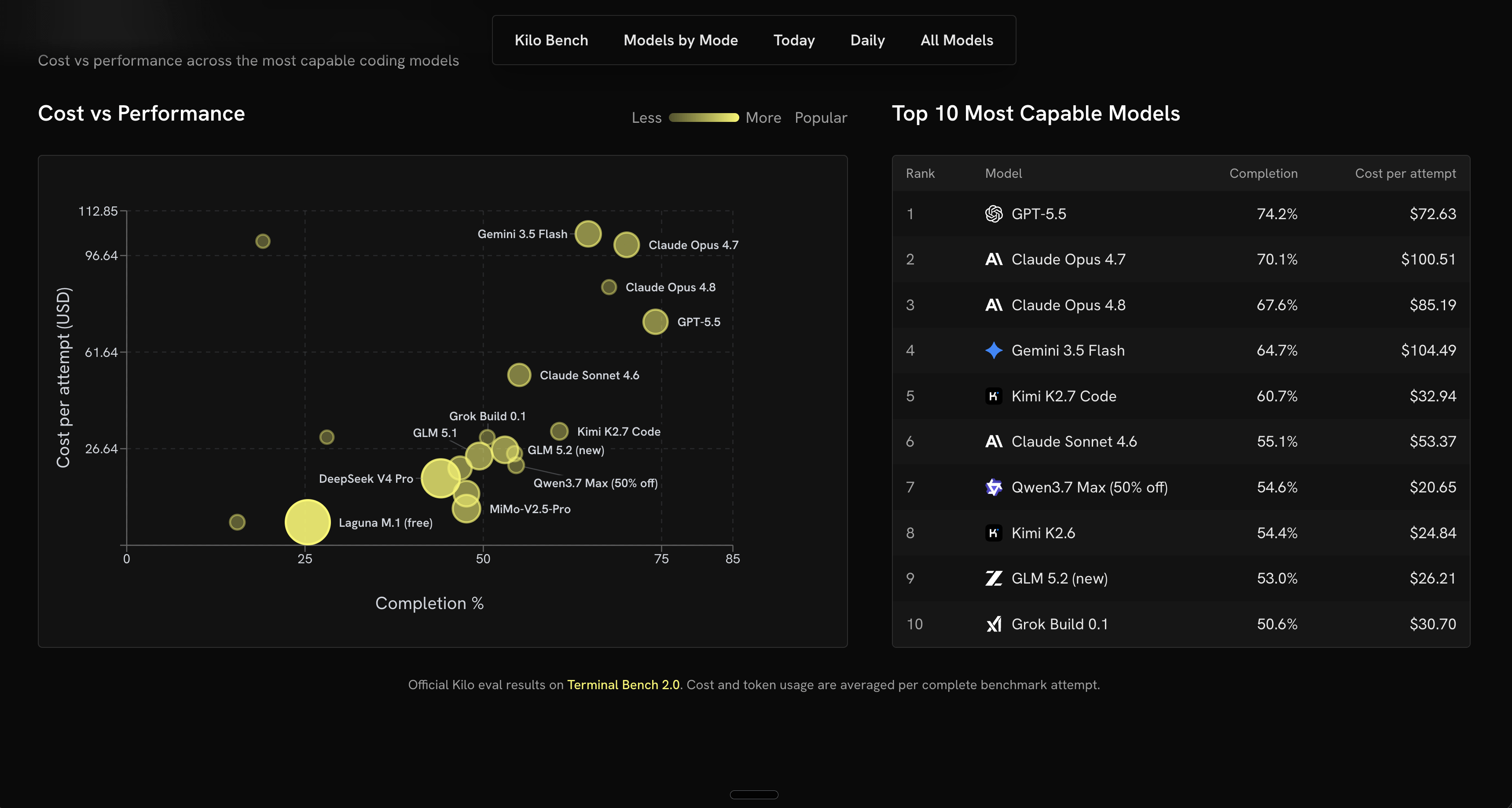
Auto Efficient doesn’t route on a model’s reputation or a vendor’s marketing copy. It routes on KiloBench, the coding benchmark we run continuously against the models in our catalog, and KiloBench is built from the kind of work developers do in Kilo every day. So when Auto Efficient hands a task to a cheaper model, it’s because that model has already shown it can do that class of work just as well as a pricier one. The savings come from cutting spend you didn’t need, not from cutting corners.
The routing isn’t a black box
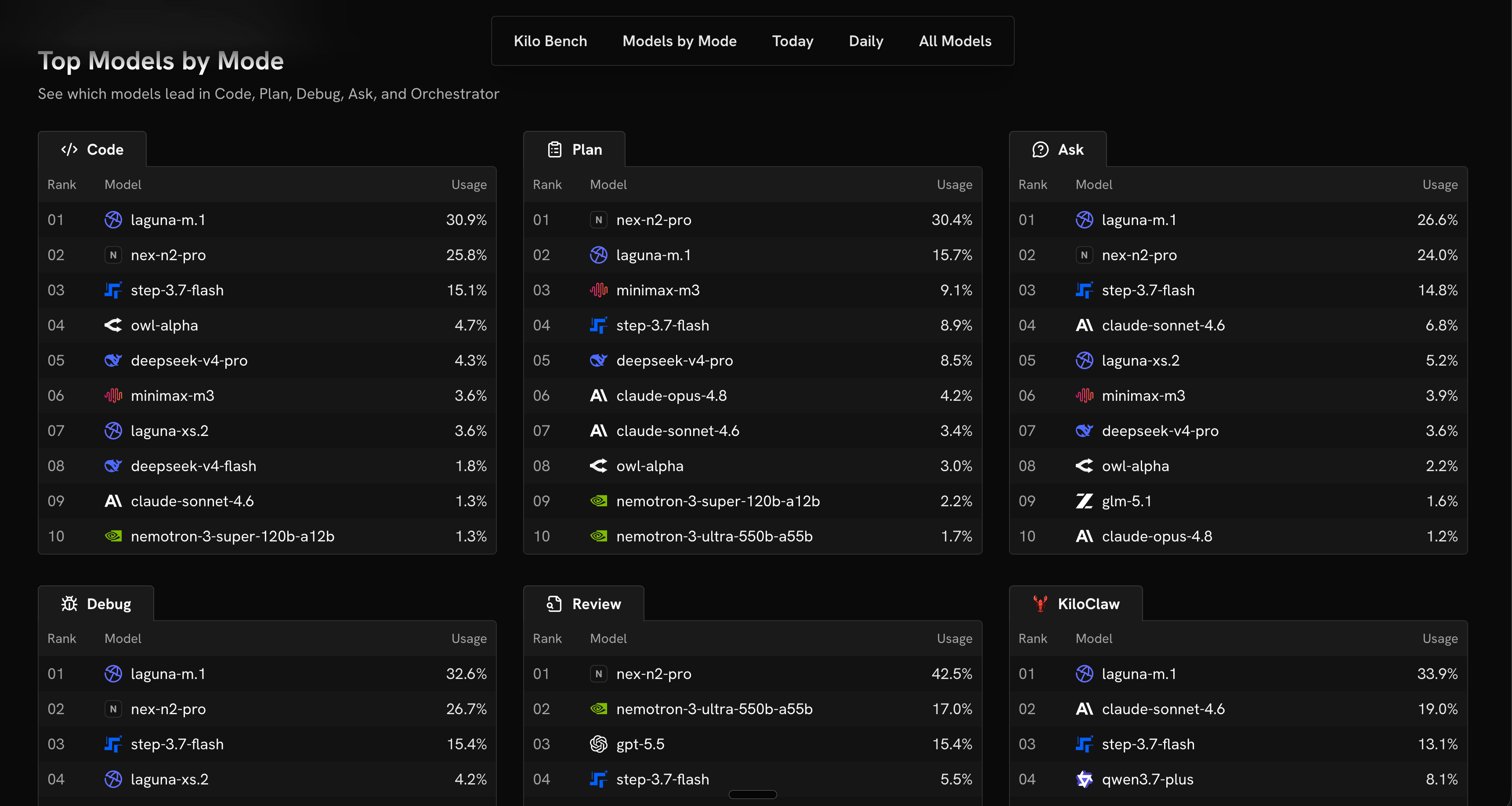
The model rankings and benchmarked performance Auto Efficient routes on are public, sitting on the Kilo Leaderboard for anyone to read. It comes from real-world model usage across developer workflows and the coding benchmarks we run, which is the same signal the router acts on.
So Auto Efficient isn’t asking you to trust a number you can’t see. If you’d rather route by hand, you can: open the Leaderboard, find the cheapest model that holds up on the kind of work you’re doing, and pick it yourself. Auto Efficient just runs that lookup for you, continuously, on every request. The convenience is automatic, and the data underneath it is open.
Session Awareness
Per-request routing has an obvious failure mode: a router that swaps models every turn loses the thread, contradicts itself, and feels erratic. Auto Efficient is session-aware precisely to avoid that. Once it’s on a model that’s working for the thread you’re in, it stays there across related turns and only switches when a cheaper option is clearly the better call. You get the cost benefit of fine-grained routing without the whiplash of a model that changes its mind mid-conversation.
Also, routing calls aren’t always clear-cut, and Auto Efficient doesn’t gamble when they aren’t. If it can’t confidently match a request to a model, it falls back to the Balanced tier, which routes to a capable paid model. That gives you a hard floor: quality under Auto Efficient never drops below Balanced, whatever the classifier sees. Easy tasks get cheaper, and the hard ones keep the reliability you depend on.
Tune it toward the bill or the bar
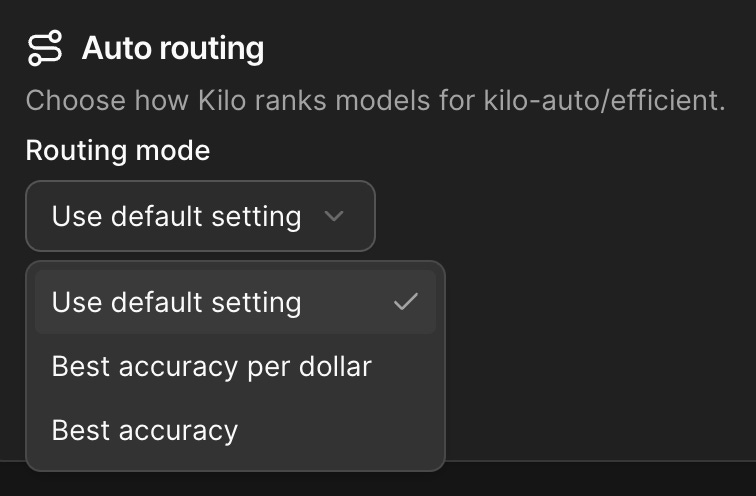
Auto Efficient gives you a dial with two settings. One picks the cheapest model that clears the accuracy bar for the work, squeezing the most value out of every dollar. The other leans toward the strongest proven model in the pool, optimizing for accuracy first. You can set it in the Kilo dashboard based on whether a given project cares more about the bill or the bar, then let it run.
You’re still in charge
Auto Efficient is a smarter default, and it stays optional. It sits alongside the other Auto Model tiers - Frontier for maximum capability, Balanced for capable paid routing without frontier prices, and Free for no-cost models - and you can move between them whenever the work calls for it.
You can also step out of routing entirely at any point: pick a specific model by hand, bring your own provider key, or run a local model through Ollama or LM Studio. The router is there when you want it out of your way and gone the moment you don’t.
Turn it on
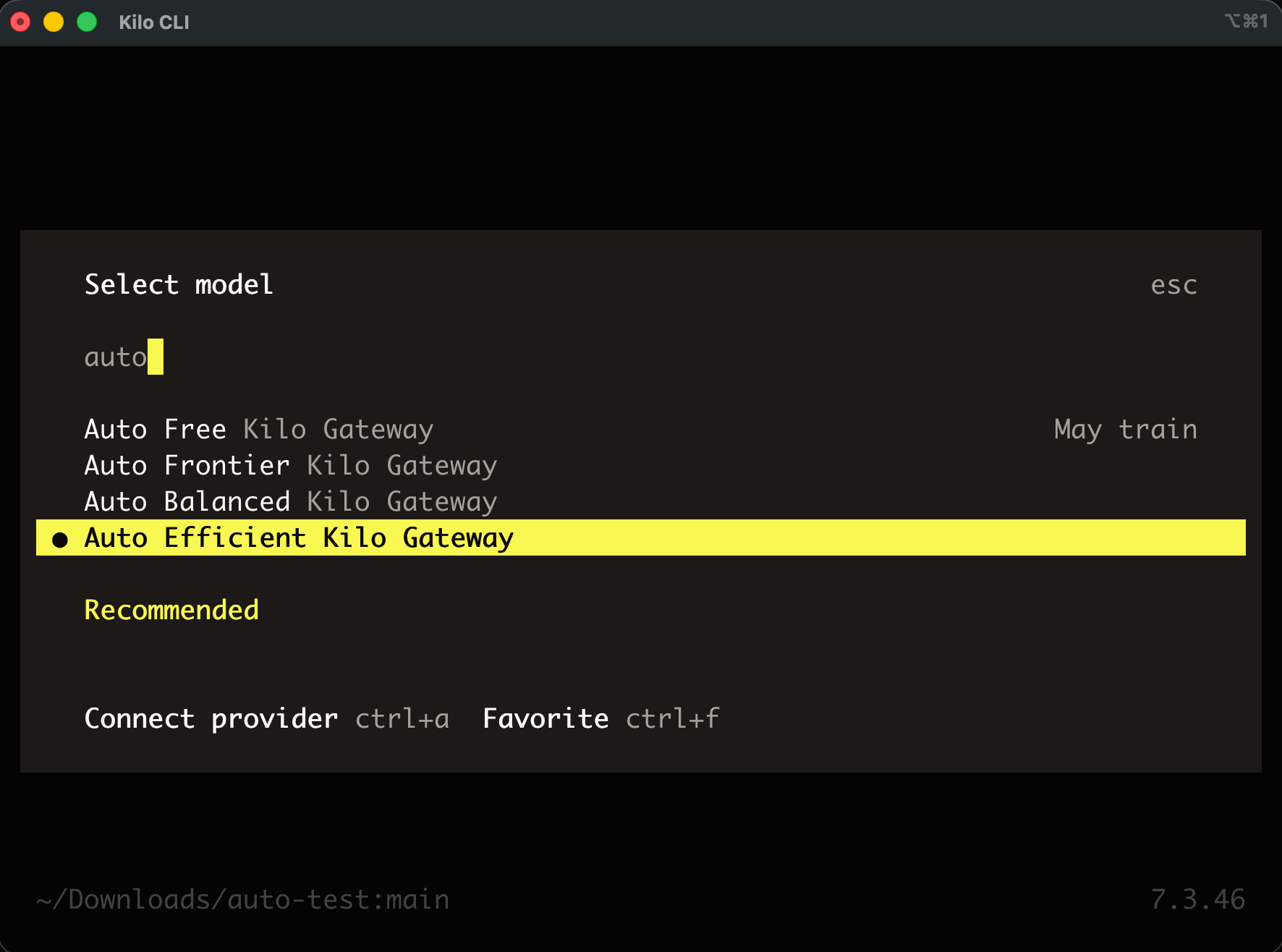
Open the model picker in Kilo and select Auto Efficient. One thing to check first: automatic mode-based switching needs the VS Code or JetBrains extension on v5.2.3 or newer, or the CLI on v1.0.15 or newer. On older versions the tier falls back to a single model for every request, so update if you’re behind.
See it in full at kilo.ai/auto-model, read the docs, and once you’ve run it for a while, tell us what you think!
Matching the model to the task is the biggest lever on your AI bill, and Auto Efficient now pulls it for you on every request, backed by benchmarks instead of guesswork. Turn it on, set the dial, and stop overpaying for the easy stuff.
This is so cool. Working really well in practice so far!
What a great concept and product! Kilo is always moving forward. 👍