

Coding at the speed of thought just got a massive upgrade. Today, we’re thrilled to introduce Next-Edit in Kilo, powered by the Mercury Edit 2 model from Inception. Next-Edit is like a co-editor that predicts what should be coming next based on your recent snippets, file context, and edit history.
To celebrate this leap forward, we are making Next-Edit completely free for everyone for the next month. No trials to activate and no credit cards to enter—anytime you use Next-Edit powered by Inception over the next 30 days, it’s completely on us via the Kilo Gateway.
What Exactly is “Next-Edit”?
Traditional autocomplete predicts the next few tokens or lines ahead of your cursor. It’s like an eager typewriter guessing your next word.
Next-Edit is fundamentally different. Instead of just looking forward, it acts like an elite co-editor sitting right next to you. Often referred to as Next Edit Suggestions or NES, Next-Edit is a way to work faster and smarter. By analyzing your recent edits and broader codebase context, Next-Edit anticipates what you’re about to change next across your file—whether that’s refactoring a function you just touched, renaming a variable across a block, or implementing a cascading feature change.
Because Mercury Edit 2 is built on a cutting-edge diffusion LLM (dLLM) architecture, it doesn’t generate code left-to-right, one token at a time. Instead, it refines text in parallel and you just hit Tab to accept. This “jump to edit” feature takes some getting used to, but once you start coding with it, we hope you will love the feeling of being in the flow.
Autocomplete has been a popular feature in Kilo, and it’s not going anywhere. We’re just expanding the functionality to include Next-Edit.
Backed by Breakthrough Benchmarks
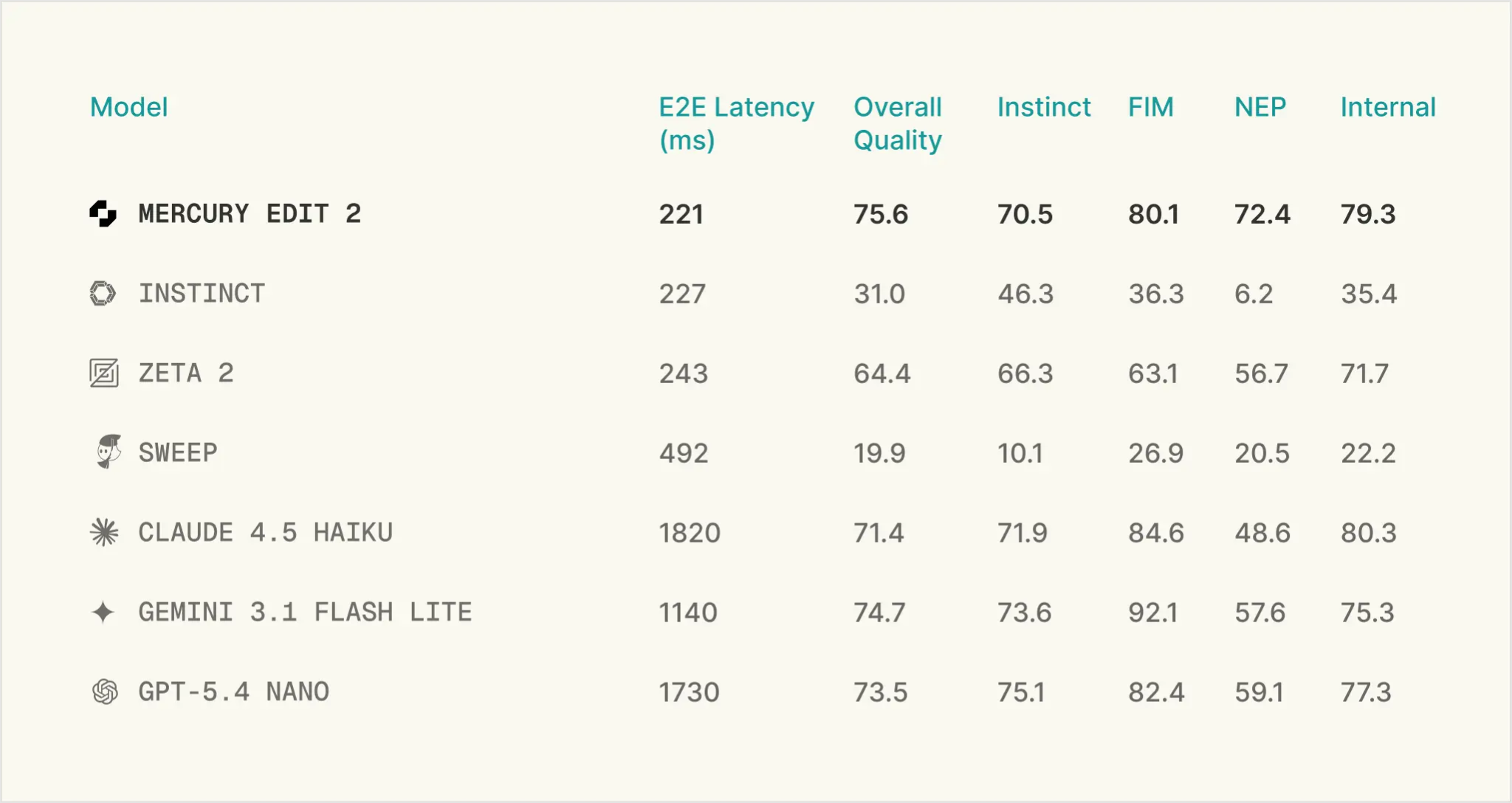
We didn’t just pick Mercury Edit 2 because it sounds futuristic; its performance metrics are genuinely staggering. Inception put this model through a rigorous set of industry benchmarks—including Instinct, Fill-in-the-Middle (FIM), and Next-Edit Prediction (NEP)—and the data speaks for itself:
48% Higher Acceptance: Thanks to alignment via an advanced reinforcement learning method (KTO) based on real human feedback, developers accept Mercury Edit 2’s edits 48% more often than previous iterations.
27% More Selective: Nobody likes a noisy AI that constantly derails your train of thought. Mercury Edit 2 is 27% more selective, meaning it only interrupts when it has a high-quality, targeted edit, keeping distractions to an absolute minimum.
Unmatched Quality & Speed: In side-by-side latency testing against custom next-edit frameworks and speed-optimized frontier models, Mercury Edit 2 consistently takes the crown for real-time responsiveness.
Two Flavors of Mercury Edit 2 Now in Kilo
We know every developer has their own rhythm. To give you total control over your workflow, you will now find two separate versions of Mercury Edit 2 inside Kilo:
Next-Edit Mode (The New Default): The powerhouse editor that actively anticipates your next logical code modification.
General Autocomplete Mode: The ultra-fast, classic line-and-token filler for standard, sequential coding sessions.
Heads Up: Next-Edit is now the default experience for all new Kilo users. If you had previously set a default for autocomplete, you will need to manually change to Next-Edit. We highly recommend giving it a spin to experience the parallel diffusion difference for yourself.
How to Customize Your Setup
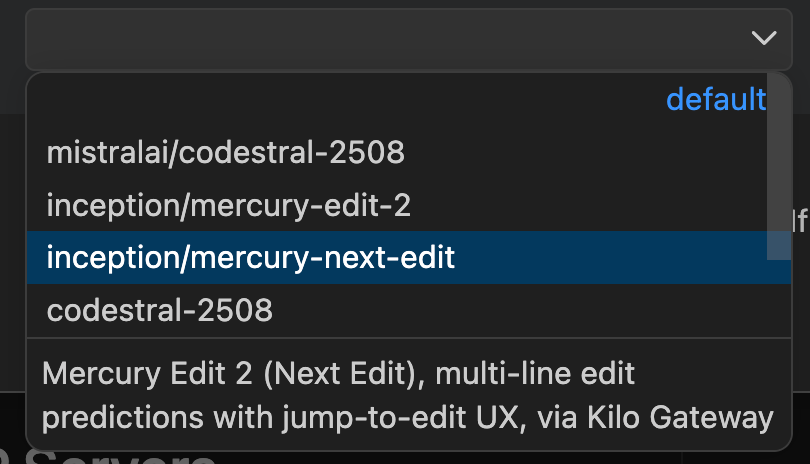
While we think Next-Edit will change how you code forever, Kilo is built entirely around developer choice. If you ever want to change the model back to autocomplete-only, doing so takes just a few clicks. You can seamlessly modify your Next-Edit and autocomplete settings right from your workspace:
Open Kilo in VS Code.
Locate and click the Gear Icon (Settings) inside Kilo’s VS Code extension sidebar.
Under Settings > Extensions > Kilo Code, toggle your preferences or switch between Next-Edit and classic Autocomplete to suit your current project’s needs.
Enjoy Free Next-Edit Functionality
There is nothing extra to install, no individual trial to start, and no complex configuration required. Just fire up Kilo anytime over the next month and you’ll automatically have access to next-generation, diffusion-powered predictions entirely for free, as long as you are using the Kilo Gateway (this is the default).
When the promotion ends, on July 23rd, 2026, you can continue using Mercury Edit 2 at affordable market rates.
Happy editing!