

The last two migrations of this size took Pedro Heyerdahl more than six months each. This one took 12 business days from plan approval to finish, and most of the work was done by agents running against runbooks and harnesses he’d already built.
Pedro runs data at Kilo. Before Kilo, he ran two migrations for another company: moving orchestration off an existing system into Airflow, which was mostly code translation, and moving the transformation layer into dbt. Both together took over six months. Asked what this migration would have cost him without agents, he put it at six months, and called that the optimistic number.
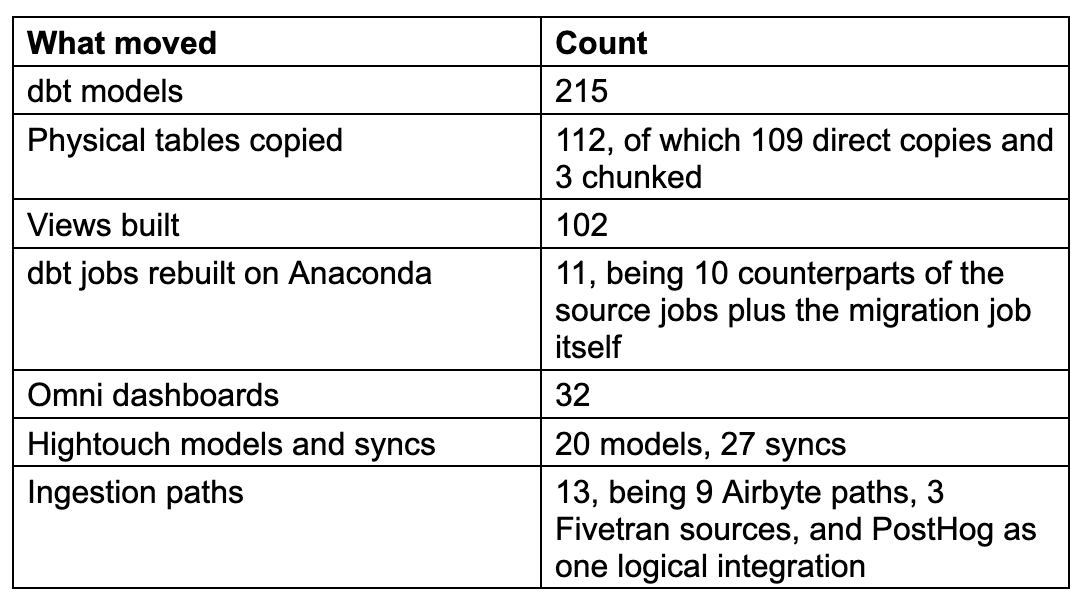
After Anaconda acquired Kilo, the entire Kilo data platform had to land inside Anaconda’s: the connections bringing data in, the code processing it, the syncs sending it back to business tools, and every business intelligence dashboard. The challenge was coordinating dependencies, rebuilding permissions and integrations, keeping everything running during the move, and validating that the new environment produced the same results.
The first 48 hours went into the plan document
The goal of the plan was to cut the number of unknown unknowns before execution started. Every step of the plan, all downstream dependencies that needed to be updated, every secret that had to be rotated or created fresh the data validation scripts, and the migration scripts all existed on paper before leadership ever saw the document for approval.
What the document contained:
A summary of the target state
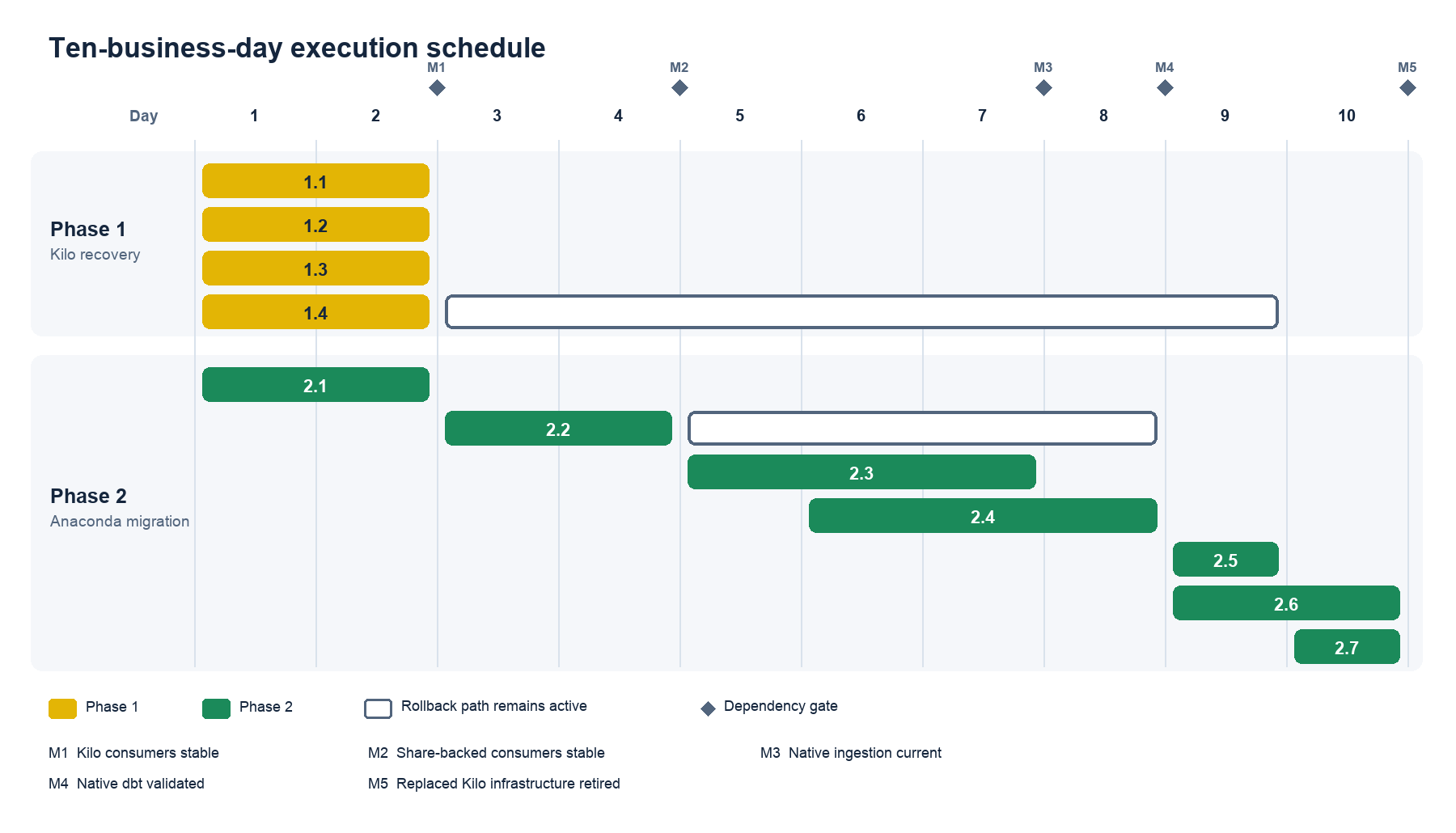
Gantt charts mapping which step depended on which
Two execution phases, with detailed execution steps, validation checks, and rollback procedures for each item
The exact objects to create in each system, and the grants to apply to them
A contract for every table being moved, with anything holding sensitive data flagged
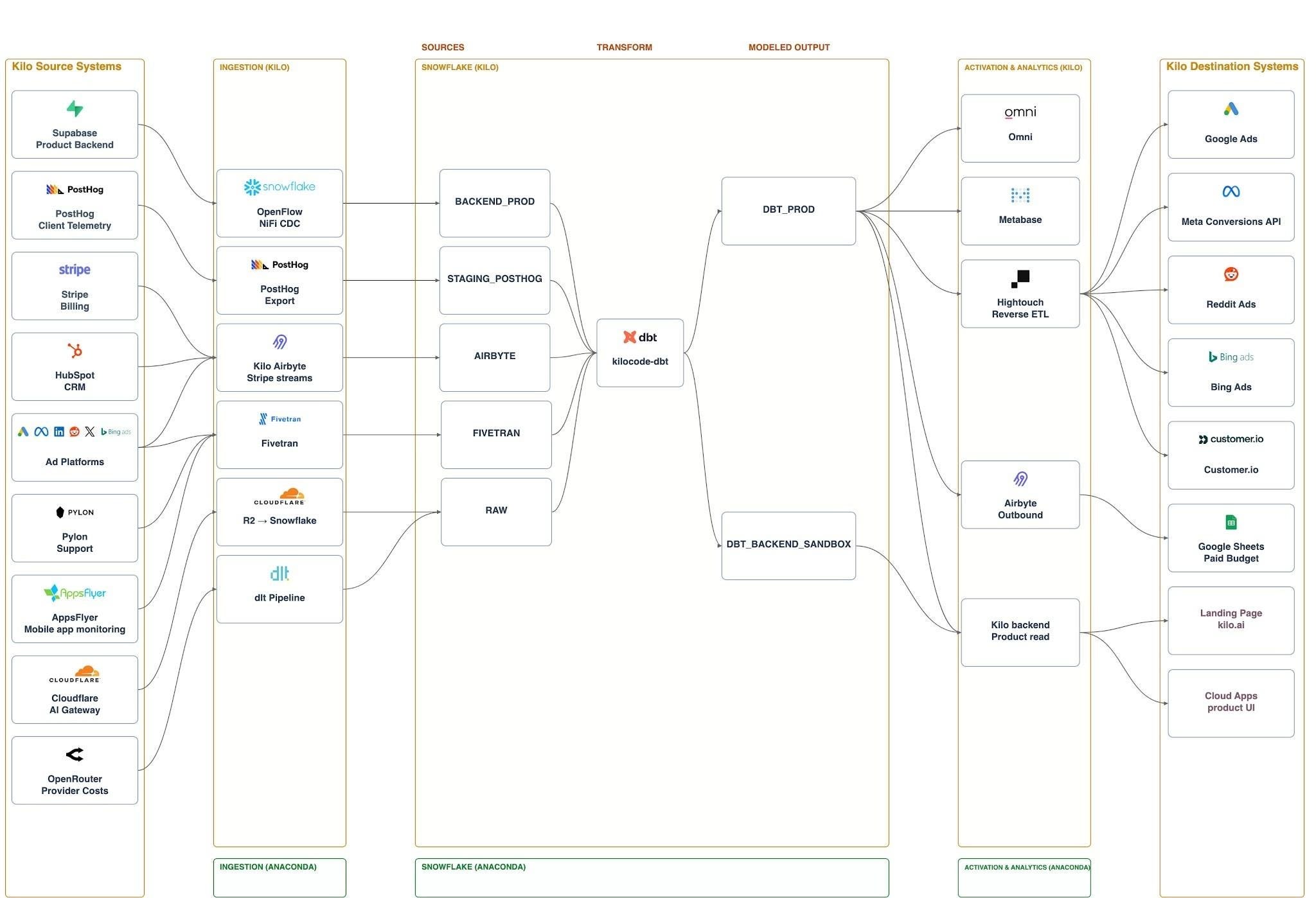
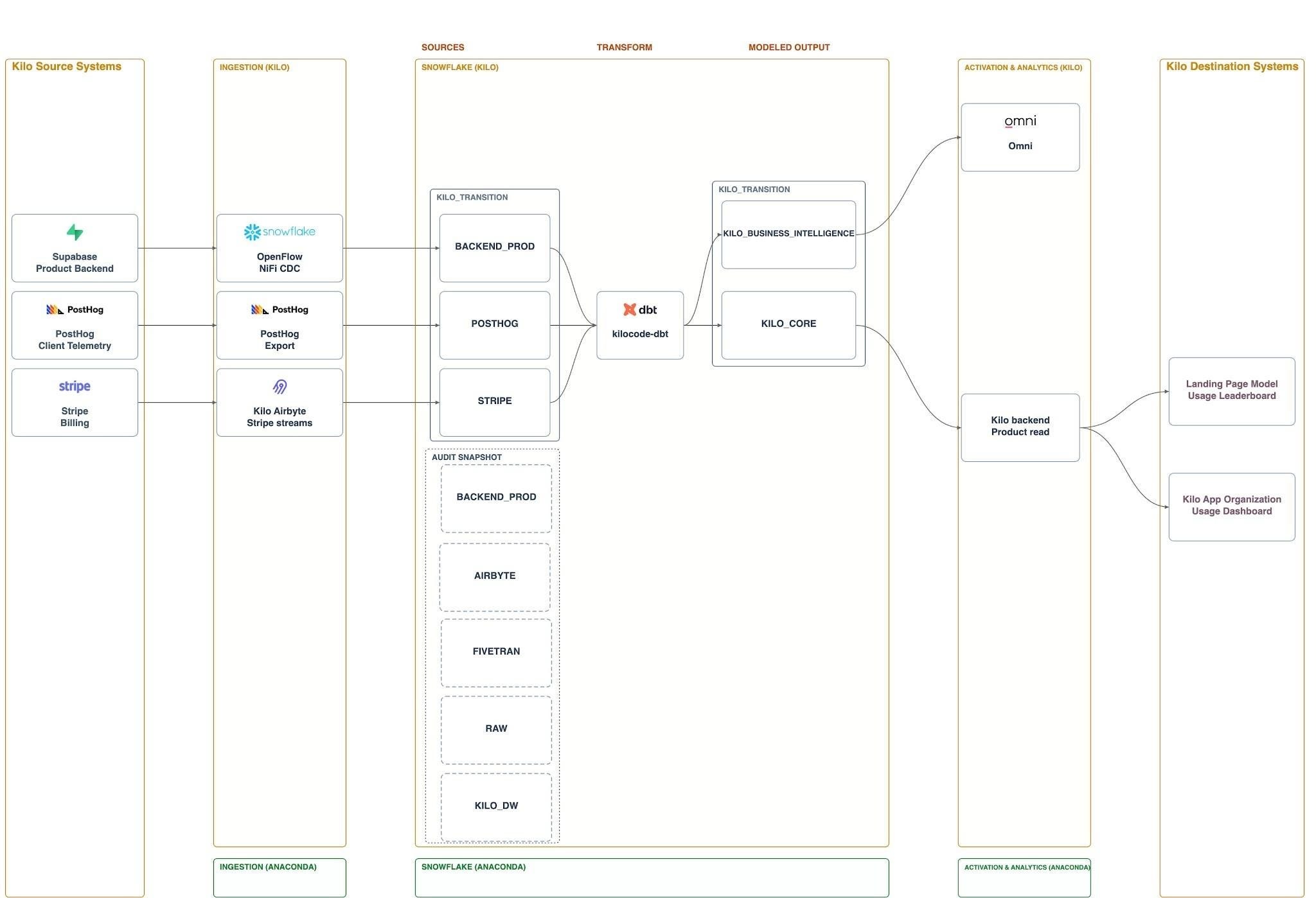
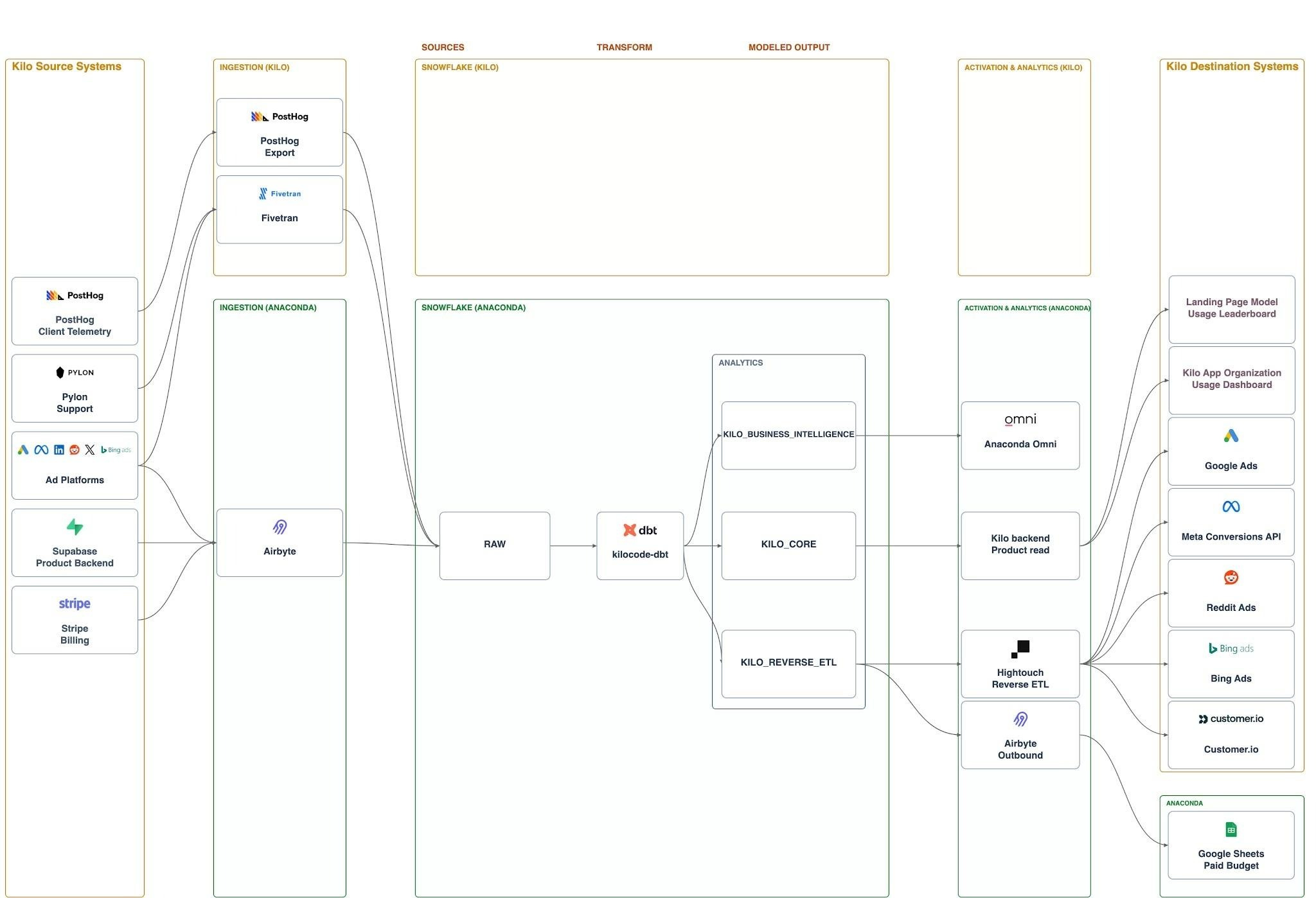
Architecture diagrams for each state of the migration
Pedro pointed Kilo at the existing platform documentation and connected systems, had it draft the plan with minimal prompting, then revised the result. Total time in the document: roughly 48 hours.
The architecture diagrams were agent-drawn
The four states diagrams are Excalidraw: the before state, phase 1, a bridge phase, and the final form. Pedro didn’t touch the drawings. He told the agent what was wrong and what had to be fixed, and it redrew them.
They did two jobs at once. They got leadership and the Anaconda data engineering team aligned quickly, and they gave the executing agent a picture of where data was supposed to end up.
Where the agent’s context came from
Pedro wrote a description of the Kilo data platform: the full stack, what each tool was used for, the main data marts, and the core transformation logic. That document became the starting context.
For planning, he connected the agent to that knowledge base and to the Atlassian MCP, pointed it at the description, then had it query the databases directly so it had detail the document didn’t carry. From there the question was how each system could be rebuilt on the Anaconda side.
Design, then tickets, then runbooks
Progress lived in a migration tracking sheet. As Pedro worked through a task, he’d ask the agent to write the ticket for it from the plan and add the ticket link back into the sheet, so three layers stayed connected: high-level design, detailed design, and a ticket per executable task. The Jira tickets split the execution along the same lines as the plan, with separate tickets for the jobs, for the tables and views, and for the historical backfill.
Anything that would repeat across sessions got a runbook. Migrating an Omni dashboard is the clearest example. Pedro would do it once with the agent, have the agent write down the exact steps, and replay that file afterwards. When something went wrong, he’d correct the runbook on the spot, so a lesson from one session became a constraint in every session after it instead of dying with the context window.
That’s also what made the validation defensible. The runbooks specify how the agent performs the migration and how it proves the result matches.
The payoff arrived late in the project. With runbooks in place, a single instruction to migrate every Omni dashboard returned all of them in one day.
Making those runbooks executable took more than written steps. The agent needed tools that could perform each action, enough context to choose the right environment, and checks that would stop it when it crossed a boundary.
A custom MCP for the dashboards
The dashboard procedure required the agent to recreate dashboards in the destination, preserving their layout and behavior. Omni’s existing MCP could read dashboards but couldn’t write them.
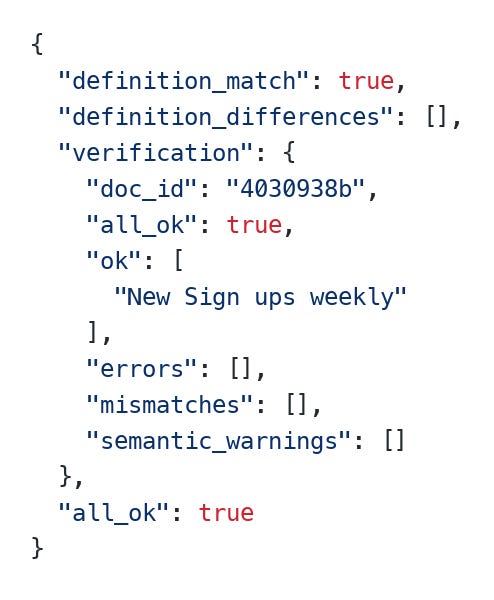
Pedro already had a custom write MCP from an earlier move off Metabase. For this migration, he extended it to move dashboards between Omni environments while preserving their formatting and layout and updating references to the underlying data. The tool required a fresh export from the live source, rejected stale or modified snapshots, and checked the imported dashboard’s structure and ran its queries. That gave the agent specific failures to fix and a way to verify its work beyond a successful API response.
A representative call, on September 3, moved the New Signups by Channel and Week dashboard into the transition stage: the definition came back matching with no differences, and every query verification passed. Writing it into Pedro’s personal folder failed, and the authorized fallback placement in the Marketing folder succeeded.
On the code side, the dbt MCP did the equivalent work.
Keeping the agent in the right environment
Executing the runbooks also required the agent to choose the right tool and environment at each step. A question might require inspecting the running system rather than changing code, and a migration step might require reading from the source or acting on the destination.
Pedro encoded that guidance in a custom Kilo mode he called Migration Analyst. During the migration, both Kilo’s and Anaconda’s warehouses were live behind near-identical MCPs. The mode encodes which one is the source and which is the destination, and when to query each. It also carries the validation procedure: after switching on a new ingestion, confirm the backfill completed, then check that the dbt models produce the same metrics on both sides. It knows when to reach for the knowledge base too, though this project didn’t need that often.
Deterministic harnesses did what instructions couldn’t
The agent had access to four versions of the same system at different stages of the migration: the live original in Kilo’s Snowflake, a copy Pedro created, that copy exposed in Anaconda, and the final prod version in Anaconda. Choosing the right target depended on which step it was executing, while the targets themselves differed only by database name and account. Given how similar they were, the agent mixed them up.
Instructions didn’t fix it. Pedro put the rule in AGENTS.md and it still targeted the wrong database from time to time, so he wrote a harness that checks the database against the environment and hard-fails when they don’t match. The failure mode matters: instead of the agent reasoning its way to “I should change the database”, it stops and reports that it’s blocked.
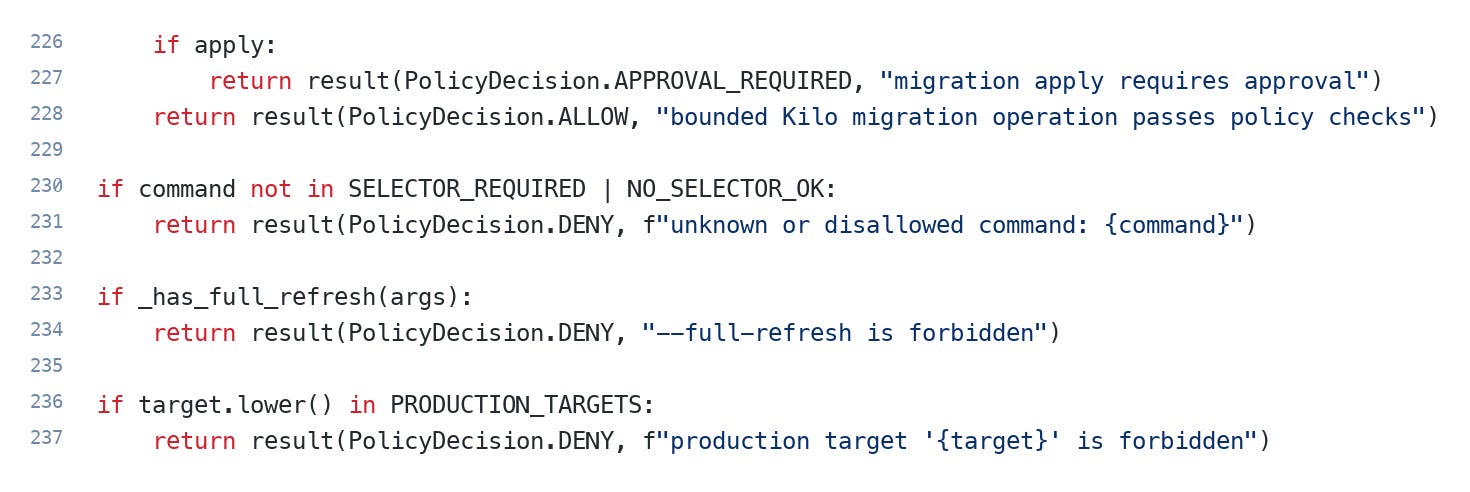
The one he leans on most is dbt safe, a wrapper around the dbt CLI. The agent runs dbt safe run <model> instead of dbt run <model>, and the policy behind the wrapper refuses --full-refresh outright, refuses any command pointed at a production target, rejects commands it doesn’t recognise, and holds a migration apply until it gets approval. He wrote it after an agent full-refreshed a dev table with 7 billion rows in it, and after another overwrote a table he was working on. He wanted the CLI reachable as a fallback for when the MCP breaks, since the MCP holds his credentials, without leaving the destructive commands reachable with it.
Around those sit a script the agent runs when submitting a PR, which enforces that the description says what Pedro wants it to say, and a CI job that fails and sends the agent back to fix its own work. In many cases he also requires the agent to write a unit test, so that a later agent that has forgotten the constraint hits a failing test instead of shipping a silent regression.
This is the direction his setup has been moving for a while: away from AGENTS.md as the primary control, toward script-based harnesses and tests the agent has to pass before it’s allowed to call a task done. Long autonomous loops work better when there’s something deterministic to fail against. Most of these harnesses predate the migration, built during his regular work at Kilo and reused here.
The ClickOps went to a browser agent
Some steps in the runbooks required configuration through web interfaces that the available APIs didn’t cover. A browser agent made those steps executable too. This was the first time browser navigation genuinely worked for Pedro: hand the agent a runbook, let it drive the UI, and stay out of it.
The Hightouch migration ran entirely that way. He also built a custom Hightouch MCP, but used it mostly for reading syncs, spotting failures, and getting fix suggestions rather than for the move itself.
Rebuilding the ad platform ingestion connections was the other case. Meta and Bing Ads each have their own token flow, and Pedro doesn’t work in those platforms day to day, so the agent went and found where to generate each new token and what the steps were.
What broke at cutover
The migration scripts ran through dbt and were tested in dev first. In prod, the dbt jobs failed.
The first cause was database targeting. A job would point at the wrong database, or build a malformed database name, because the macro constructing that name behaved differently between dev and prod. The fix loop was mechanical: the agent opened the failing job, read the Snowflake error message, traced it back into dbt, fixed it, and reran. Because the SQL scripts were written to be re-runnable, a failed step cost a rerun rather than a rebuild.
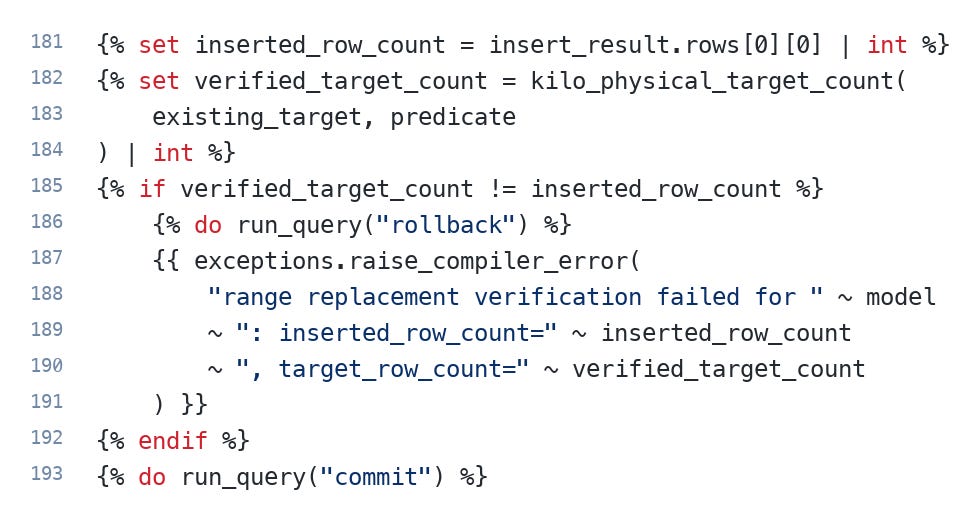
The more interesting failure was a count that didn’t match. On September 4, the migration job died on the PostHog window covering August 15 to September 5: 230,956,592 rows inserted against a target of 232,494,508. The macro doing the range replacement counts both sides before it commits and rolls back when they disagree, so the run failed with a comparison in the error message and left nothing half-written behind. The cause of the mismatch was never established. The retry split the same interval into four smaller windows and all four passed.
Issues ran through the first day or two. Since then, zero errors.
Models
Pedro used GPT-5.6 Sol on high for the early sessions to write the plan, then switched to GPT-5.6 Luna for execution.
He doesn’t attribute the outcome mainly to the models. Longer autonomous runs work now because of the harnesses and tools wrapped around them, and that’s where he’s putting his effort.
What it cost in tokens
Pedro reconstructed usage from his local agent logs: 171 tasks and 19 subagent sessions between August 6 and September 10, which attributes roughly 9.41 billion tokens to the migration.
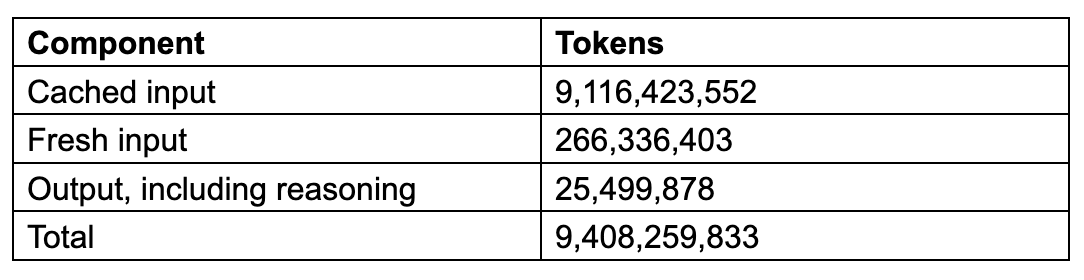
Cached input dominates because the same context gets processed again on every turn. The part that represents new text, fresh input plus output, comes to 291,836,281 tokens. Sol accounts for about 7.48 billion of the total and Luna for about 1.90 billion, with a long tail of a few tens of millions across other models.
Priced at standard published API rates on September 11 (Kilo charges provider rates with no markup), the attributed usage is worth $4,164.17. Sol carries $4,081.18 of that, on about four times Luna’s token count at roughly twenty times Luna’s published rate. For a platform migration, that is cheap.
Three caveats, since the number invites misreading. It isn’t a billing export, it values recorded usage at current rates rather than reconstructing what was actually charged, and the records run from August 6 rather than covering only the twelve business days of execution. Which tasks count as migration work is also a judgment call Pedro made by reading titles and prompts.
What he’d do differently
He’d batch harder. The plan walked through one data mart at a time, marketing, then finance, then product, migrating the dashboards, then the dbt jobs, then validating before moving on. With the runbooks written, the agent could have taken far more of that in one pass. His words on the dashboard day: that much code and that many dashboards migrated at once was something he’d only seen in dreams before.
He’d also stop earlier on the plan document. An agent will happily generate unlimited detail, and the document has two audiences: people who need to read and approve it, and an agent that needs enough precision to execute. Splitting it into two documents creates a drift problem, so one artifact has to serve both, and deciding how much detail is enough is a judgment call that took him too long each time.
The failure mode he actually hit, for what it’s worth, wasn’t hallucinated schemas or invented SQL. It was over-engineering. The agents wrote things that were more complicated than the job required.
